

v1.3.0
video_player_web_hls
video_player 的 Web 平台实现,支持 Chrome 及其他浏览器的 HLS。
79喜欢 3.3万近 30 天下载150Pub 分数
Web
支持在 Chrome 和其他浏览器上使用 HLS。

以下为英文项目原文快照,最新内容请访问 GitHub。

Supports hls on chrome and other browsers.
...
dependencies:
  ...
  video_player_web_hls: ^0.1.1
  video_player: ^0.10.10

  ...
Add
<script src="https://cdn.jsdelivr.net/npm/hls.js@latest" type="application/javascript"></script>
in index.html above
<script src="main.dart.js" type="application/javascript"></script>
The Web platform does not suppport dart:io, so attempts to create a VideoPlayerController.file will throw an UnimplementedError.
Playing videos without prior interaction with the site might be prohibited by the browser and lead to runtime errors. See also: https://goo.gl/xX8pDD.
Different web browsers support different sets of video codecs.
Check MDN's Web video codec guide to learn more about the pros and cons of each video codec.
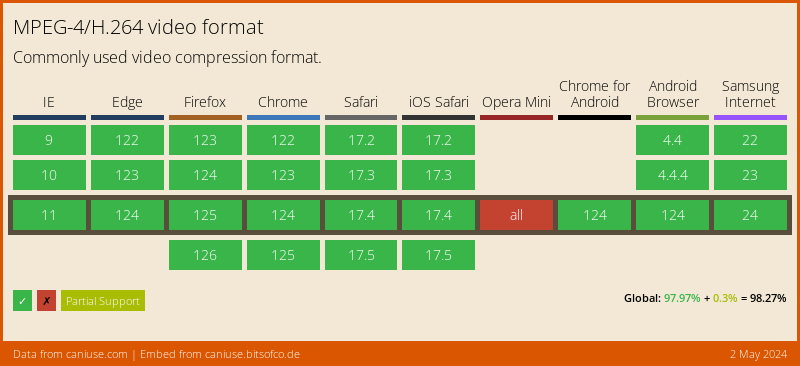
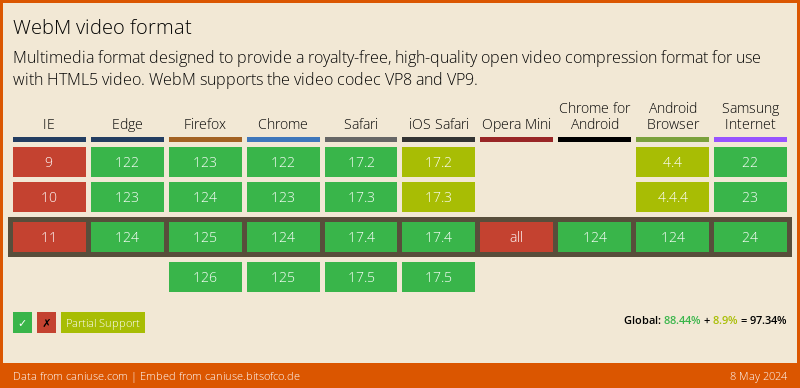
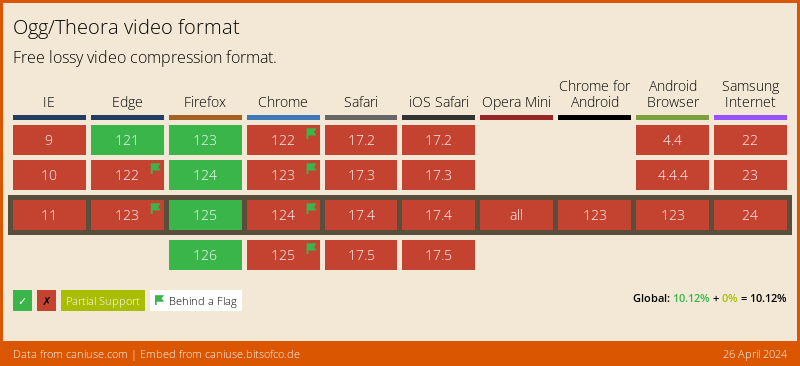
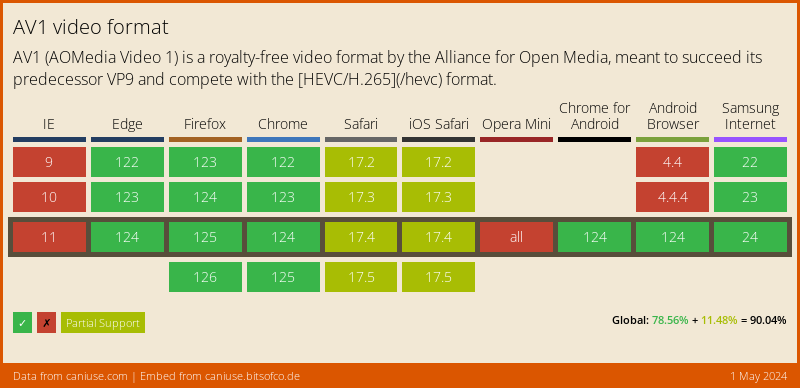
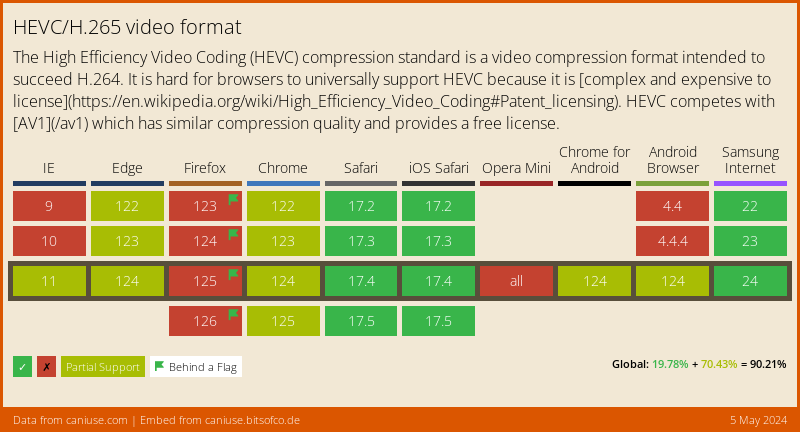
Visit caniuse.com: 'video format' for a breakdown of which browsers support what codecs. You can customize charts there for the users of your particular website(s).
Here's an abridged version of the data from caniuse, for a Global audience:
import 'package:video_player/video_player.dart';
import 'package:flutter/material.dart';

void main() => runApp(VideoApp());

class VideoApp extends StatefulWidget {
  @override
  _VideoAppState createState() => _VideoAppState();
}

class _VideoAppState extends State<VideoApp> {
  VideoPlayerController _controller;

  @override
  void initState() {
    super.initState();
    _controller = VideoPlayerController.network(
        'https://test-streams.mux.dev/x36xhzz/x36xhzz.m3u8')
      ..initialize().then((_) {
        // Ensure the first frame is shown after the video is initialized, even before the play button has been pressed.
        setState(() {});
      });
  }

  @override
  Widget build(BuildContext context) {
    return MaterialApp(
      title: 'Video Demo',
      home: Scaffold(
        body: Center(
          child: _controller.value.initialized
              ? AspectRatio(
                  aspectRatio: _controller.value.aspectRatio,
                  child: VideoPlayer(_controller),
                )
              : Container(),
        ),
        floatingActionButton: FloatingActionButton(
          onPressed: () {
            setState(() {
              _controller.value.isPlaying
                  ? _controller.pause()
                  : _controller.play();
            });
          },
          child: Icon(
            _controller.value.isPlaying ? Icons.pause : Icons.play_arrow,
          ),
        ),
      ),
    );
  }

  @override
  void dispose() {
    super.dispose();
    _controller.dispose();
  }
}
先按使用场景筛选,再比较项目活跃情况,最后到原始仓库核对使用要求。
“A repository is the most basic element of GitHub.”
GitHub Docs — About repositories ↗