
 v1.0.0+0
widget_mask
使用一个控件来遮罩并混合另一个控件,例如将文本印在表面上。
70喜欢 13近 30 天下载150Pub 分数
AndroidiOSWebmacOSWindowsLinux
使用一个控件来遮罩并混合另一个控件,例如将文本印在表面上。

依赖清单 4 项
^1.15.0{"sdk":"flutter"}{"sdk":"flutter"}^1.11.1以下为英文项目原文快照,最新内容请访问 GitHub。
pub.dev package page GitHub Actions CI GitHub Stars
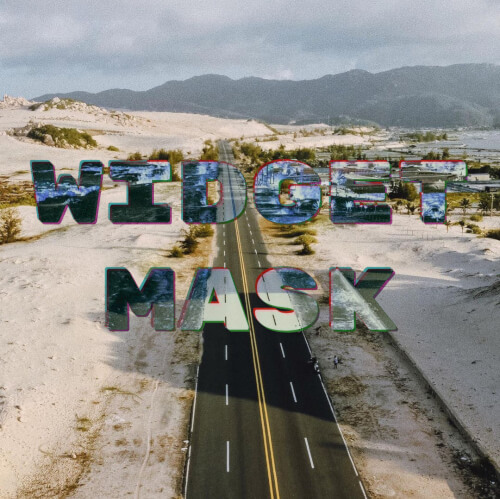
Use a widget to mask and blend another widget, for example to imprint text onto surfaces.
https://raw.githubusercontent.com/blaugold/widget_mask/main/docs/images/example_screenshot.jpg?v=1
If you're looking for a database solution, check out
cbl, another project of mine. It brings
Couchbase Lite to standalone Dart and Flutter, with support for:
and more.
Widgets that are used as children of WidgetMask or SaveLayer must not need
compositing, or contain widgets which need compositing, such as
RepaintBoundary.
This is because this package makes use of save layers, which cannot encompass compositing layers.
A mask is an image, which is positioned in front of another image and affects this images in some way, where it is not empty.
Blending is a process which takes two images and produces a new image by
applying a mathematical function to each pair of pixels from the input images.
For some of these functions, the order of the arguments matters. That's why the
input images are labeled with src and dst. A mask is usually the image
labeled with src.
The example below paints some text onto an image. The text is filled with the negative of the image.
WidgetMask(
  // `BlendMode.difference` results in the negative of `dst` where `src`
  // is fully white. That is why the text is white.
  blendMode: BlendMode.difference,
  mask: Center(
    child: Text(
      'Negative',
      style: TextStyle(
        fontSize: 50,
        color: Colors.white,
      ),
    ),
  ),
  child: Image.asset('images/my_image.jpg'),
);
WidgetMask delegates to child to lay itself out. It always has the same size
as child. mask is forced to adopt the same size as child and positioned on
top it.
During hit testing mask is positioned over child.
The different BlendModes use src and dst to describe how the colors of two
images are blended with each other. In the context of WidgetMask mask is the
src and child the dst.
The NegativeMaskedImageDemo widget, in the
example app, implements the
image at the top.
SaveLayerThis widget paints its child into a save layer and allows you to fully specify
the Paint to use with the save layer. If you need to use a custom Paint or
require a different layout of the widgets, you can use SaveLayer.
WidgetMask is implement using two SaveLayers to blend the mask and
child:
@override
Widget build(BuildContext context) {
  Widget child = Stack(
    textDirection: TextDirection.ltr,
    fit: StackFit.passthrough,
    children: [
      this.child,
      Positioned.fill(
        child: SaveLayer(
          paint: Paint()..blendMode = blendMode,
          child: mask,
        ),
      ),
    ],
  );

  if (childSaveLayer) {
    child = SaveLayer(
      child: child,
    );
  }

  return child;
}
Gabriel Terwesten • GitHub @blaugold • Twitter @GTerwesten • Medium @gabriel.terwesten