
 v1.0.0
pluto_layout
PlutoLayout 是一个 Flutter UI 包,可在每一侧配置菜单或标签屏幕。
82喜欢 208近 30 天下载140Pub 分数
AndroidiOSWebmacOSWindowsLinux
PlutoLayout 是一个 Flutter UI 包,可在每一侧配置菜单或标签屏幕。

{"sdk":"flutter"}^1.17.0^0.27.7^2.1.3{"sdk":"flutter"}^2.0.1以下为英文项目原文快照,最新内容请访问 GitHub。
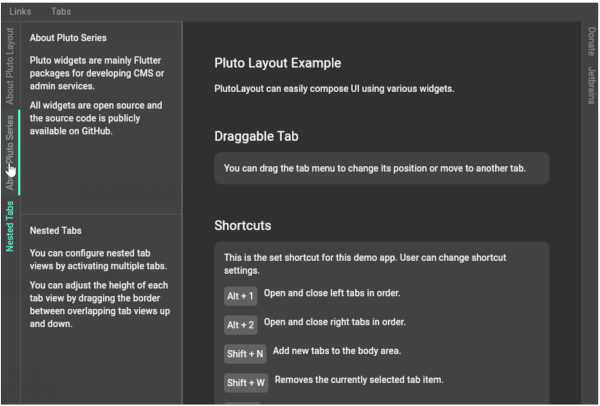
PlutoLayout is a Flutter UI package that can configure a menu or tab screen on each side.
You can adjust the width of the tab menu by dragging the right border of the tab menu.
You can also assign custom shortcut keys to open or close tab views and resize tab views.
PlutoLayout Screenshot
import 'package:flutter/material.dart';
import 'package:flutter/services.dart';
import 'package:pluto_layout/pluto_layout.dart';

void main() {
  runApp(const ExampleApp());
}

class ExampleApp extends StatelessWidget {
  const ExampleApp({super.key});

  @override
  Widget build(BuildContext context) {
    return MaterialApp(
      debugShowCheckedModeBanner: false,
      theme: ThemeData.dark(useMaterial3: true),
      home: const ExamplePage(),
    );
  }
}

class ExamplePage extends StatefulWidget {
  const ExamplePage({super.key});

  @override
  State<ExamplePage> createState() => _ExamplePageState();
}

class _ExamplePageState extends State<ExamplePage> {
  @override
  Widget build(BuildContext context) {
    return Scaffold(
      body: PlutoLayout(
        shortcuts: {
          LogicalKeySet(LogicalKeyboardKey.escape):
          PlutoLayoutActions.hideAllTabView(),
          LogicalKeySet(LogicalKeyboardKey.alt, LogicalKeyboardKey.digit1):
          PlutoLayoutActions.rotateTabView(
            PlutoLayoutContainerDirection.left,
          ),
          LogicalKeySet(LogicalKeyboardKey.alt, LogicalKeyboardKey.digit2):
          PlutoLayoutActions.rotateTabView(
            PlutoLayoutContainerDirection.right,
          ),
          LogicalKeySet(LogicalKeyboardKey.alt, LogicalKeyboardKey.arrowUp):
          PlutoLayoutActions.increaseTabView(),
          LogicalKeySet(LogicalKeyboardKey.alt, LogicalKeyboardKey.arrowDown):
          PlutoLayoutActions.decreaseTabView(),
        },
        body: const PlutoLayoutContainer(
          child: Text('Body container'),
        ),
        top: PlutoLayoutContainer(
          child: PlutoLayoutTabs(
            items: [
              PlutoLayoutTabItem(
                id: 'top1',
                title: 'top1',
                tabViewBuilder: (e) => const Text('top1'),
              ),
              PlutoLayoutTabItem(
                id: 'top2',
                title: 'top2',
                tabViewBuilder: (e) => const Text('top2'),
              ),
            ],
          ),
        ),
        left: PlutoLayoutContainer(
          child: PlutoLayoutTabs(
            items: [
              PlutoLayoutTabItem(
                id: 'left1',
                title: 'left1',
                tabViewBuilder: (e) => const Text('left1'),
              ),
              PlutoLayoutTabItem(
                id: 'left2',
                title: 'left2',
                tabViewBuilder: (e) => const Text('left2'),
              ),
            ],
          ),
        ),
        right: PlutoLayoutContainer(
          child: PlutoLayoutTabs(
            items: [
              PlutoLayoutTabItem(
                id: 'right1',
                title: 'right1',
                tabViewBuilder: (e) => const Text('right1'),
              ),
              PlutoLayoutTabItem(
                id: 'right2',
                title: 'right2',
                tabViewBuilder: (e) => const Text('right2'),
              ),
            ],
          ),
        ),
        bottom: PlutoLayoutContainer(
          child: PlutoLayoutTabs(
            items: [
              PlutoLayoutTabItem(
                id: 'bottom1',
                title: 'bottom1',
                tabViewBuilder: (e) => const Text('bottom1'),
              ),
              PlutoLayoutTabItem(
                id: 'bottom2',
                title: 'bottom2',
                tabViewBuilder: (e) => const Text('bottom2'),
              ),
            ],
          ),
        ),
      ),
    );
  }
}
| Flutter | PlutoLayout |
|---|---|
| 3.7.0 or higher | 1.0.0 or higher |
| Less than 3.3.7 | 0.x |
develop packages that make it easy to develop admin pages or CMS with Flutter.