
 v0.1.7
multiselect_formfield
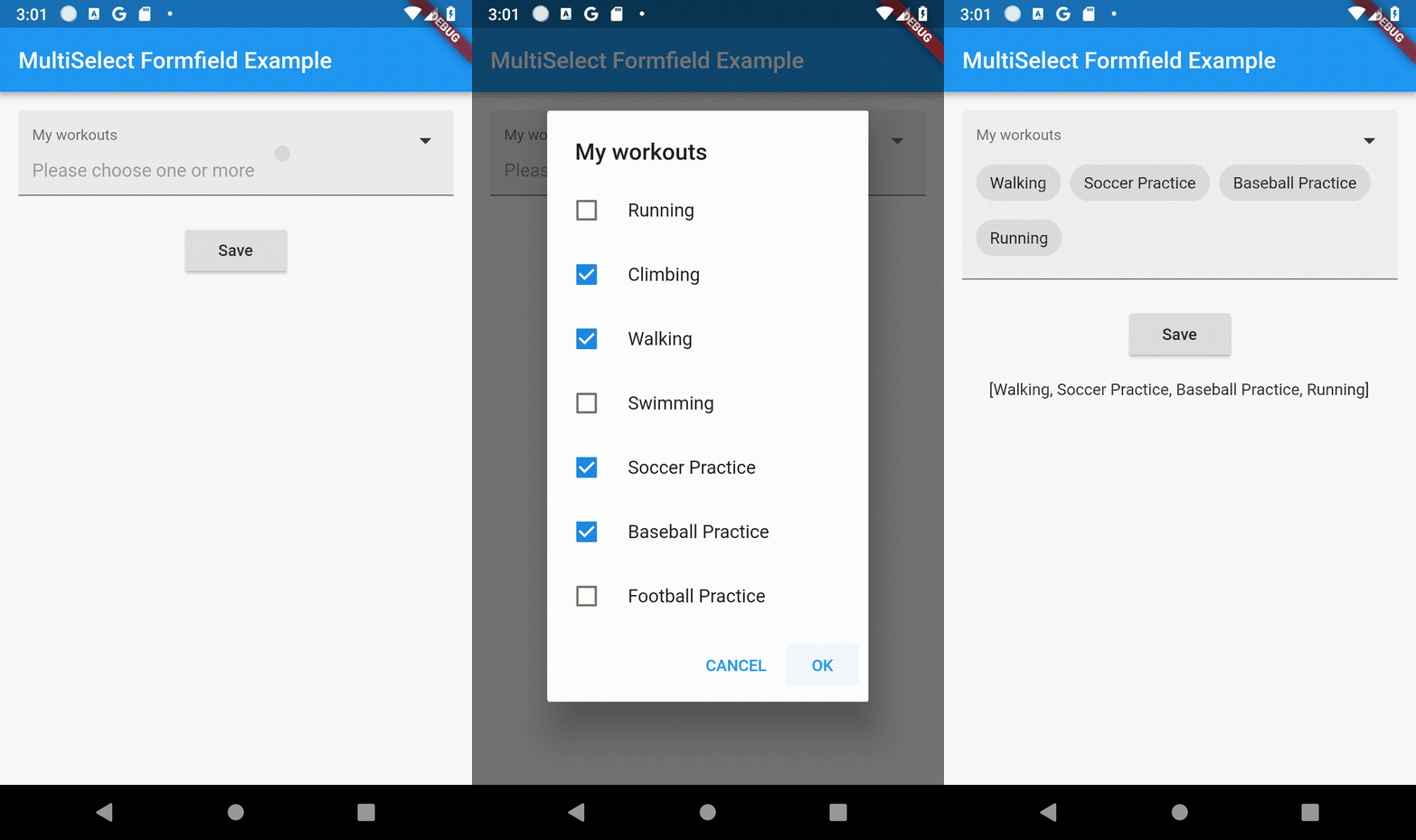
使用警报对话框选择多个项目(带复选框),并以芯片形式显示的多选表单字段。
139喜欢 1400近 30 天下载130Pub 分数
AndroidiOSWebmacOSWindowsLinux
一个 Flutter 包,使用弹出对话框提供多选表单字段,通过复选框选择多个项目,并以芯片形式显示。

{"sdk":"flutter"}{"sdk":"flutter"}以下为英文项目原文快照,最新内容请访问 GitHub。
A multi select form field using alert dialog to select multiple items with checkboxes and showing as chips.
| Parameter | Description |
|---|---|
| title Widget | Set Title of MultiSelectTextFormField. |
| hintWidget Widget | Set Hint Text of MultiSelectTextFormField. |
| required bool | Add Selection is Compulsary or not. |
| errorText String | Error String to be Displayed |
| dataSource List | List of Data as DataSource To Select. |
| textField String | Key Param from List (DataSource). |
| valueField String | Value Param From List (DataSource). |
| okButtonLabel String* | POsitive Button Label String. |
| cancelButtonLabel String* | Negative Button Label String. |
| fillColor Color Widget | Changes background color of FormField |
| Parameter | Description |
|---|---|
| Shape ShapeBorder | Customizes the Shape Of AlertDialog |
| dialogTextStyle TextStyle | Customizes the TextStyle Of AlertDialog |
| checkBoxCheckColor Color | Customizes the CheckColor |
| checkBoxActiveColor Color | Customizes the CheckBoxActiveColor |
| Parameter | Description |
|---|---|
| chipLabelStyle TextStyle | Customizes the TextStyle Of Selected Chip |
| chipBackGroundColor Color | Customizes the Color Of Selected Chip |
MultiSelectFormField(
                  autovalidate: false,
                  chipBackGroundColor: Colors.red,
                  chipLabelStyle: TextStyle(fontWeight: FontWeight.bold),
                  dialogTextStyle: TextStyle(fontWeight: FontWeight.bold),
                  checkBoxActiveColor: Colors.red,
                  checkBoxCheckColor: Colors.green,
                  dialogShapeBorder: RoundedRectangleBorder(
                      borderRadius: BorderRadius.all(Radius.circular(12.0))),
                  title: Text(
                    "Title Of Form",
                    style: TextStyle(fontSize: 16),
                  ),
                  dataSource: [
                    {
                      "display": "Running",
                      "value": "Running",
                    },
                    {
                      "display": "Climbing",
                      "value": "Climbing",
                    },
                    {
                      "display": "Walking",
                      "value": "Walking",
                    },
                  ],
                  textField: 'display',
                  valueField: 'value',
                  okButtonLabel: 'OK',
                  cancelButtonLabel: 'CANCEL',
                  hintWidget: Text('Please choose one or more'),
                  initialValue: _myActivities,
                  onSaved: (value) {
                    if (value == null) return;
                    setState(() {
                      _myActivities = value;
                    });
                  },
                ),
import 'package:flutter/material.dart';
import 'package:multiselect_formfield/multiselect_formfield.dart';

void main() => runApp(MyApp());

class MyApp extends StatelessWidget {
  @override
  Widget build(BuildContext context) {
    return MaterialApp(
      home: MyHomePage(),
    );
  }
}

class MyHomePage extends StatefulWidget {
  @override
  _MyHomePageState createState() => _MyHomePageState();
}

class _MyHomePageState extends State<MyHomePage> {
  List? _myActivities;
  late String _myActivitiesResult;
  final formKey = new GlobalKey<FormState>();

  @override
  void initState() {
    super.initState();
    _myActivities = [];
    _myActivitiesResult = '';
  }

  _saveForm() {
    var form = formKey.currentState!;
    if (form.validate()) {
      form.save();
      setState(() {
        _myActivitiesResult = _myActivities.toString();
      });
    }
  }

  @override
  Widget build(BuildContext context) {
    return Scaffold(
      appBar: AppBar(
        title: Text('MultiSelect Formfield Example'),
      ),
      body: Center(
        child: Form(
          key: formKey,
          child: Column(
            mainAxisAlignment: MainAxisAlignment.start,
            children: <Widget>[
              Container(
                padding: EdgeInsets.all(16),
                child: MultiSelectFormField(
                  autovalidate: AutovalidateMode.disabled,
                  chipBackGroundColor: Colors.blue,
                  chipLabelStyle: TextStyle(fontWeight: FontWeight.bold, color: Colors.white),
                  dialogTextStyle: TextStyle(fontWeight: FontWeight.bold),
                  checkBoxActiveColor: Colors.blue,
                  checkBoxCheckColor: Colors.white,
                  dialogShapeBorder: RoundedRectangleBorder(
                      borderRadius: BorderRadius.all(Radius.circular(12.0))),
                  title: Text(
                    "My workouts",
                    style: TextStyle(fontSize: 16),
                  ),
                  validator: (value) {
                    if (value == null || value.length == 0) {
                      return 'Please select one or more options';
                    }
                    return null;
                  },
                  dataSource: [
                    {
                      "display": "Running",
                      "value": "Running",
                    },
                    {
                      "display": "Climbing",
                      "value": "Climbing",
                    },
                    {
                      "display": "Walking",
                      "value": "Walking",
                    },
                    {
                      "display": "Swimming",
                      "value": "Swimming",
                    },
                    {
                      "display": "Soccer Practice",
                      "value": "Soccer Practice",
                    },
                    {
                      "display": "Baseball Practice",
                      "value": "Baseball Practice",
                    },
                    {
                      "display": "Football Practice",
                      "value": "Football Practice",
                    },
                  ],
                  textField: 'display',
                  valueField: 'value',
                  okButtonLabel: 'OK',
                  cancelButtonLabel: 'CANCEL',
                  hintWidget: Text('Please choose one or more'),
                  initialValue: _myActivities,
                  onSaved: (value) {
                    if (value == null) return;
                    setState(() {
                      _myActivities = value;
                    });
                  },
                ),
              ),
              Container(
                padding: EdgeInsets.all(8),
                child: ElevatedButton(
                  child: Text('Save'),
                  onPressed: _saveForm,
                ),
              ),
              Container(
                padding: EdgeInsets.all(16),
                child: Text(_myActivitiesResult),
              )
            ],
          ),
        ),
      ),
    );
  }
}
This project is licensed under the BSD License. See the LICENSE file for details.