
 v2.0.2
select_dialog
一个用于从列表中选择项目的包,支持过滤甚至在线搜索项目。
97喜欢 3150近 30 天下载150Pub 分数
AndroidiOSWebmacOSWindowsLinux
一个用于从列表中选择项目的 Flutter 包,支持筛选甚至在线搜索项目。

依赖清单 2 项
{"sdk":"flutter"}^1.24.6以下为英文项目原文快照,最新内容请访问 GitHub。
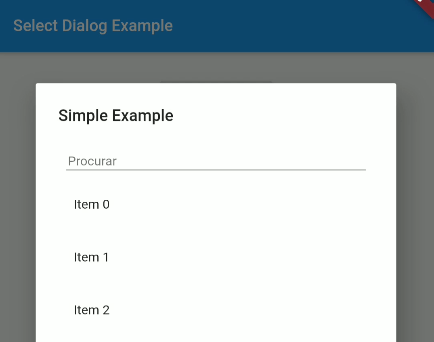
Package designed to select an item from a list, with the option to filter and even search the items online.
https://user-images.githubusercontent.com/16373553/94357714-95d4fc80-0071-11eb-8b99-9cff034a1ece.png https://user-images.githubusercontent.com/16373553/94357674-4098eb00-0071-11eb-8985-45edf99b9812.png
Non Null Safety Version: 1.2.3 or less
Null Safety Version: 2.0.0 or more
select_dialog: <last version>
import 'package:select_dialog/select_dialog.dart';
String ex1 = "No value selected";

SelectDialog.showModal<String>(
  context,
  label: "Simple Example",
  selectedValue: ex1,
  items: List.generate(50, (index) => "Item $index"),
  onChange: (String selected) {
    setState(() {
      ex1 = selected;
    });
  },
);
List<String> ex5 = [];

SelectDialog.showModal<String>(
  context,
  label: "Multiple Items Example",
  multipleSelectedValues: ex5,
  items: List.generate(50, (index) => "Item $index"),
  onMultipleItemsChange: (List<String> selected) {
    setState(() {
      ex5 = selected;
    });
  },
);
To use a template as an item type, you need to implement toString, equals and hashcode, as shown below:
class UserModel {
  final String id;
  final DateTime createdAt;
  final String name;
  final String avatar;

  UserModel({this.id, this.createdAt, this.name, this.avatar});

  @override
  String toString() => name;

  @override
  operator ==(o) => o is UserModel && o.id == id;

  @override
  int get hashCode => id.hashCode^name.hashCode^createdAt.hashCode;

}
This project is a starting point for a Dart package, a library module containing code that can be shared easily across multiple Flutter or Dart projects.
For help getting started with Flutter, view our online documentation, which offers tutorials, samples, guidance on mobile development, and a full API reference.