

 v2.0.0
christian_picker_image
用于从 Android 和 iOS 图像库中选择图片以及使用相机拍摄新照片的 Flutter 插件。
44喜欢 131近 30 天下载140Pub 分数
AndroidiOS
适用于 Flutter 的图像和相机选择插件

以下为英文项目原文快照,最新内容请访问 GitHub。
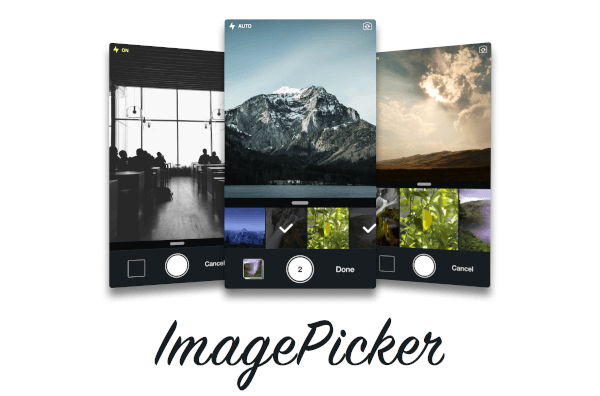
Flutter plugin that allows you to upload multi image picker on iOS & Android.
ChristianImagePicker is an all-in-one camera solution for your iOS app. It lets your users select images from the library and take pictures at the same time. As a developer you get notified of all the user interactions and get the beautiful UI for free, out of the box, it's just that simple.
ImagePicker has been optimized to give a great user experience, it passes around referenced images instead of the image itself which makes it less memory consuming. This is what makes it smooth as butter.

Add the following keys to your Info.plist file, located in <project root>/ios/Runner/Info.plist:
NSPhotoLibraryUsageDescription - describe why your app needs permission for the photo library. This is called Privacy - Photo Library Usage Description in the visual editor.NSCameraUsageDescription - describe why your app needs access to the camera. This is called Privacy - Camera Usage Description in the visual editor. visual editor.import 'package:christian_picker_image/christian_picker_image.dart';
class MyHomePage extends StatefulWidget {
@override
_MyHomePageState createState() => _MyHomePageState();
}
class _MyHomePageState extends State<MyHomePage> {
void takeImage(BuildContext context) async {
List<File> images = await ChristianPickerImage.pickImages(maxImages: 5);
print(images);
Navigator.of(context).pop();
}
Future _pickImage(BuildContext context) async {
showDialog<Null>(
context: context,
barrierDismissible: false,
builder: (BuildContext context) {
takeImage(context);
return Center();
});
}
@override
Widget build(BuildContext context) {
return MaterialApp(
home: Scaffold(
appBar: AppBar(
title: const Text('Plugin example app'),
),
body: Text("Christian Picker Image Demo"),
floatingActionButton: Column(
mainAxisAlignment: MainAxisAlignment.end,
children: <Widget>[
Padding(
padding: const EdgeInsets.only(top: 16.0),
child: FloatingActionButton(
onPressed: () {
_pickImage(context);
},
tooltip: 'Take a Photo',
child: const Icon(Icons.photo_library),
),
),
],
)
),
);
}
}
依赖清单 2 项
{"sdk":"flutter"}{"sdk":"flutter"}先按使用场景筛选,再比较项目活跃情况,最后到原始仓库核对使用要求。
“A repository is the most basic element of GitHub.”
GitHub Docs — About repositories ↗