
可滚动列表标签滑块
可定制的 Flutter 小部件,将可滚动的分组项目列表与标签同步

- 星标
- 24
- 复刻
- 20
- 最近推送(UTC)
- 2025年6月4日
- 项目状态
- 未归档
原始 README
以下为英文项目原文快照,最新内容请访问 GitHub。
scrollable_list_tab_scroller
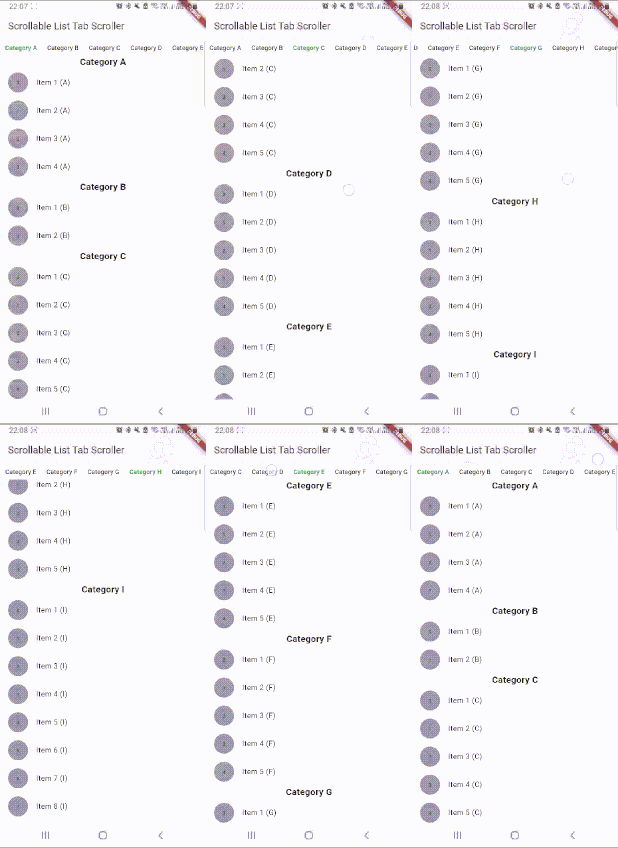
Customizable Flutter widget that synchronizes a scrollable list of grouped items with tabs.
Create custom tabs that synchronize with inner ScrollView. The tabs follow the index of scroll view and vice-versa.
Installation
Add dependency for package on your pubspec.yaml:
dependencies:
    scrollable_list_tab_scroller: <latest>
Usage
To use this widget we must first define how our tabs will look like.
ScrollableListTabScroller
| Parameter | Definition |
|---|---|
int itemCount |
Quantity item that will be built. |
IndexedWidgetBuilder itemBuilder |
Builder of list item. |
IndexedActiveStatusWidgetBuilder tabBuilder |
Builder of tab with active status for customization. |
HeaderContainerBuilder? headerContainerBuilder |
Optional header container builder for customization. |
BodyContainerBuilder? bodyContainerBuilder |
Optional body container builder for customization. |
ItemScrollController? itemScrollController |
Optional controller for item list. |
ItemPositionsListener? itemPositionsListener |
Optional listener of item list positions. |
void Function(int)? tabChanged |
Optional listener of tab changes. |
double earlyChangePositionOffset |
Optional vertical offset to change the index before the list item reaches the edge(default = 0). |
Duration animationDuration |
Optional animation duration |
rest of the parameters |
Optional scrollable_positioned_list's parameters |
If you don't want to build your own HeaderContainer with a builder, you can instead use the ScrollableListTabScroller.defaultComponents() constructor, which provides additional properties for customizing the default header container and tab bar.
Example
import 'package:flutter/material.dart';
import 'package:scrollable_list_tab_scroller/scrollable_list_tab_scroller.dart';

void main() {
  runApp(MyApp());
}

class MyApp extends StatelessWidget {
  // This widget is the root of your application.
  @override
  Widget build(BuildContext context) {
    return MaterialApp(
      title: 'Scrollable List Tab Scroller',
      theme: ThemeData(
        primarySwatch: Colors.blue,
      ),
      home: MyHomePage(title: 'Scrollable List Tab Scroller'),
    );
  }
}

class MyHomePage extends StatefulWidget {
  MyHomePage({Key? key, required this.title}) : super(key: key);

  final String title;

  @override
  _MyHomePageState createState() => _MyHomePageState();
}

class _MyHomePageState extends State<MyHomePage> {
  final data = {
    "Category A": [
      "Item 1 (A)",
      "Item 2 (A)",
      "Item 3 (A)",
      "Item 4 (A)",
    ],
    "Category B": [
      "Item 1 (B)",
      "Item 2 (B)",
    ],
    "Category C": [
      "Item 1 (C)",
      "Item 2 (C)",
      "Item 3 (C)",
      "Item 4 (C)",
      "Item 5 (C)",
    ],
    "Category D": [
      "Item 1 (D)",
      "Item 2 (D)",
      "Item 3 (D)",
      "Item 4 (D)",
      "Item 5 (D)",
      "Item 6 (D)",
      "Item 7 (D)",
      "Item 8 (D)",
      "Item 9 (D)",
    ],
  };

  @override
  Widget build(BuildContext context) {
    return Scaffold(
      appBar: AppBar(
        title: Text(widget.title),
      ),
      body: ScrollableListTabScroller(
        itemCount: data.length,
        tabBuilder: (BuildContext context, int index, bool active) => Padding(
          padding: EdgeInsets.symmetric(horizontal: 10),
          child: Text(
            data.keys.elementAt(index),
            style: !active
                ? null
                : TextStyle(fontWeight: FontWeight.bold, color: Colors.green),
          ),
        ),
        itemBuilder: (BuildContext context, int index) => Column(
          children: [
            Text(
              data.keys.elementAt(index),
              style: TextStyle(fontWeight: FontWeight.bold, fontSize: 20),
            ),
            ...data.values
                .elementAt(index)
                .asMap()
                .map(
                  (index, value) => MapEntry(
                    index,
                    ListTile(
                      leading: Container(
                        height: 40,
                        width: 40,
                        decoration: BoxDecoration(
                            shape: BoxShape.circle, color: Colors.grey),
                        alignment: Alignment.center,
                        child: Text(index.toString()),
                      ),
                      title: Text(value),
                    ),
                  ),
                )
                .values
          ],
        ),
      ),
    );
  }
}
License
This project is licensed under the MIT license, additional knowledge about the license can be found here.

Rai Ferreira ↗
分类
使用的依赖
依赖清单 5 项
- flutter
{"sdk":"flutter"} - scrollable_positioned_list
^0.3.8 - scrolls_to_top
>=1.0.0 <3.0.0 - flutter_test开发依赖
{"sdk":"flutter"} - lints开发依赖
^4.0.0
如何选择适合项目的代码仓?
先按使用场景筛选,再比较项目活跃情况,最后到原始仓库核对使用要求。
- 通过仓库名、作者或描述搜索,再按技术分类缩小范围。
- 结合星标、复刻与最近推送比较项目;星标反映社区关注,不代表质量保证。
- 使用前在 GitHub 核对 README、许可证与 Issues。
来源与维护
“A repository is the most basic element of GitHub.”
GitHub Docs — About repositories ↗