
flutter_whatsnew
Flutter 新功能 - 展示应用更新后的新功能,类似于 Pages、Numbers 和 Keynote。维护者:@rodydavis

- 星标
- 68
- 复刻
- 16
- 最近推送(UTC)
- 2026年1月14日
- 项目状态
- 已归档
原始 README
以下为英文项目原文快照,最新内容请访问 GitHub。


flutter_whatsnew

[!WARNING] This project has moved here: https://github.com/rodydavis/packages.dart
A Flutter Plugin to Show a Whats New page.
Online Demo: https://fluttercommunity.github.io/flutter_whatsnew/
Usage
To use this plugin, add flutter_whatsnew as a dependency in your pubspec.yaml file.
// Import package
import 'package:flutter_whatsnew/flutter_whatsnew.dart';
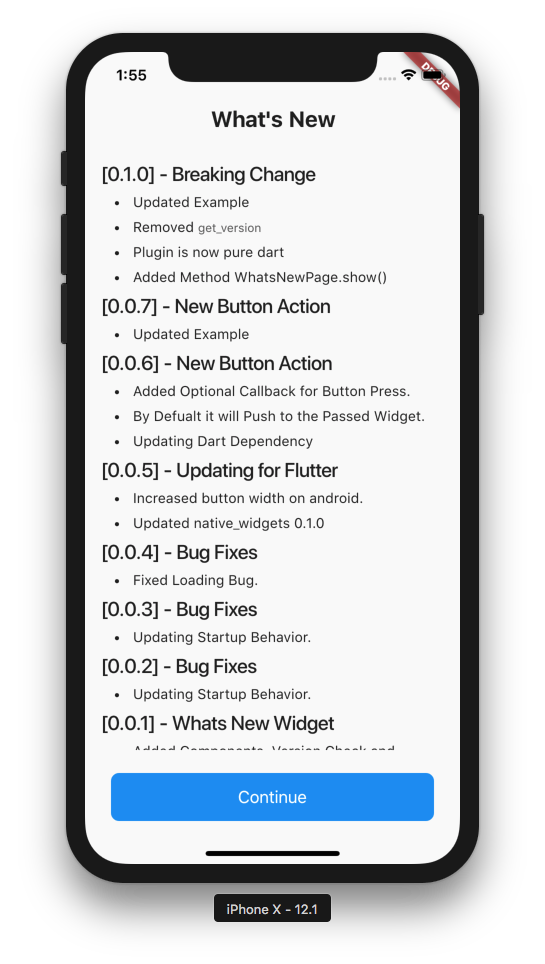
If using WhatsNewPage.changelog and you want it to pickup the `CHANGELOG.md' add it to the Flutter asset directory, otherwise manually pass in the .md file with the changes. This uses the full markdown previewer.
  assets:
    - CHANGELOG.md
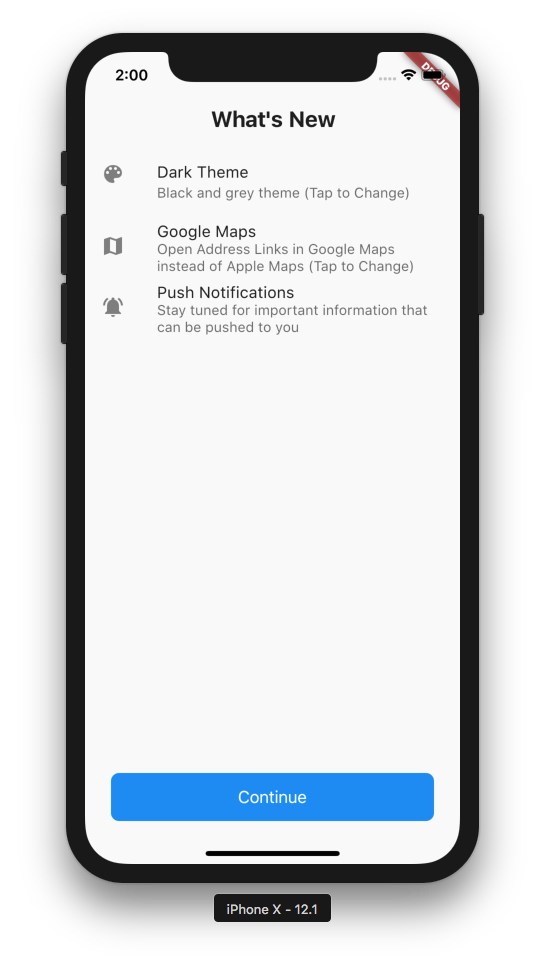
Example
import 'package:flutter/material.dart';
import 'package:flutter/cupertino.dart';
import 'package:flutter_whatsnew/flutter_whatsnew.dart';

void main() {
  runApp(MaterialApp(home: ShowWhatsNew()));
}

class ShowWhatsNew extends StatelessWidget {
  final double textScaleFactor = 1.0;

  @override
  Widget build(BuildContext context) {
    return new Scaffold(
      body: SafeArea(
          child: Center(
        child: Column(
          mainAxisAlignment: MainAxisAlignment.center,
          crossAxisAlignment: CrossAxisAlignment.center,
          children: <Widget>[
            RaisedButton(
              child: Text("Show Changelog"),
              onPressed: () {
                Navigator.push(
                  context,
                  MaterialPageRoute(
                    builder: (context) => WhatsNewPage.changelog(
                          title: Text(
                            "What's New",
                            textScaleFactor: textScaleFactor,
                            textAlign: TextAlign.center,
                            style: const TextStyle(
                              // Text Style Needed to Look like iOS 11
                              fontSize: 22.0,
                              fontWeight: FontWeight.bold,
                            ),
                          ),
                          buttonText: Text(
                            'Continue',
                            textScaleFactor: textScaleFactor,
                            style: const TextStyle(color: Colors.white),
                          ),
                        ),
                    fullscreenDialog: true,
                  ),
                );
              },
            ),
            Container(height: 50.0),
            RaisedButton(
              child: Text("Show Changes"),
              onPressed: () {
                Navigator.push(
                  context,
                  MaterialPageRoute(
                    builder: (context) => WhatsNewPage(
                          title: Text(
                            "What's New",
                            textScaleFactor: textScaleFactor,
                            textAlign: TextAlign.center,
                            style: const TextStyle(
                              // Text Style Needed to Look like iOS 11
                              fontSize: 22.0,
                              fontWeight: FontWeight.bold,
                            ),
                          ),
                          buttonText: Text(
                            'Continue',
                            textScaleFactor: textScaleFactor,
                            style: const TextStyle(color: Colors.white),
                          ),
                          // Create a List of WhatsNewItem for use in the Whats New Page
                          // Create as many as you need, it will be scrollable
                          items: <ListTile>[
                            ListTile(
                              leading: const Icon(Icons.color_lens),
                              title: Text(
                                'Dark Theme',
                                textScaleFactor: textScaleFactor,
                              ), //Title is the only Required Item
                              subtitle: Text(
                                'Black and grey theme (Tap to Change)',
                                textScaleFactor: textScaleFactor,
                              ),
                              onTap: () {
                                // You Can Navigate to Locations in the App
                                Navigator.of(context).pushNamed("/settings");
                              },
                            ),
                            ListTile(
                              leading: const Icon(Icons.map),
                              title: Text(
                                'Google Maps',
                                textScaleFactor: textScaleFactor,
                              ),
                              subtitle: Text(
                                'Open Address Links in Google Maps instead of Apple Maps (Tap to Change)',
                                textScaleFactor: textScaleFactor,
                              ),
                              onTap: () {
                                // You Can Navigate to Locations in the App
                                Navigator.of(context).pushNamed("/settings");
                              },
                            ),
                            ListTile(
                              leading: const Icon(Icons.notifications_active),
                              title: Text(
                                'Push Notifications',
                                textScaleFactor: textScaleFactor,
                              ),
                              subtitle: Text(
                                'Stay tuned for important information that can be pushed to you',
                                textScaleFactor: textScaleFactor,
                              ),
                              onTap: () {
                                WhatsNewPage.showDetailPopUp(
                                  context,
                                  'Info',
                                  "You can turn off push notifications any time in your application settings.",
                                );
                              },
                            ),
                          ], //Required
                        ),
                    fullscreenDialog: true,
                  ),
                );
              },
            ),
          ],
        ),
      )),
    );
  }
}

GitHub 作者
Flutter Community ↗
语言DartHTML
分类
使用的依赖
依赖清单 4 项
- flutter
{"sdk":"flutter"} - flutter_markdown
^0.6.12 - shared_preferences
^2.0.15 - flutter_test开发依赖
{"sdk":"flutter"}
如何选择适合项目的代码仓?
先按使用场景筛选,再比较项目活跃情况,最后到原始仓库核对使用要求。
- 通过仓库名、作者或描述搜索,再按技术分类缩小范围。
- 结合星标、复刻与最近推送比较项目;星标反映社区关注,不代表质量保证。
- 使用前在 GitHub 核对 README、许可证与 Issues。
来源与维护
“A repository is the most basic element of GitHub.”
GitHub Docs — About repositories ↗