


 v2.3.0
expandable_text
仅显示文本第一行的部件,并添加一个链接以展开完整文本。
291喜欢 3.2万近 30 天下载140Pub 分数
AndroidiOSWebmacOSWindowsLinux
带有可展开文本控件的 Flutter 插件

以下为英文项目原文快照,最新内容请访问 GitHub。


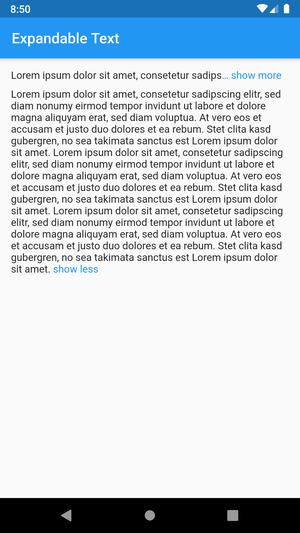
This Flutter package includes the widget ExpandableText which you can use to initially only show a
defined number of lines of a probably long text. The widget appends a configurable text link which
lets the user expand the full text, or collapse it again.

Add this to your package's pubspec.yaml file:
dependencies:
  expandable_text: 2.3.0
Next, import the package into your dart code:
import 'package:expandable_text/expandable_text.dart';
Show an expandable text if longText exceeds one line:
Widget build(BuildContext context) {
    return ExpandableText(
        longText,
        expandText: 'show more',
        collapseText: 'show less',
        maxLines: 1,
        linkColor: Colors.blue,
    );
}
This example shows a message that was posted by a user.
The username is always visible right before the text and tapping on it opens the user profile.
The text is truncated after two lines and can be expanded by tapping on the link show more at the end or the text itself.
After the text was expanded it cannot be collapsed again as no collapseText was provided.
URLs, @mentions and #hashtags in the text are styled differently and can be tapped to open the browser or the user profile.
Widget build(BuildContext context) {
    return ExpandableText(
        message,
        expandText: 'show more',
        maxLines: 2,
        linkColor: Colors.blue,
        animation: true,
        collapseOnTextTap: true,
        prefixText: username,
        onPrefixTap: () => showProfile(username),
        prefixStyle: TextStyle(fontWeight: FontWeight.bold),
        onHashtagTap: (name) => showHashtag(name),
        hashtagStyle: TextStyle(
            color: Color(0xFF30B6F9),
        ),
        onMentionTap: (username) => showProfile(username),
        mentionStyle: TextStyle(
            fontWeight: FontWeight.w600,
        ),
        onUrlTap: (url) => launchUrl(url),
        urlStyle: TextStyle(
            decoration: TextDecoration.underline,
        ),
    );
}
expandText)animation, animationDuration, animationCurve)collapseText)linkStyle / linkColor)linkEllipsis)prefixText, prefixStyle, onPrefixTap)onUrlTap, urlStyle)onMentionTap, mentionStyle)onHashtagTap, hashtagStyle)maxLines)expanded, onLinkTap)onExpandedChanged)expandOnTextTap, collapseOnTextTap)Have a bug or a feature request? Please first search for existing and closed issues. If your problem or idea is not addressed yet, please open a new issue.
Code copyright 2020–2022 Florian Weinaug. Code released under the MIT license.
依赖清单 2 项
{"sdk":"flutter"}{"sdk":"flutter"}先按使用场景筛选,再比较项目活跃情况,最后到原始仓库核对使用要求。
“A repository is the most basic element of GitHub.”
GitHub Docs — About repositories ↗