
css_text_for_flutter
此 Flutter 库允许您使用 CSS 来样式化您的文本
- 星标
- 56
- 复刻
- 16
- 最近推送(UTC)
- 2023年5月26日
- 项目状态
- 未归档
原始 README
以下为英文项目原文快照,最新内容请访问 GitHub。
CSS Text
This library makes it easy for you to convert HTML and CSS content into RichText widgets. It supports most CSS properties that are relevant to text content, except those related to text alignment.
Here's some sample HTML content with inline CSS styles:
<body>
<p style="font-size:2.5em;color:darkseagreen">This is a test</p>
<p style="font-size:1.8em;color:#ff3311">So is this</p>
<p style="font-size:45px;background:#3311ff;color:yellow">And this!</p>
<br/>
<br/>
<p style="font-size:1.5em">
Hello <b style="font-style:italic;color:#bb0000;background:#eeff00">World</b>!!
<br/>
How are you <span style="font-family:RobotoBlack;color:#ff0000;">today?</span>
<br/>
<b>But</b> why are you doing <a href="https://google.com">this?</a><br/>
<br/>
<span style="text-decoration: underline wavy; font-size:2em">Can you tell <del>me</del>?</span>
<br/>
Multiple <span style="font-weight:100">font</span>
<span style="font-weight:600">weights</span><br/><br/>
Please visit <a style="font-weight:bold;" href="https://docs.flutter.io">Flutter docs</a>
<br/>
<br/>
<span style="color:#990000ff;background:#4400ff00">
This text is slightly transparent, and has a slightly transparent background too.
</span>
</p>
</body>
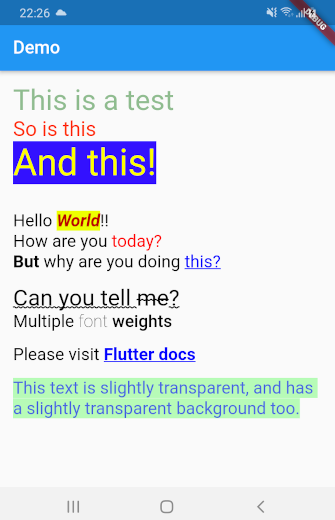
This library can automatically convert all the HTML content above into a TextSpan object or a RichText widget. Here's what the rendered HTML will look like:
Getting Started
Using css_text is extremely easy. First import the library in your Dart code:
import 'package:css_text/css_text.dart';
You can then create RichText widget from any HTML content by calling the HTML.toTextSpan() method.
String htmlContent = """
<p style="font-size:1.5em;color:#99ff0011">Hello <b>World</b>
""";

var myRichText = RichText(text: HTML.toTextSpan(context, htmlContent));
As a shortcut, you can also use the HTML.toRichText() method.
myRichText = HTML.toRichText(context, htmlContent);
Handling Links
Your HTML content can have links. To handle them, you must use the linksCallback optional parameter.
String htmlContent = """<span style="font-size:2em">
Please click <a href="https://pub.dartlang.org">here</a> or
<a href="https://old.reddit.com">here</a>.<br/>
<br/>
Go ahead! Try it.
</span>""";

var myRichText = HTML.toRichText(context, htmlContent, linksCallback: (link) {
    // You can now use the url_launcher library to open the link.
    // Or you can handle the link in your app itself. This gives you
    // complete control over your links.
    // For now, let's just print it
    print(link);
});

Ashraff Hathibelagal ↗
分类
使用的依赖
依赖清单 2 项
- flutter
{"sdk":"flutter"} - xml
^6.3.0
如何选择适合项目的代码仓?
先按使用场景筛选,再比较项目活跃情况,最后到原始仓库核对使用要求。
- 通过仓库名、作者或描述搜索,再按技术分类缩小范围。
- 结合星标、复刻与最近推送比较项目;星标反映社区关注,不代表质量保证。
- 使用前在 GitHub 核对 README、许可证与 Issues。
来源与维护
“A repository is the most basic element of GitHub.”
GitHub Docs — About repositories ↗