xml 包为 Dart 提供了全面的 XML 处理功能,支持 DOM 解析、SAX 流式处理、XPath 3 查询以及用于构建 XML 文档的流畅 API。该包使开发者能够轻松地在所有主要平台上解析、操作和生成 XML。该包非常适合需要强大 XML 处理能力的应用程序,例如配置文件、数据交换或文档处理。其丰富的功能集适用于简单和复杂的 XML 工作流。
适合场景
解析 XML 配置文件
从数据生成XML输出
使用 XPath 3 查询 XML
流式传输大型 XML 文档
与基于 XML 的 API 进行交互
以编程方式构建结构化 XML
主要特点
DOM 和 SAX 解析支持
XPath 3 查询
流畅的 XML 构建器 API
跨平台兼容性
大型文件的高效流式传输
强大的错误处理
适合对象
需要完整 XML 处理的应用程序
与遗留XML系统一起工作的开发人员
需要 XPath 查询的项目
处理大型XML数据集的应用程序
后端服务处理XML数据
使用 XML 交换的桌面和移动应用程序
使用建议
DOM 解析的内存使用量更高
XPath 3 语法的学习曲线
大型嵌套结构可能带来的性能开销
除了基本示例外,文档有限
未针对极高频率的XML操作进行优化
需要仔细处理 XPath 中的命名空间
原始 README
以下为关联源码仓库的 README 原文快照,最新内容请访问源码仓库。
Dart XML
Dart XML is a lightweight library for parsing, traversing, querying, transforming and building XML documents.
This library provides a DOM-based object model for accessing and manipulating XML documents, as
well as an event-based (comparable to SAX) for incremental reading and processing of XML streams.
Furthermore, it supports querying the DOM using XPath 3.1 to simplify the querying of large documents.
This library is open source, stable and well tested. Development happens
on GitHub. Feel free to report issues or create a pull-request there. General
questions are best asked on StackOverflow.
Follow the installation instructions on dart packages.
Import the library into your Dart code using:
import'package:xml/xml.dart';
:warning: This library makes extensive use of static extension methods. If you import the library using a library prefix or only selectively show classes you might miss some of its functionality. For historical reasons public classes have an Xml prefix, so conflicts with other code should be rare.
Reading and Writing
To read XML input use the factory method XmlDocument.parse(String input):
final file = newFile('bookshelf.xml');
finaldocument = XmlDocument.parse(file.readAsStringSync());
If your file is not UTF-8 encoded pass the correct encoding to readAsStringSync. It is the responsibility of the caller to provide a standard Dart [String] using the default UTF-16 encoding. To read and write large files you might want to use the event-driven API instead.
Traversing and Querying
Accessors allow accessing nodes in the XML tree:
attributes returns the attributes of the node.
children returns the direct children of the node.
Both lists are mutable and support all common List methods, such as add(XmlNode), addAll(Iterable<XmlNode>), insert(int, XmlNode), and insertAll(int, Iterable<XmlNode>). Trying to add a null value or an unsupported node type throws an XmlNodeTypeException error. Nodes that are already part of a tree are automatically moved from their previous parent to the new location. XmlDocumentFragment nodes are automatically expanded and their children are added to the list.
There are methods to traverse the XML tree along different axes:
siblings returns an iterable over the nodes at the same level that proceed and follow this node in document order.
preceding returns an iterable over nodes preceding the opening tag of the current node in document order.
descendants returns an iterable over the descendants of the current node in document order. This includes the attributes of the current node, its children, the grandchildren, and so on.
following the nodes following the closing tag of the current node in document order.
ancestors returns an iterable over the ancestor nodes of the current node, that is the parent, the grandparent, and so on. Note that this is the only iterable that traverses nodes in reverse document order.
For example, the descendants iterator could be used to extract all textual contents from an XML tree:
final textual = document.descendants
    .whereType<XmlText>()
    .map((text) => text.value.trim())
    .where((string) => string.isNotEmpty)
    .join('\n');
print(textual);   // prints 'Growing a Language', '29.99', 'Learning XML', '39.95', and '132.00'
There are convenience helpers to filter by element nodes only: childElements, siblingElements, precedingElements, descendantElements, followingElements, and ancestorElements.
Additionally, there are helpers to find elements with a specific tag:
getElement(String name) finds the first direct child with the provided tag name, or null.
findElements(String name) finds direct children of the current node with the provided tag name.
findAllElements(String name) finds direct and indirect children of the current node with the provided tag name.
For example, to find all the nodes with the <title> tag you could write:
final titles = document.findAllElements('title');
The above code returns a lazy iterator that recursively walks the XML document and yields all the element nodes with the requested tag name. To extract the textual contents of an element call innerText:
titles
    .map((element) => element.innerText)
    .forEach(print);   // prints 'Growing a Language' and 'Learning XML'
This prints Growing a Language and Learning XML.
Similarly, to compute the total price of all the books one could write the following expression:
final total = document.findAllElements('book')
    .map((element) => double.parse(element
        .findElements('price')
        .single
        .innerText))
    .reduce((a, b) => a + b);
print(total);   // prints 69.94
Note that this first finds all the books, and then extracts the price to avoid counting the price tag that is included
in the bookshelf.
XPath
To simplify accessing and extracting specific parts of a DOM document, this library supports XPath 3.1 expressions.
To get started import the XPath library:
import'package:xml/xpath.dart';
This exposes the static extension method XmlNode.xpath(String expression) that can be used on documents, and any other
XML DOM node. The method returns an iterable over the matching XML DOM nodes. Using the bookshelf data defined above
we can write:
// Find all the books in the bookshelf.print(document.xpath('/bookshelf/book'));
// Find the second book in the bookshelf.print(document.xpath('/bookshelf/book[2]'));
// Find all the english titles anywhere in the document.print(document.xpath('//title[@lang="en"]'));
// Find all the books with an english title.print(document.xpath('//book[title/@lang="en"]'));
// Sum up the prices of all the books.final total = document.xpath('//book/price/text()')
.map((node) => double.parse(node.value!))
.reduce((a, b) => a + b);
print(total); // prints 69.94
Building
While it is possible to instantiate and compose XmlDocument, XmlElement and XmlText nodes manually,
the XmlBuilder provides a simple fluent API to build complete XML trees. To create the above bookshelf example one
would write:
The element method supports optional named arguments:
The most common is the nest: argument which is used to insert contents into the element. In most cases this will be a function that calls more methods on the builder to define attributes, declare namespaces and add child elements. However, the argument can also be a string or an arbitrary Dart object that is converted to a string and added as a text node.
While attributes can be defined from within the element, for simplicity there is also an argument attributes: that takes a map to define simple name-value pairs.
Furthermore, we can provide a URI as the namespace of the element using namespaceUri: and declare new namespace prefixes using namespaceUris:. For details see the documentation of the method.
The builder pattern allows you to easily extract repeated parts into specific methods. In the example above, one could put the part writing a book into a separate method as follows:
The above buildDocument() method returns the built document. To attach built nodes into an existing XML document, use buildFragment(). Once the builder returns the built node, its internal state is reset.
final builder = XmlBuilder();
buildBook(builder, 'The War of the Worlds', 'en', 12.50);
buildBook(builder, 'Voyages extraordinaries', 'fr', 18.20);
document.rootElement.children.add(builder.buildFragment());
Event-driven
Reading large XML files and instantiating their DOM into the memory can be expensive. As an alternative this library provides the possibility to read and transform XML documents as a sequence of events using Dart Iterables or Streams. These approaches are comparable to event-driven SAX parsing known from other libraries.
import'package:xml/xml_events.dart';
Iterables
In the simplest case you can get a Iterable<XmlEvent> over the input string using the following code. This parses the input lazily, and only parses input when requested:
The function parseEvents supports various other options, see the documentation for further examples.
This approach requires the whole input to be available at the beginning and does not work if the data itself is only available asynchronous, such as coming from a slow network connection. A more flexible, but also more complicated API is provided with Dart Streams.
Streams
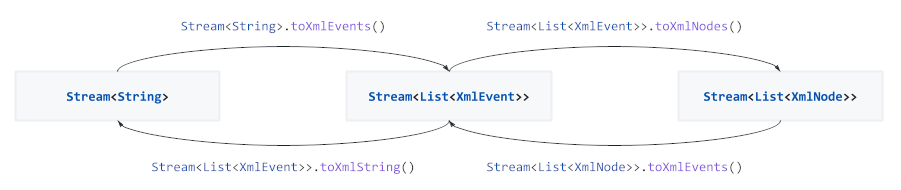
To asynchronously parse and process events directly from a file or HTTP stream use the provided extension methods on Stream to convert between streams of strings, events and DOM tree nodes:
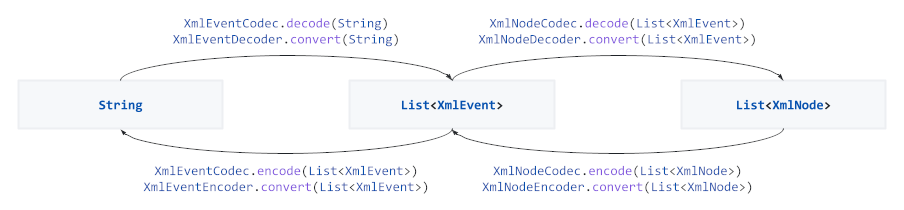
For more control the underlying Codec and Converter implementations can be used:
Stream<String>.toXmlEvents(), XmlEventDecoder(), and XmlEventCodec() are highly configurable in how they process and validate the input, see the documentation for more information.
Various more ad-hoc transformations are provided to simplify processing complex streams:
Normalizes a sequence of XmlEvent objects by removing empty and combining adjacent text events. Stream<List<XmlEvent>> normalizeEvents() on Stream<List<XmlEvent>>
From a sequence of XmlEvent objects filter the event sequences that form sub-trees for which a predicate returns true. Stream<List<XmlEvent>> selectSubtreeEvents(Predicate<XmlStartElementEvent>) on Stream<List<XmlEvent>>
Flattens a chunked stream of objects to a stream of objects. Stream<T> flatten() on Stream<Iterable<T>>
Executes the provided callbacks on each event of this stream. Future forEachEvent({onText: ...}) on Stream<XmlEvent>.
Executes the provided callbacks on each event of this stream as a side-effect. Stream<XmlEvent> tapEachEvent({onText: ...}) on Stream<XmlEvent>.
For example, the following snippet downloads data from the Internet, converts the UTF-8 input to a Dart String, decodes the stream of characters to XmlEvents, and finally normalizes and prints the events:
final url = Uri.parse('http://ip-api.com/xml/');
final request = awaitHttpClient().getUrl(url);
final response = await request.close();
await response
.transform(utf8.decoder)
.toXmlEvents()
.normalizeEvents()
.forEachEvent(onText: (event) => print(event.value));
Similarly, the following snippet extracts sub-trees with location information from a sitemap.xml file, converts the XML events to XML nodes, and finally prints out the containing text:
A common challenge when processing XML event streams is the lack of hierarchical information, thus it is hard to figure out parent dependencies such as looking up a namespace URI. Enabling withParent: true and withNamespace: true when decoding the stream validates the hierarchy and annotates the events with their parent event. This enables features (such as parentEvent and the namespaceUri accessor) and makes mapping and selecting events considerably simpler. For example:
This library started as an example of the PetitParser library. To my own surprise various people started to use it to read XML files. In April 2014 I was asked to replace the original dart-xml library from John Evans.