
 v0.12.1
awesome_notifications
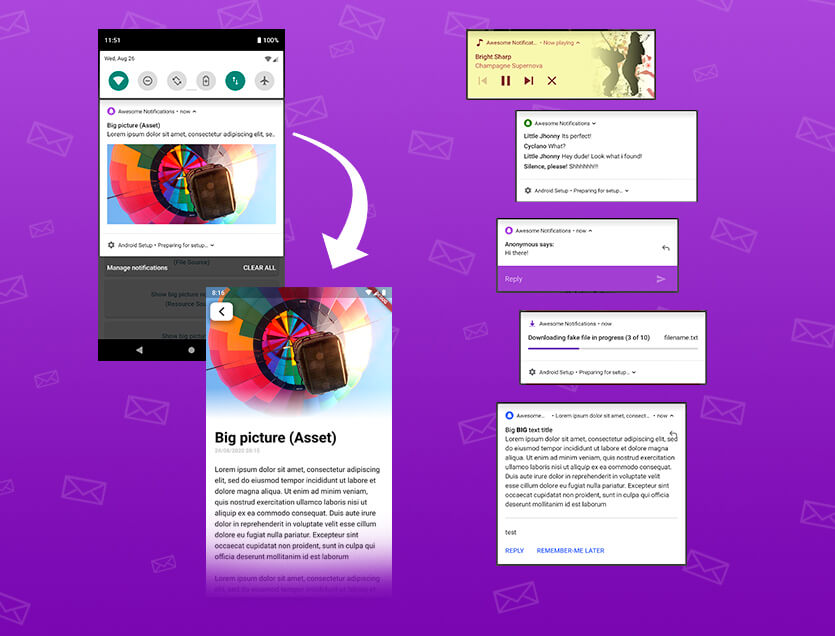
一个完整的解决方案,用于创建本地和推送通知,自定义按钮、图片、声音、表情符号,并为Flutter应用应用多种不同的布局。
3440喜欢 7.5万近 30 天下载130Pub 分数
AndroidiOSWebmacOSWindowsLinux
FireNoti 是一个基于 Flutter 的移动应用程序,通过使用 Firebase Cloud Messaging (FCM) 实现实时推送通知来增强用户参与度。该项目通过允许用户在其设备上接收即时警报和更新,提供无缝的通知体验。

依赖清单 6 项
{"sdk":"flutter"}^15.1.3^0.10.0^3.6.0{"sdk":"flutter"}^4.0.0以下为英文项目原文快照,最新内容请访问 GitHub。
FireNoti is a Flutter-based mobile application that leverages Firebase Cloud Messaging (FCM) for sending and managing push notifications. This project aims to provide a seamless notification experience by integrating Firebase FCM, enabling real-time alerts and updates for users.
Imran's Avatar
We would like to acknowledge the valuable contributions made by Imran to the Fire-Noti project.
Podfile and including necessary configurations in Debug.xcconfig and Release.xcconfig.Runner.xcodeproj to include Pods frameworks and configurations.Assets.xcassets and updated Contents.json for proper asset management.Info.plist to include user tracking usage description and background modes for notifications.NotificationCalendar class to allow mutable properties: year, month, day, hour, minute, second, and millisecond.Thank you, Imran, for your dedication and excellent work on improving the Fire-Noti project!
Before you begin, ensure you have met the following requirements:
Add these dependencies to your pubspec.yaml file:
dependencies:
  flutter:
    sdk: flutter
  firebase_core: ^3.6.0
  firebase_messaging: ^15.1.3
  awesome_notifications: ^0.10.0
git clone https://github.com/Puneetsharma5525/Fire-Noti.git
cd FireNoti
This is the main screen of the Flutter application, showcasing the primary user interface.
Simple NotificationExample of a simple notification that alerts the user to a new message or event.
Sound NotificationDemonstration of a notification with sound, enhancing user engagement through audio cues.
Big Image NotificationAn example of a big image notification.
Button NotificationIllustration of a notification featuring action buttons, allowing users to respond directly from the notification.
Reply NotificationThis shows a reply notification, enabling users to quickly respond to messages without opening the app.
Chat Message NotificationExample of a chat message notification, indicating new messages from contacts.
Music NotificationMusic notification showing playback controls and information about the currently playing track.
Big Text NotificationA big text notification that provides detailed information and context to the user.