

 v0.5.1
interactive_slider
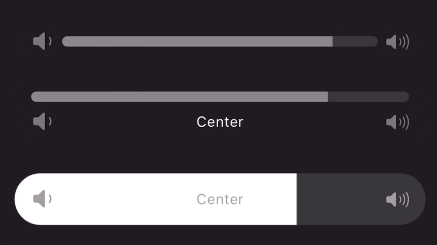
一个受 Apple Music 中使用的滑块控件启发的、具有 Cupertino 风格的交互式连续滑块小部件。
139喜欢 2700近 30 天下载160Pub 分数
AndroidiOSWebmacOSWindowsLinux
一个库珀蒂诺主题的交互式连续滑块控件。

以下为英文项目原文快照,最新内容请访问 GitHub。
A continuous or segmented slider widget inspired by the volume slider in the Apple Music app. This widget can be used with little to no setup but is still fully customizable!


Use the stock slider or customize:
Add to your dependencies:
dependencies:
  interactive_slider: ^0.5.0
Then import:
import 'package:interactive_slider/interactive_slider.dart';
InteractiveSlider(
  startIcon: const Icon(CupertinoIcons.volume_down),
  centerIcon: const Text('Center'),
  endIcon: const Icon(CupertinoIcons.volume_up),
  min: 1.0,
  max: 15.0,
  onChanged: (value) => setState(() => _value = value),
)
Please report any bugs and open any pull requests via GitHub.
依赖清单 3 项
{"sdk":"flutter"}{"sdk":"flutter"}^5.0.0先按使用场景筛选,再比较项目活跃情况,最后到原始仓库核对使用要求。
“A repository is the most basic element of GitHub.”
GitHub Docs — About repositories ↗