

 v0.2.9
laravel_echo
适用于您 Flutter 应用的官方 Laravel Echo 包的端口。
68喜欢 850近 30 天下载30Pub 分数
平台暂无数据
适用于您 Flutter 应用程序的 Laravel Echo。

以下为英文项目原文快照,最新内容请访问 GitHub。
Basically, this package is port of official Laravel Echo javascript library. It helps subscribe to channels and listen for events broadcasted from your Laravel app.
API is mostly same as official Echo package, so everything in Official documentation should work.
Available connectors:
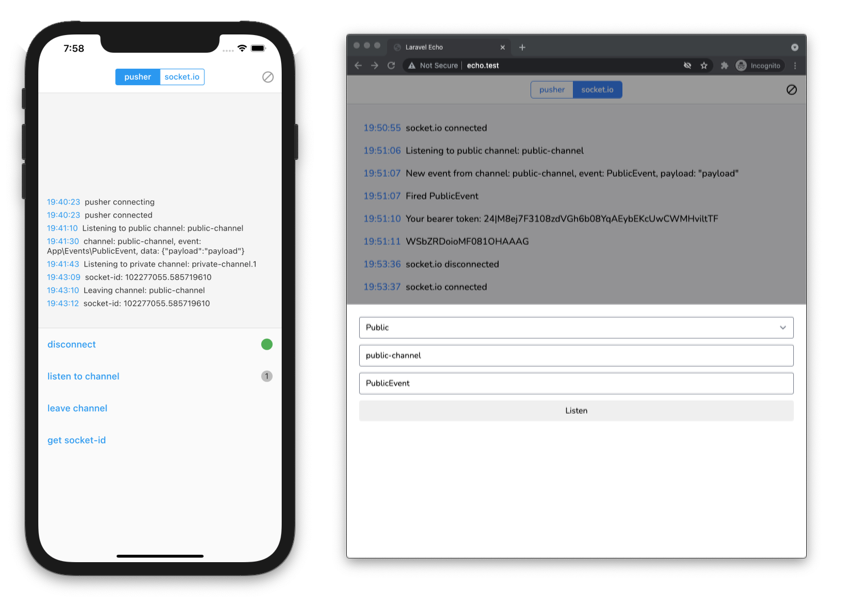
To use with Pusher, you need to install pusher_client for you Flutter app.
In your pubspec.yaml file:
dependencies:
  ...
  pusher_client: ^2.0.0
  laravel_echo: ^1.0.0
import laravel_echo and pusher_client
import 'package:laravel_echo/laravel_echo.dart';
import 'package:pusher_client/pusher_client.dart';
const String PUSHER_KEY = 'YOUR_PUSHER_KEY_HERE';
const String PUSHER_CLUSTER = 'YOUR_PUSHER_CLUSTER_HERE';
const String BEARER_TOKEN = 'YOUR_BEARER_TOKEN_HERE';
const String AUTH_URL = 'http://echo.test/api/broadcasting/auth';

PusherOptions options = PusherOptions(
  cluster: PUSHER_CLUSTER,
  auth: PusherAuth(
    AUTH_URL,
    headers: {
      'Authorization': 'Bearer $BEARER_TOKEN',
    },
  ),
);

// Create pusher client
PusherClient pusherClient = PusherClient(
  PUSHER_KEY,
  options,
  autoConnect: false,
  enableLogging: true,
);

// Create echo instance
Echo echo = new Echo(
  broadcaster: EchoBroadcasterType.Pusher,
  client: pusherClient,
);

// Listening public channel
echo.channel('public-channel').listen('PublicEvent', (e) {
  print(e);
});

// Accessing pusher instance
echo.connector.pusher.onConnectionStateChange((state) {
  print(state!.currentState.toString());
});
To use with socket.io, you need to install socket_io_client for your Flutter app.
In your pubspec.yaml file:
dependencies:
  ...
  socket_io_client: ^1.0.1
  laravel_echo: ^1.0.0
import socket_io_client
import 'package:laravel_echo/laravel_echo.dart';
import 'package:socket_io_client/socket_io_client.dart' as IO;
usage
const String BEARER_TOKEN = 'YOUR_BEARER_TOKEN_HERE';

// Create socket.io client
IO.Socket socket = IO.io(
  'http://localhost:6001',
  IO.OptionBuilder()
      .disableAutoConnect()
      .setTransports(['websocket']).build(),
);

// Create echo instance
Echo echo = new Echo(
  broadcaster: EchoBroadcasterType.SocketIO,
  client: socket,
  options: {
    'auth': {
      'headers': {
        'Authorization': 'Bearer $BEARER_TOKEN',
      }
    },
  },
);

// Listening public channel
echo.channel('public-channel').listen('PublicEvent', (e) {
  print(e);
});

// Listening private channel
// Needs auth. See details how to authorize channel below in guides
echo.private('private-channel').listen('PrivateEvent', (e) {
  print(e);
});

// Listening presence channel
// Needs auth. See details how to authorize channel below in guides
echo.join('presence-channel')
  .here((users) {
    print(users);
  }).joining((user) {
    print(user);
  }).leaving((user) {
    print(user);
  }).listen('PresenceEvent', (e) {
    print(e);
  });

// Accessing socket instance
echo.connector.socket.onConnect((_) => print('connected'));
echo.connector.socket.onDisconnect((_) => print('disconnected'));
| Option | Description | Default |
|---|---|---|
| auth | ||
| authEndpoint | /api/broadcasting/auth | |
| broadcaster | EchoBroadcasterType.Pusher | |
| host | Socket host | http://localhost:6001 |
| namespace | Event namespace | App.Events |
| ... | Any other options, passed as socket params |
Backend used for example app could be found at echo-server
This package would not be existed without hard work of these awesome devs.
pusher_clientsocket_io_client依赖清单 2 项
{"sdk":"flutter"}{"sdk":"flutter"}先按使用场景筛选,再比较项目活跃情况,最后到原始仓库核对使用要求。
“A repository is the most basic element of GitHub.”
GitHub Docs — About repositories ↗