
 v0.3.0
image_picker_gallery_camera
用于从相册或相机选择图片的 Flutter 包。此包支持从相机、相册以及相机和相册两者中选择图片。
46喜欢 124近 30 天下载140Pub 分数
AndroidiOSWeb
kotlincodes/image_picker_gallery_camera open-source repository details.

{"sdk":"flutter"}^0.7.4{"sdk":"flutter"}以下为英文项目原文快照,最新内容请访问 GitHub。
Flutter Package to Pick Image From Gallery or Camera
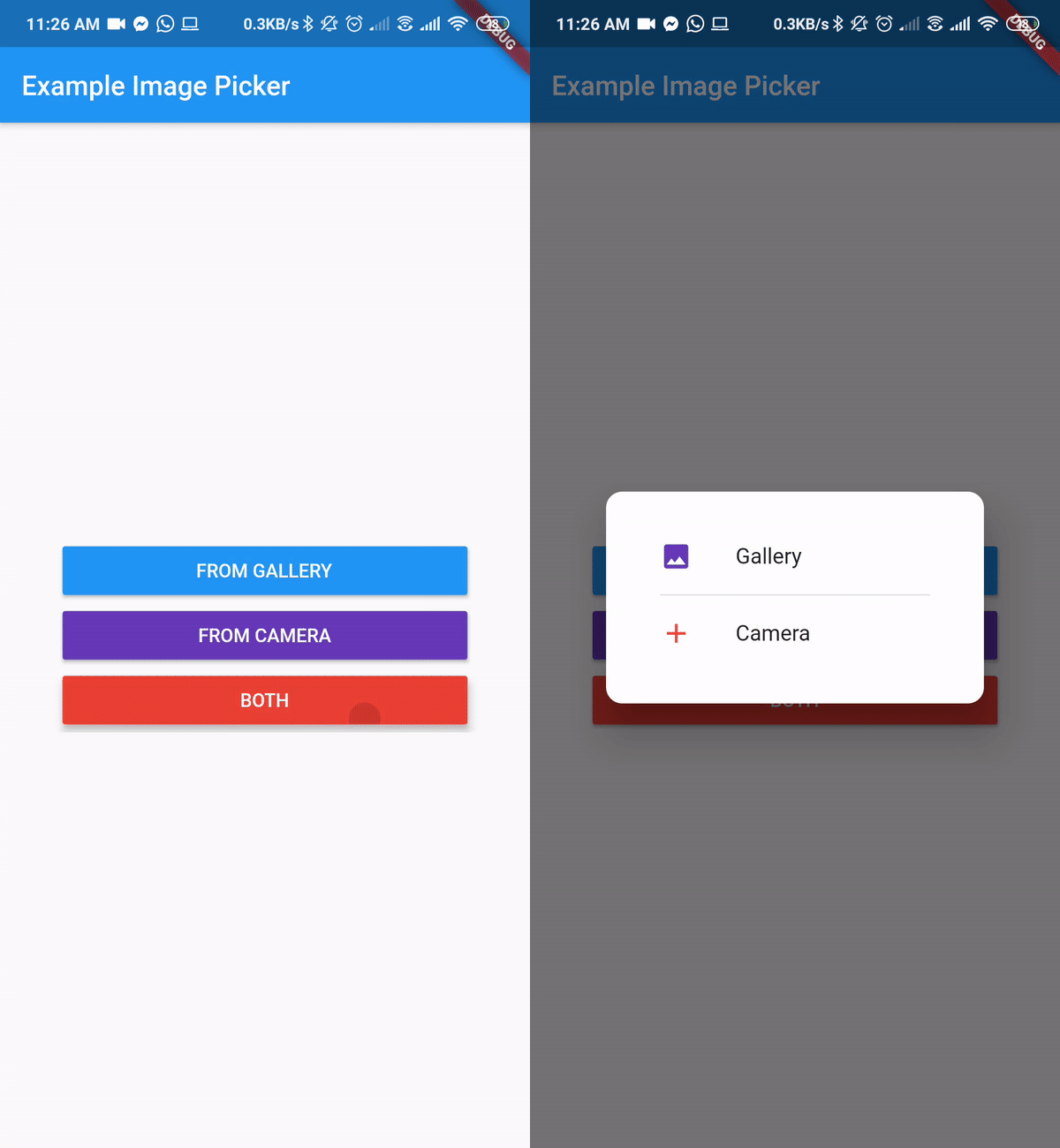
A Flutter plugin for iOS and Android for picking images from the image library, and taking new pictures with the camera. You can use both Camera and Gallery Option.
First, add image_picker_gallery_camera as a dependency in your pubspec.yaml file.
Add the following keys to your Info.plist file, located in /ios/Runner/Info.plist:
NSPhotoLibraryUsageDescription - describe why your app needs permission for the photo library. This is called Privacy - Photo Library Usage Description in the visual editor.
NSCameraUsageDescription - describe why your app needs access to the camera. This is called Privacy - Camera Usage Description in the visual editor.
NSMicrophoneUsageDescription - describe why your app needs access to the microphone, if you intend to record videos. This is called Privacy - Microphone Usage Description in the visual editor.
No configuration required - the plugin should work out of the box.
https://raw.githubusercontent.com/kotlincodes/image_picker_gallery_camera/HEAD/image_picker_flutter.gif
import 'dart:io';

import 'package:flutter/material.dart';
import 'package:image_picker_gallery_camera/image_picker_gallery_camera.dart';

void main() => runApp(MyApp());

class MyApp extends StatelessWidget {
  // This widget is the root of your application.
  @override
  Widget build(BuildContext context) {
    return MaterialApp(
      title: 'Example Image Picker',
      theme: ThemeData(
        primarySwatch: Colors.blue,
      ),
      home: MyHomePage(title: 'Example Image Picker'),
    );
  }
}

class MyHomePage extends StatefulWidget {
  MyHomePage({Key key, this.title}) : super(key: key);
  final String title;

  @override
  _MyHomePageState createState() => _MyHomePageState();
}

class _MyHomePageState extends State<MyHomePage> {
  var _image;

  Future getImage(ImgSource source) async {
    var image = await ImagePickerGC.pickImage(
        enableCloseButton: true,
        closeIcon: Icon(
          Icons.close,
          color: Colors.red,
          size: 12,
        ),
        context: context,
        source: source,
        barrierDismissible: true,
        cameraIcon: Icon(
          Icons.camera_alt,
          color: Colors.red,
        ), //cameraIcon and galleryIcon can change. If no icon provided default icon will be present
        cameraText: Text(
          "From Camera",
          style: TextStyle(color: Colors.red),
        ),
        galleryText: Text(
          "From Gallery",
          style: TextStyle(color: Colors.blue),
        ));
    setState(() {
      _image = image;
    });
  }

  @override
  Widget build(BuildContext context) {
    return Scaffold(
      appBar: AppBar(
        title: Text(widget.title),
      ),
      body: Center(
        child: SingleChildScrollView(
          child: Column(
            mainAxisAlignment: MainAxisAlignment.center,
            children: <Widget>[
              Container(
                width: 300,
                child: ElevatedButton(
                  onPressed: () => getImage(ImgSource.Gallery),
                  style: ElevatedButton.styleFrom(
                    primary: Colors.blue,
                  ),
                  child: Text(
                    "From Gallery".toUpperCase(),
                    style: TextStyle(color: Colors.white),
                  ),
                ),
              ),
              Container(
                width: 300,
                child: ElevatedButton(
                  onPressed: () => getImage(ImgSource.Camera),
                  style: ElevatedButton.styleFrom(
                    primary: Colors.deepPurple,
                  ),
                  child: Text(
                    "From Camera".toUpperCase(),
                    style: TextStyle(color: Colors.white),
                  ),
                ),
              ),
              Container(
                width: 300,
                child: ElevatedButton(
                  onPressed: () => getImage(ImgSource.Both),
                  style: ElevatedButton.styleFrom(
                    primary: Colors.red,
                  ),
                  child: Text(
                    "Both".toUpperCase(),
                    style: TextStyle(color: Colors.white),
                  ),
                ),
              ),
              _image != null ? Image.file(File(_image.path)) : Container(),
            ],
          ),
        ),
      ),
    );
  }
}