

 v5.1.3
animated_size_and_fade
在不同高度的 widget 之间执行淡入淡出和大小过渡。也用于显示/隐藏 widget。
245喜欢 1.5万近 30 天下载160Pub 分数
AndroidiOSWebmacOSWindowsLinux
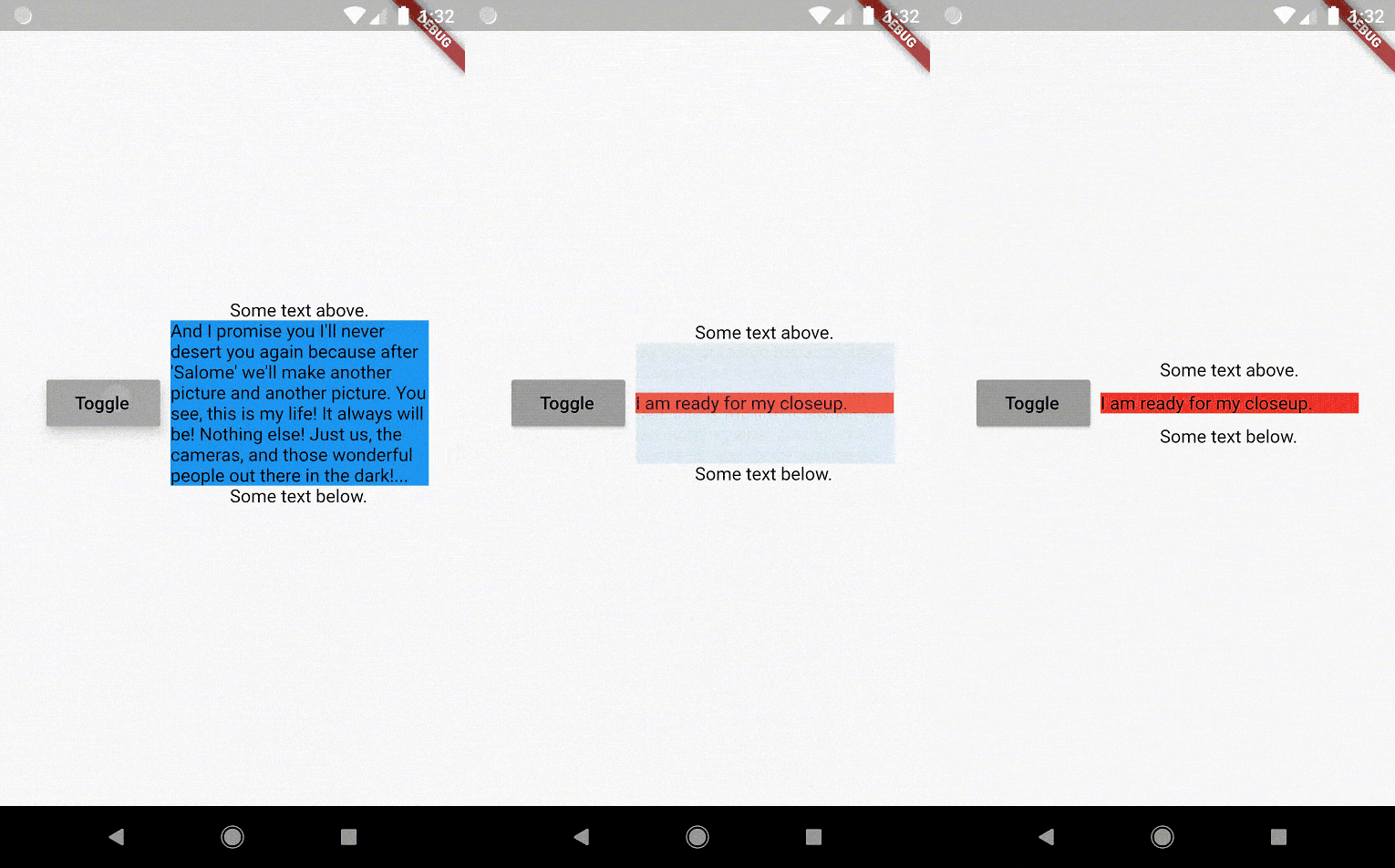
Flutter 包:一个在宽度相同但高度不同的小部件之间执行淡入淡出和大小过渡的组件,您无需提前知道它们的大小。

以下为英文项目原文快照,最新内容请访问 GitHub。








The AnimatedSizeAndFade widget allows you to:

To do a fade and size transition when you change the child widget,
the "old" and the "new" child must have the same width,
but can have different heights,
and you don't need to know their sizes in advance.
You can also define a duration and curve for both the fade and the size, separately.
Important: If the "new" child is the same widget type as the "old" child, but with different
parameters, then AnimatedSizeAndFade will NOT do a transition between them, since as far as
the framework is concerned, they are the same widget, and the existing widget can be updated with
the new parameters. To force the transition to occur, set a Key (typically a ValueKey
taking any widget data that would change the visual appearance of the widget) on each child widget
that you wish to be considered unique.
Example:
bool toggle=true;
Widget widget1 = ...;
Widget widget2 = ...;

AnimatedSizeAndFade(
   child: toggle ? widget1 : widget2
);
The AnimatedSizeAndFade.showHide constructor may be used to show/hide a widget, by resizing it
vertically while fading.
Example:
bool toggle=true;
Widget widget = ...;

AnimatedSizeAndFade.showHide(
   show: toggle,
   child: widget,
);
With AnimatedCrossFade you must provide both the firstChild and secondChild
at the same time, but with AnimatedSizeAndFade you may simply change its child.
With AnimatedSwitcher you may simply change its child, but then it only animates
the fade, not the size.
AnimatedContainer only works if you know the size of the children in advance.
Note: See the StackOverflow question that prompted this widget development.
glasberg.dev
github.com/marcglasberg
linkedin.com/in/marcglasberg/
twitter.com/glasbergmarcelo
stackoverflow.com/users/3411681/marcg
medium.com/@marcglasberg
My article in the official Flutter documentation:
The Flutter packages I've authored:
My Medium Articles:
依赖清单 2 项
{"sdk":"flutter"}{"sdk":"flutter"}先按使用场景筛选,再比较项目活跃情况,最后到原始仓库核对使用要求。
“A repository is the most basic element of GitHub.”
GitHub Docs — About repositories ↗