

 v0.0.4
dragsheet
具有物理效果、弹跳感且可拖动的 Flutter 页面和模态框。专为填补我自己的应用中遇到的空白而构建。
4喜欢 53近 30 天下载160Pub 分数
AndroidiOSWebmacOSWindowsLinux
具有物理效果、弹跳感且可拖动的 Flutter 页面和模态框。专为填补我自己的应用中遇到的空白而构建。

以下为英文项目原文快照,最新内容请访问 GitHub。
Simple Flutter package for creating bouncy, fun, and most importantly draggable sheets.
Developed because I wanted this for my own app, was familiar with the React Native versions of this, but couldn't find a matching one in the Flutter ecosystem.

|

|

|
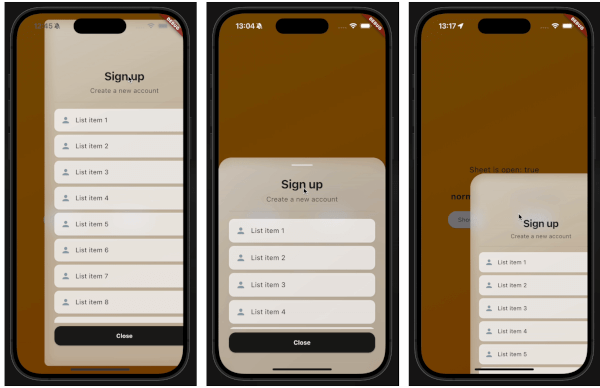
This demo "sign up" blurry sheet is not included with the package. I created it to demonstrate what you are capable of doing with the dragsheet package.
Initialize the controller.
final controller = DragSheetController();
Open YourWidget via the controller.
controller.show(
    context,
    (ctx) => YourWidget(),
),
If you want to close the sheet, use the controller.
controller.close();
If you want to listen to the state of the sheet, use the controller.
controller.addListener(() {
    print(controller.isOpen);
});
Remember to dispose of the controller when you're done with it.
@override
void dispose() {
    super.dispose();
    controller.dispose();
}
If you care about customization, you won't be disapointed. However, the defaults should be solid enough. The main properties to know about are shrinkWrap, which will make the dragsheet shrink to the size of the child you provide it, and if shrinkWrap is true, closeOnShrinkWrapTap, which will close the sheet when you tap outside of the sheet.
void show(
    BuildContext context,
    WidgetBuilder builder, {
    bool shrinkWrap = false,
    bool closeOnShrinkWrapTap = true,
    double minScale = 0.85,
    double maxScale = 1.0,
    double minRadius = 0.0,
    double maxRadius = 30.0,
    double minOpacity = 0.0,
    double maxOpacity = 0.5,
    Duration entranceDuration = const Duration(milliseconds: 200),
    Duration exitDuration = const Duration(milliseconds: 200),
    Duration gestureFadeDuration = const Duration(milliseconds: 200),
    Duration programmaticFadeDuration = const Duration(milliseconds: 200),
    double effectDistance = 220.0,
    BgOpacity? bgOpacity,
    double swipeVelocityMultiplier = 2.5,
    double swipeAccelerationThreshold = 50.0,
    double swipeAccelerationMultiplier = 12.0,
    double swipeMinVelocity = 1000.0,
    double swipeMaxVelocity = 10000.0,
    double swipeFriction = 0.09,
    VoidCallback? onShow,
    VoidCallback? onDismiss,
    Duration opacityDuration = const Duration(milliseconds: 200),
    ApplyBorderRadius applyBorderRadius = ApplyBorderRadius.toTop,
})
依赖清单 3 项
{"sdk":"flutter"}{"sdk":"flutter"}^5.0.0先按使用场景筛选,再比较项目活跃情况,最后到原始仓库核对使用要求。
“A repository is the most basic element of GitHub.”
GitHub Docs — About repositories ↗