搜索插件、代码仓与 APP 分类

dragsheet 封面
插件详情v0.0.4

dragsheet

具有物理效果、弹跳感且可拖动的 Flutter 页面和模态框。专为填补我自己的应用中遇到的空白而构建。

AndroidiOSWebmacOSWindowsLinux
近 30 天下载
71
喜欢数
4
Pub 分数
160

安装插件

flutter pub add dragsheet

插件介绍

基于插件公开信息、社区数据与项目使用情况整理的选型参考。

Dragsheet 是一个 Flutter 包,提供基于物理、弹跳式且可拖动的底部抽屉和模态框。旨在提供更动态和响应式的用户体验,填补了标准 Flutter 底部抽屉实现中的空白,通过类似弹簧的动画添加了逼真的拖动交互。非常适合需要交互式、手势驱动面板的应用程序,让界面感觉自然且富有吸引力。

适合场景

  • 可交互的底部面板
  • 由手势驱动的模态框
  • 动态UI组件
  • 以移动设备为优先的设计模式
  • 可自定义的页面转换
  • 增强用户参与度

主要特点

  • 基于物理的拖拽交互
  • 弹跳动画效果
  • 流畅的手势响应
  • 跨平台支持
  • 可自定义的拖动阈值
  • 轻松集成到现有的 Flutter 应用中

适合对象

  • 寻求高级底部表单行为的开发者
  • 需要触觉、动画用户界面的应用程序
  • 设计师专注于流畅的运动
  • 带有交互式底部面板的 Flutter 项目
  • 想要一个可直接替换标准 BottomSheet 的用户

使用建议

  • 可能需要调整以获得最佳物理行为
  • 动画带来的额外性能开销
  • 不适合用于简单的静态表格
  • 最好配合清晰的视觉反馈使用
  • 除了拖拽机制外,自定义功能有限
  • 需要理解物理模拟原理

原始 README

以下为关联源码仓库的 README 原文快照,最新内容请访问源码仓库。

Dragsheet: Bouncy, Fun, & Draggable ✨

Simple Flutter package for creating bouncy, fun, and most importantly draggable sheets.

Developed because I wanted this for my own app, was familiar with the React Native versions of this, but couldn't find a matching one in the Flutter ecosystem.

Examples

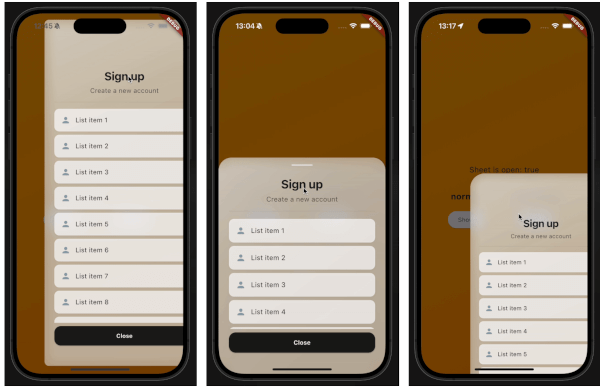
demo gif 1 demo gif 2 demo gif 3

This demo "sign up" blurry sheet is not included with the package. I created it to demonstrate what you are capable of doing with the dragsheet package.

Usage

  1. Initialize the controller.

    final controller = DragSheetController();
    
  2. Open YourWidget via the controller.

    controller.show(
        context,
        (ctx) => YourWidget(),
    ),
    
  3. If you want to close the sheet, use the controller.

    controller.close();
    
  4. If you want to listen to the state of the sheet, use the controller.

    controller.addListener(() {
        print(controller.isOpen);
    });
    
  5. Remember to dispose of the controller when you're done with it.

    @override
    void dispose() {
        super.dispose();
        controller.dispose();
    }
    
  6. If you care about customization, you won't be disapointed. However, the defaults should be solid enough. The main properties to know about are shrinkWrap, which will make the dragsheet shrink to the size of the child you provide it, and if shrinkWrap is true, closeOnShrinkWrapTap, which will close the sheet when you tap outside of the sheet.

    void show(
        BuildContext context,
        WidgetBuilder builder, {
        bool shrinkWrap = false,
        bool closeOnShrinkWrapTap = true, 
        double minScale = 0.85,
        double maxScale = 1.0,
        double minRadius = 0.0,
        double maxRadius = 30.0,
        double minOpacity = 0.0,
        double maxOpacity = 0.5,
        Duration entranceDuration = const Duration(milliseconds: 200),
        Duration exitDuration = const Duration(milliseconds: 200),
        Duration gestureFadeDuration = const Duration(milliseconds: 200),
        Duration programmaticFadeDuration = const Duration(milliseconds: 200),
        double effectDistance = 220.0,
        BgOpacity? bgOpacity,
        double swipeVelocityMultiplier = 2.5,
        double swipeAccelerationThreshold = 50.0,
        double swipeAccelerationMultiplier = 12.0,
        double swipeMinVelocity = 1000.0,
        double swipeMaxVelocity = 10000.0,
        double swipeFriction = 0.09,
        VoidCallback? onShow,
        VoidCallback? onDismiss,
        Duration opacityDuration = const Duration(milliseconds: 200),
        ApplyBorderRadius applyBorderRadius = ApplyBorderRadius.toTop,
    })
    

所属分类

源码仓库

使用此插件的项目

暂无相关数据。