

 v1.3.0
searchable_paginated_dropdown
可用于分页请求的 Flutter 可搜索下拉选择框组件。
43喜欢 2300近 30 天下载150Pub 分数
AndroidiOSWebmacOSWindowsLinux
可用于分页请求的 Flutter 可搜索下拉选择框组件。

以下为英文项目原文快照,最新内容请访问 GitHub。
This Flutter package helps create a dropdown which constains a search bar inside. And also provides a feature for compatibility with paginated searchable requests.

To use this package, add searchable_dropdown as a dependency in your [pubspec.yaml] file. And add this import to your file.
import 'package:searchable_dropdown/searchable_dropdown.dart';
Pre setted item list example
SearchableDropdown<int>(
    hintText: const Text('List of items'),
    margin: const EdgeInsets.all(15),
    items: List.generate(10, (i) => SearchableDropdownMenuItem(value: i, label: 'item $i', child: Text('item $i'))),
    onChanged: (int? value) {
        debugPrint('$value');
    },
)
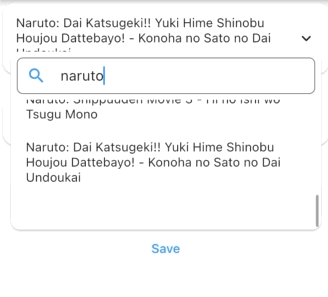
Paginated request example
SearchableDropdown<int>.paginated(
    hintText: const Text('Paginated request'),
    margin: const EdgeInsets.all(15),
    paginatedRequest: (int page, String? searchKey) async {
        final paginatedList = await getAnimeList(page: page, key: searchKey);
        return paginatedList?.animeList
            ?.map((e) => SearchableDropdownMenuItem(value: e.malId, label: e.title ?? '', child: Text(e.title ?? '')))
            .toList();
    },
    requestItemCount: 25,
    onChanged: (int? value) {
        debugPrint('$value');
    },
)
Future request example
SearchableDropdown<int>.future(
    hintText: const Text('Future request'),
    margin: const EdgeInsets.all(15),
    futureRequest: () async {
        final paginatedList = await getAnimeList(page: 1, key: '');
        return paginatedList?.animeList
            ?.map((e) => SearchableDropdownMenuItem(value: e.malId, label: e.title ?? '', child: Text(e.title ?? '')))
            .toList();
    },
    onChanged: (int? value) {
        debugPrint('$value');
    },
)
Example of usage inside a form.
Form(
    key: formKey,
    child: SearchableDropdownFormField<int>(
        backgroundDecoration: (child) => Card(
            margin: EdgeInsets.zero,
            color: Colors.red,
            elevation: 3,
            child: Padding(
            padding: const EdgeInsets.all(8.0),
            child: child,
            ),
        ),
        hintText: const Text('Search Anime'),
        margin: const EdgeInsets.all(15),
        items: List.generate(10, (i) => SearchableDropdownMenuItem(value: i, label: 'item $i', child: Text('item $i'))),
        validator: (val) {
            if (val == null) return 'Cant be empty';
            return null;
        },
        onSaved: (val) {
            debugPrint('On save: $val');
        },
    ),
)

依赖清单 4 项
>=2.8.2 <3.0.0{"sdk":"flutter"}{"git":{"url":"git@github.com:mdikcinar/better_linter.git","ref":"master"}}{"sdk":"flutter"}先按使用场景筛选,再比较项目活跃情况,最后到原始仓库核对使用要求。
“A repository is the most basic element of GitHub.”
GitHub Docs — About repositories ↗