搜索插件、代码仓与 APP 分类

searchable_paginated_dropdown 封面
插件详情v1.3.0

searchable_paginated_dropdown

可用于分页请求的 Flutter 可搜索下拉选择框组件。

AndroidiOSWebmacOSWindowsLinux
近 30 天下载
2190
喜欢数
43
Pub 分数
150

安装插件

flutter pub add searchable_paginated_dropdown

插件介绍

基于插件公开信息、社区数据与项目使用情况整理的选型参考。

一个 Flutter 小部件,将可搜索下拉框与分页数据加载支持相结合。它允许用户动态过滤选项,同时通过懒加载高效处理大型数据集。非常适合需要大量选择列表的表单或界面,而不会导致性能下降。该小部件可与异步数据源无缝集成,适用于 API 驱动的应用程序。支持所有主要平台,包括移动、Web 和桌面。

适合场景

  • 大型数据集选择
  • 基于 API 的下拉菜单
  • 带过滤功能的表单输入
  • 动态数据加载
  • 移动应用中的可搜索列表
  • 网页和桌面下拉菜单

主要特点

  • 可搜索的输入字段
  • 分页数据获取
  • 异步数据支持
  • 跨平台兼容性
  • 可自定义样式
  • 高效的内存使用

适合对象

  • 开发包含大量选项的表单的开发者
  • 使用远程 API 获取下拉数据的应用程序
  • 需要响应式搜索功能的项目
  • 跨平台 Flutter 应用程序
  • 需要流畅滚动和筛选的 UI

使用建议

  • 需要异步数据源设置
  • 网络请求需要适当的错误处理
  • 复杂设计可能需要自定义UI调整
  • 性能取决于分页策略
  • 有限的内置验证
  • 依赖外部包依赖

原始 README

以下为关联源码仓库的 README 原文快照,最新内容请访问源码仓库。

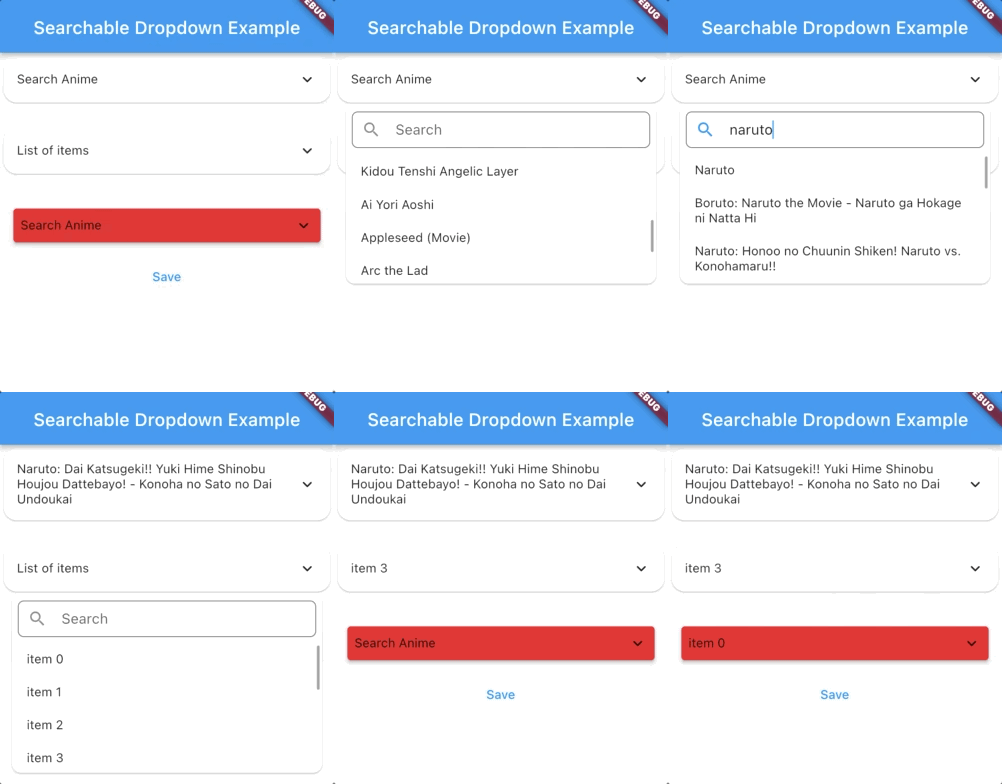
This Flutter package helps create a dropdown which constains a search bar inside. And also provides a feature for compatibility with paginated searchable requests.

Features

  • SearchableDropdown for pre setted item list,
  • SearchableDropdown.paginated for paginated requests.
  • SearchableDropdown.future for normal requests.
  • SearchableDropdownFormfield for compatibility with forms.

Getting started

To use this package, add searchable_dropdown as a dependency in your [pubspec.yaml] file. And add this import to your file.

import 'package:searchable_dropdown/searchable_dropdown.dart';

Usage

Pre setted item list example

SearchableDropdown<int>(
    hintText: const Text('List of items'),
    margin: const EdgeInsets.all(15),
    items: List.generate(10, (i) => SearchableDropdownMenuItem(value: i, label: 'item $i', child: Text('item $i'))),
    onChanged: (int? value) {
        debugPrint('$value');
    },
)

Paginated request example

  • requestItemCount: Paginated request item count which returns in one page, this value is using for knowledge about isDropdown has more item or not.
SearchableDropdown<int>.paginated(
    hintText: const Text('Paginated request'),
    margin: const EdgeInsets.all(15),
    paginatedRequest: (int page, String? searchKey) async {
        final paginatedList = await getAnimeList(page: page, key: searchKey);
        return paginatedList?.animeList
            ?.map((e) => SearchableDropdownMenuItem(value: e.malId, label: e.title ?? '', child: Text(e.title ?? '')))
            .toList();
    },
    requestItemCount: 25,
    onChanged: (int? value) {
        debugPrint('$value');
    },
)

Future request example

SearchableDropdown<int>.future(
    hintText: const Text('Future request'),
    margin: const EdgeInsets.all(15),
    futureRequest: () async {
        final paginatedList = await getAnimeList(page: 1, key: '');
        return paginatedList?.animeList
            ?.map((e) => SearchableDropdownMenuItem(value: e.malId, label: e.title ?? '', child: Text(e.title ?? '')))
            .toList();
    },
    onChanged: (int? value) {
        debugPrint('$value');
    },
)

Example of usage inside a form.

  • backgroundDecoration: Background decoration of dropdown, i.e. with this you can wrap dropdown with Card
Form(
    key: formKey,
    child: SearchableDropdownFormField<int>(
        backgroundDecoration: (child) => Card(
            margin: EdgeInsets.zero,
            color: Colors.red,
            elevation: 3,
            child: Padding(
            padding: const EdgeInsets.all(8.0),
            child: child,
            ),
        ),
        hintText: const Text('Search Anime'),
        margin: const EdgeInsets.all(15),
        items: List.generate(10, (i) => SearchableDropdownMenuItem(value: i, label: 'item $i', child: Text('item $i'))),
        validator: (val) {
            if (val == null) return 'Cant be empty';
            return null;
        },
        onSaved: (val) {
            debugPrint('On save: $val');
        },
    ),
)

License

License

所属分类

依赖

依赖清单 1 项

源码仓库

使用此插件的项目

暂无相关数据。