

v0.0.8
auto_store_translate
一个自动化应用商店/Play 商店元数据(标题、描述等)翻译和注册的库。
12喜欢 82近 30 天下载120Pub 分数
AndroidiOSmacOSWindowsLinux
melodysdreamj/auto_store_translate open-source repository details.

以下为英文项目原文快照,最新内容请访问 GitHub。

 playstore & appstore translated screenshot

dependencies:
  auto_store_translate:
create dart file in your project
project path > auto_translation > store_meta_info.dart
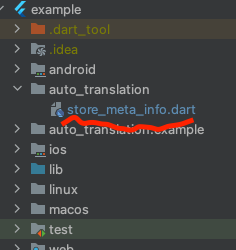
please fill in all the information below.
import 'package:auto_store_translate/auto_store_translate.dart';

/// write your store info here.

MyStoreInfo myStoreInfo = MyStoreInfo(
  // Play Store Title 30 characters or less
  playStoreTitle: "",

  // Play Store Short Description 80 characters or less
  playStoreShortDescription: "",

  // Play Store Long Description 4000 characters or less
  playStoreFullDescription: '''


  ''',

  // Play Store Translation Start Language
  playStoreStartLanguage: "en",

  // Play Store Title Translation
  translatePlayStoreName: true,

  // App Store Title 30 characters or less
  appStoreTitle: "",

  // App Store Subtitle 30 characters or less
  appStoreSubTitle: "",

  // App Store Description 4000 characters or less
  appStringDescription: '''


  ''',

  // App Store Keywords 100 characters or less , separated by commas, SEO
  appStoreKeywords: "",

  // App Store Translation Start Language
  appStoreStartLanguage: "en",

  // App Store Title Translation
  translateAppStoreName: true,

  // Whether to display the first letter of the App Store title in uppercase
  onlyFirstCharacterUpperAppName: true,

  // App Store Update Notes
  releaseNote: "fix small bug :)",

  // Home Page URL
  homepageLink: "",

  // Privacy Policy URL
  policyPageLink: "",
);

main() {
  AutoStoreTranslate.translateStoreInfo(
      myStoreInfo: myStoreInfo,

      // google translate api key
      googleTranslateApiKey: "INPUT_YOUR_GOOGLE_TRANSLATE_API_KEY",

      // true: translate only title, false: translate title + all
      onlyAppNameTranslate: false);
}
It works even if you don't put the Google Translate api key, but you will soon reach the free limit.
For a guide to getting the Google Translate api key, please refer to this document.


please refer to the official document.
    lane :metaOnly do
      upload_to_play_store(
          track: 'internal',
          metadata_path: '../auto_translation/metadata/android',
          skip_upload_screenshots: true,
          skip_upload_changelogs: true,
          release_status: 'draft',
          aab: '../build/app/outputs/bundle/release/app-release.aab',
      )
    end
fastlane metaOnly

please refer to the official document.
    lane :metaOnly do
        get_certificates
        get_provisioning_profile
        deliver(
            metadata_path: '../auto_translation/metadata/ios',
            force: true, # Skip HTMl report verification
            skip_screenshots: true,
            skip_binary_upload: true,
        )
    end
fastlane metaOnly

依赖清单 9 项
{"sdk":"flutter"}^5.0.1^3.0.1+1^5.3.3^5.4.2^0.13.4^1.8.2{"sdk":"flutter"}^2.0.0先按使用场景筛选,再比较项目活跃情况,最后到原始仓库核对使用要求。
“A repository is the most basic element of GitHub.”
GitHub Docs — About repositories ↗