Auto Store Translate 是一个 Flutter/Dart 包,可自动完成 Apple App Store 和 Google Play Store 应用元数据(如标题、描述和关键词)的翻译和注册。它通过集成翻译服务并管理多语言的元数据更新,简化了本地化工作流程。专为希望高效发布全球市场应用的开发者设计,可减少手动操作并降低多语言应用列表中的错误。该包支持 Android、iOS、macOS、Windows 和 Linux 平台。
适合场景
自动化应用商店元数据本地化
简化国际应用发布
减少手动翻译工作
更新多语言的元数据
与 CI/CD 流水线集成
主要特点
自动元数据翻译
对 App Store 和 Play Store 的支持
多平台兼容性
与翻译API的集成
CI/CD 就绪的工作流
适合对象
全球应用发布商
开发团队管理多语言应用程序
CI/CD自动化爱好者
本地化专家
使用建议
需要翻译服务的 API 密钥
取决于外部翻译提供商的质量
可能需要对翻译内容进行手动审核
仅限元数据,不包括应用UI或内容
平台特定的元数据约束
原始 README
以下为关联源码仓库的 README 原文快照,最新内容请访问源码仓库。
Auto Store Translate
A library that automates translation/registration of metadata (title, description, etc.) in the App Store/Play Store.
playstore & appstore translated screenshot
How to Use?
1. Setup the config file
dependencies:auto_store_translate:
2. Create a dart file in your project and paste the code below.
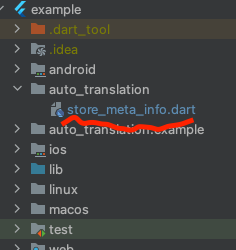
create dart file in your project
project path > auto_translation > store_meta_info.dart please fill in all the information below.
import'package:auto_store_translate/auto_store_translate.dart';
/// write your store info here.MyStoreInfo myStoreInfo = MyStoreInfo(
// Play Store Title 30 characters or less
playStoreTitle: "",
// Play Store Short Description 80 characters or less
playStoreShortDescription: "",
// Play Store Long Description 4000 characters or less
playStoreFullDescription: '''
''',
// Play Store Translation Start Language
playStoreStartLanguage: "en",
// Play Store Title Translation
translatePlayStoreName: true,
// App Store Title 30 characters or less
appStoreTitle: "",
// App Store Subtitle 30 characters or less
appStoreSubTitle: "",
// App Store Description 4000 characters or less
appStringDescription: '''
''',
// App Store Keywords 100 characters or less , separated by commas, SEO
appStoreKeywords: "",
// App Store Translation Start Language
appStoreStartLanguage: "en",
// App Store Title Translation
translateAppStoreName: true,
// Whether to display the first letter of the App Store title in uppercase
onlyFirstCharacterUpperAppName: true,
// App Store Update Notes
releaseNote: "fix small bug :)",
// Home Page URL
homepageLink: "",
// Privacy Policy URL
policyPageLink: "",
);
main() {
AutoStoreTranslate.translateStoreInfo(
myStoreInfo: myStoreInfo,
// google translate api key
googleTranslateApiKey: "INPUT_YOUR_GOOGLE_TRANSLATE_API_KEY",
// true: translate only title, false: translate title + all
onlyAppNameTranslate: false);
}
It works even if you don't put the Google Translate api key, but you will soon reach the free limit.
For a guide to getting the Google Translate api key, please refer to this document.
3. Run the code above and wait for the translation to complete.
4. you will see the translated folder in the project.
5. Set up fastlane for each android/ios and register the information in the play store/app store.


 playstore & appstore translated screenshot