

 v0.5.1
popover
弹出框是在您点击控件或某个区域时,出现在屏幕上其他内容之上的临时视图。
688喜欢 3.8万近 30 天下载160Pub 分数
AndroidiOSWebmacOSWindowsLinux
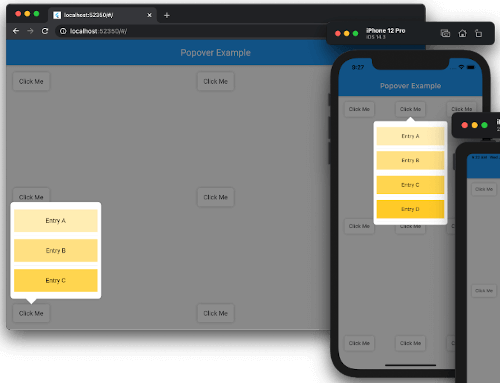
Flutter 的气泡窗。气泡窗是在您点击控件或某个区域时,短暂显示在屏幕上其他内容之上的视图。

以下为英文项目原文快照,最新内容请访问 GitHub。


A popover is a transient view that appears above other content onscreen when you tap a control or in an area. Typically, a popover includes an arrow pointing to the location from which it emerged. Popovers can be nonmodal or modal. A nonmodal popover is dismissed by tapping another part of the screen or a button on the popover. A modal popover is dismissed by tapping a Cancel or other button on the popover.
Source: Human Interface Guidelines.
dependencies:
  popover: ^0.4.0
See example/lib/main.dart.
import 'package:flutter/material.dart';
import 'package:popover/popover.dart';

class PopoverExample extends StatelessWidget {
  @override
  Widget build(BuildContext context) {
    return MaterialApp(
      home: Scaffold(
        appBar: AppBar(title: const Text('Popover Example')),
        body: const SafeArea(
          child: Padding(
            padding: EdgeInsets.all(16),
            child: Button(),
          ),
        ),
      ),
    );
  }
}

class Button extends StatelessWidget {
  const Button({Key? key}) : super(key: key);

  @override
  Widget build(BuildContext context) {
    return Container(
      width: 80,
      height: 40,
      decoration: const BoxDecoration(
        color: Colors.white,
        borderRadius: BorderRadius.all(Radius.circular(5)),
        boxShadow: [BoxShadow(color: Colors.black26, blurRadius: 5)],
      ),
      child: GestureDetector(
        child: const Center(child: Text('Click Me')),
        onTap: () {
          showPopover(
            context: context,
            bodyBuilder: (context) => const ListItems(),
            onPop: () => print('Popover was popped!'),
            direction: PopoverDirection.bottom,
            width: 200,
            height: 400,
            arrowHeight: 15,
            arrowWidth: 30,
          );
        },
      ),
    );
  }
}

class ListItems extends StatelessWidget {
  const ListItems({Key? key}) : super(key: key);

  @override
  Widget build(BuildContext context) {
    return Padding(
        padding: const EdgeInsets.symmetric(vertical: 8),
        child: ListView(
          padding: const EdgeInsets.all(8),
          children: [
            InkWell(
              onTap: () {
                Navigator.of(context)
                  ..pop()
                  ..push(
                    MaterialPageRoute<SecondRoute>(
                      builder: (context) => SecondRoute(),
                    ),
                  );
              },
              child: Container(
                height: 50,
                color: Colors.amber[100],
                child: const Center(child: Text('Entry A')),
              ),
            ),
            const Divider(),
            Container(
              height: 50,
              color: Colors.amber[200],
              child: const Center(child: Text('Entry B')),
            ),
            const Divider(),
            Container(
              height: 50,
              color: Colors.amber[300],
              child: const Center(child: Text('Entry C')),
            ),
          ],
        ),
    );
  }
}

class SecondRoute extends StatelessWidget {
  @override
  Widget build(BuildContext context) {
    return Scaffold(
      appBar: AppBar(
        title: const Text('Second Route'),
        automaticallyImplyLeading: false,
      ),
      body: Center(
        child: ElevatedButton(
          onPressed: () => Navigator.pop(context),
          child: const Text('Go back!'),
        ),
      ),
    );
  }
}
To see examples of the following package on a device or simulator:
cd example && flutter run
This project accepts pull requests only.
If you've encountered a bug or have an improvement in mind, please open a PR with a minimal fix or a reproduction in the example app. See CONTRIBUTING.md for the full contribution process.
The source code of the Popover project is available under the MIT license. See the LICENSE file for more info.
依赖清单 3 项
{"sdk":"flutter"}{"sdk":"flutter"}3.0.10先按使用场景筛选,再比较项目活跃情况,最后到原始仓库核对使用要求。
“A repository is the most basic element of GitHub.”
GitHub Docs — About repositories ↗