
 v6.1.0
bottom_navy_bar
一个美丽且带有动画效果的底部导航栏。导航栏使用您当前的主题,但您可以自由自定义它。
1370喜欢 6180近 30 天下载150Pub 分数
AndroidiOSWebmacOSWindowsLinux
一个美丽且带有动画效果的底部导航栏

{"sdk":"flutter"}{"sdk":"flutter"}以下为英文项目原文快照,最新内容请访问 GitHub。
Pub Awesome Flutter Widget Tests
Latest compatibility result for Stable channel Latest compatibility result for Beta channel Latest compatibility result for Dev channel
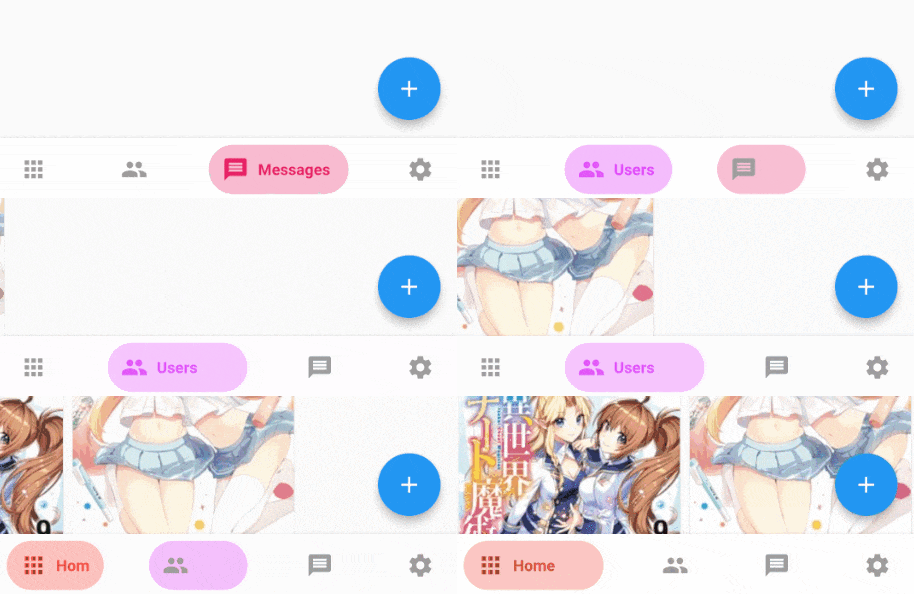
https://github.com/pedromassango/bottom_navy_bar/blob/master/images/flutter_favorite_badge.pngA beautiful and animated bottom navigation. The navigation bar uses your current theme, but you are free to customize it.
| Preview | PageView |
|---|---|
| FanBottomNavyBar Gif | Fix Gif |
iconSize - the item icon's sizeitems - navigation items, required more than one item and less than sixselectedIndex - the current item index. Use this to change the selected item. Defaults to zeroonItemSelected - required to listen when an item is tapped it provides the selected item's indexbackgroundColor - the navigation bar's background colorshowElevation - if false the appBar's elevation will be removedmainAxisAlignment - use this property to change the horizontal alignment of the items. It is mostly used when you have ony two items and you want to center the itemscurve - param to customize the item change's animationcontainerHeight - changes the Navigation Bar's heightshowInactiveTitle - use this property show a Inactive titles. Defaults to false.icon - the icon of this itemtitle - the text that will appear next to the icon when this item is selectedactiveColor - the active item's background and text colorinactiveColor - the inactive item's icon colortextAlign - property to change the alignment of the item titleactiveBackgroundColor - the active item's background coloractiveTextColor - the active item's text colortooltipText - the tooltip text that will appear when the item is long pressedAdd the dependency in pubspec.yaml:
dependencies:
  ...
  bottom_navy_bar: ^6.0.0
Adding the widget
bottomNavigationBar: BottomNavyBar(
   selectedIndex: _selectedIndex,
   showElevation: true, // use this to remove appBar's elevation
   onItemSelected: (index) => setState(() {
              _selectedIndex = index;
              _pageController.animateToPage(index,
                  duration: Duration(milliseconds: 300), curve: Curves.ease);
    }),
   items: [
     BottomNavyBarItem(
       icon: Icon(Icons.apps),
       title: Text('Home'),
       activeColor: Colors.red,
     ),
     BottomNavyBarItem(
         icon: Icon(Icons.people),
         title: Text('Users'),
         activeColor: Colors.purpleAccent
     ),
     BottomNavyBarItem(
         icon: Icon(Icons.message),
         title: Text('Messages'),
         activeColor: Colors.pink
     ),
     BottomNavyBarItem(
         icon: Icon(Icons.settings),
         title: Text('Settings'),
         activeColor: Colors.blue
     ),
   ],
)
class _MyHomePageState extends State<MyHomePage> {

  int _currentIndex = 0;
  PageController _pageController;

  @override
  void initState() {
    super.initState();
    _pageController = PageController();
  }

  @override
  void dispose() {
    _pageController.dispose();
    super.dispose();
  }

  @override
  Widget build(BuildContext context) {
    return Scaffold(
      appBar: AppBar(title: Text("Bottom Nav Bar")),
      body: SizedBox.expand(
        child: PageView(
          controller: _pageController,
          onPageChanged: (index) {
            setState(() => _currentIndex = index);
          },
          children: <Widget>[
            Container(color: Colors.blueGrey,),
            Container(color: Colors.red,),
            Container(color: Colors.green,),
            Container(color: Colors.blue,),
          ],
        ),
      ),
      bottomNavigationBar: BottomNavyBar(
        selectedIndex: _currentIndex,
        onItemSelected: (index) {
          setState(() => _currentIndex = index);
          _pageController.jumpToPage(index);
        },
        items: <BottomNavyBarItem>[
          BottomNavyBarItem(
            title: Text('Item One'),
            icon: Icon(Icons.home)
          ),
          BottomNavyBarItem(
            title: Text('Item Two'),
            icon: Icon(Icons.apps)
          ),
          BottomNavyBarItem(
            title: Text('Item Three'),
            icon: Icon(Icons.chat_bubble)
          ),
          BottomNavyBarItem(
            title: Text('Item Four'),
            icon: Icon(Icons.settings)
          ),
        ],
      ),
    );
  }
}
Contributions of any kind are more than welcome! Feel free to fork and improve in any way you want, make a pull request, or open an issue. See CONTRIBUTING.md for more info on how to contribute to this project.
This project is licensed under the Apache-2.0 License - see the LICENSE file for details.