
 v1.0.7+2
rich_console
丰富您的调试、控制台程序或分析反馈 - 在控制台中打印颜色和样式。
6喜欢 113近 30 天下载120Pub 分数
AndroidiOSWebmacOSWindowsLinux
polarby/rich_console open-source repository details.

{"sdk":"flutter"}^0.19.0{"sdk":"flutter"}^2.0.2以下为英文项目原文快照,最新内容请访问 GitHub。
A natural way of printing text styles and colors in flutter/dart.
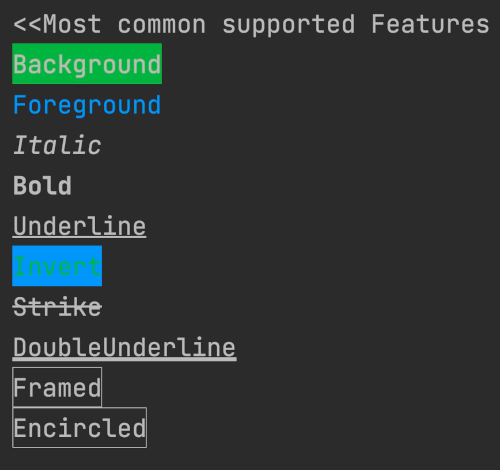
This packages contains a set of configurations that make it easy to differentiate console outputs and print all sort of colors. It's multi-IDE compatible as it is based on the basic ANSI escape codes. Note that there might be parameters and features that your IDE doesn't support. You will notice this simply that no effect is applied to you text.
https://i.imgur.com/17SaE6T.jpg
https://i.imgur.com/Whe5gbj.jpg
import 'package:rich_console/rich_console.dart';

void main(){

  // * Reusable styles
  final yourReusableStyle = RichStyle(italic: true, foreground: Colors.pinkAccent);
  printRich("Your Text", style: yourReusableStyle);
  printRich("Another Text", style: yourReusableStyle.copyWith(framed: true));

  // * Simple prints
  printRich("Background", background: Colors.green);
  printRich("Foreground", foreground: Colors.blue);
  printRich("Italic", italic: true);
  printRich("Bold", bold: true);
  printRich("Underline", underline: true);
  printRich("Invert",
      foreground: Colors.blue, background: Colors.green, invert: true);
  printRich("Strike", strike: true);
  printRich("DoubleUnderline", doubleUnderline: true);
  printRich("Framed", framed: true);
  printRich("Encircled", encircled: true);
}
printRich()
printError()
printWarning()
Please feel welcome add anything that is missing. Simply create a pull request. Especially, ff you are familiar with obtaining text input from the console please make sure to add such features to this package.