

v2.0.0
enhanced_future_builder
提高可读性并解决 FutureBuilder 常见的重复触发问题的包装器
29喜欢 1050近 30 天下载140Pub 分数
AndroidiOSWebmacOSWindowsLinux
小型 FutureBuilder 包装器,用于提高可读性

以下为英文项目原文快照,最新内容请访问 GitHub。
This library is no longer maintained. Use at your own discretion.
Small FutureBuilder wrapper to improve readabiltity. It can also be used as an easy solution to the common 'my FutureBuilder keeps refiring' problem (more info about that here).


Let's say you want to build an app that displays a random cat from the internet at launch and then increases a counter whenever a button is clicked. You came up with the following code:
@override
Widget build(BuildContext context) {
  return Scaffold(
    appBar: AppBar(
      title: Text('Clicked $_counter times')
    ),
    body: FutureBuilder(
      // resolves to cat data from the internet
      future: widget._api.getRandomCat(),
      builder: (context, snapshot) {
        if (snapshot.connectionState == ConnectionState.done) {
          // builds an image widget containing a random cat
          return _showCatWidget(snapshot.data);
        }else {
          return Center(child: Text('Loading...'));
        }
      }
    ),
    floatingActionButton: FloatingActionButton(
      // _incrementCounter calls setState() to update the view
      onPressed: _incrementCounter,
      tooltip: 'Increment',
      child: Icon(Icons.add),
    ),
  );
}
Which results in the following app:
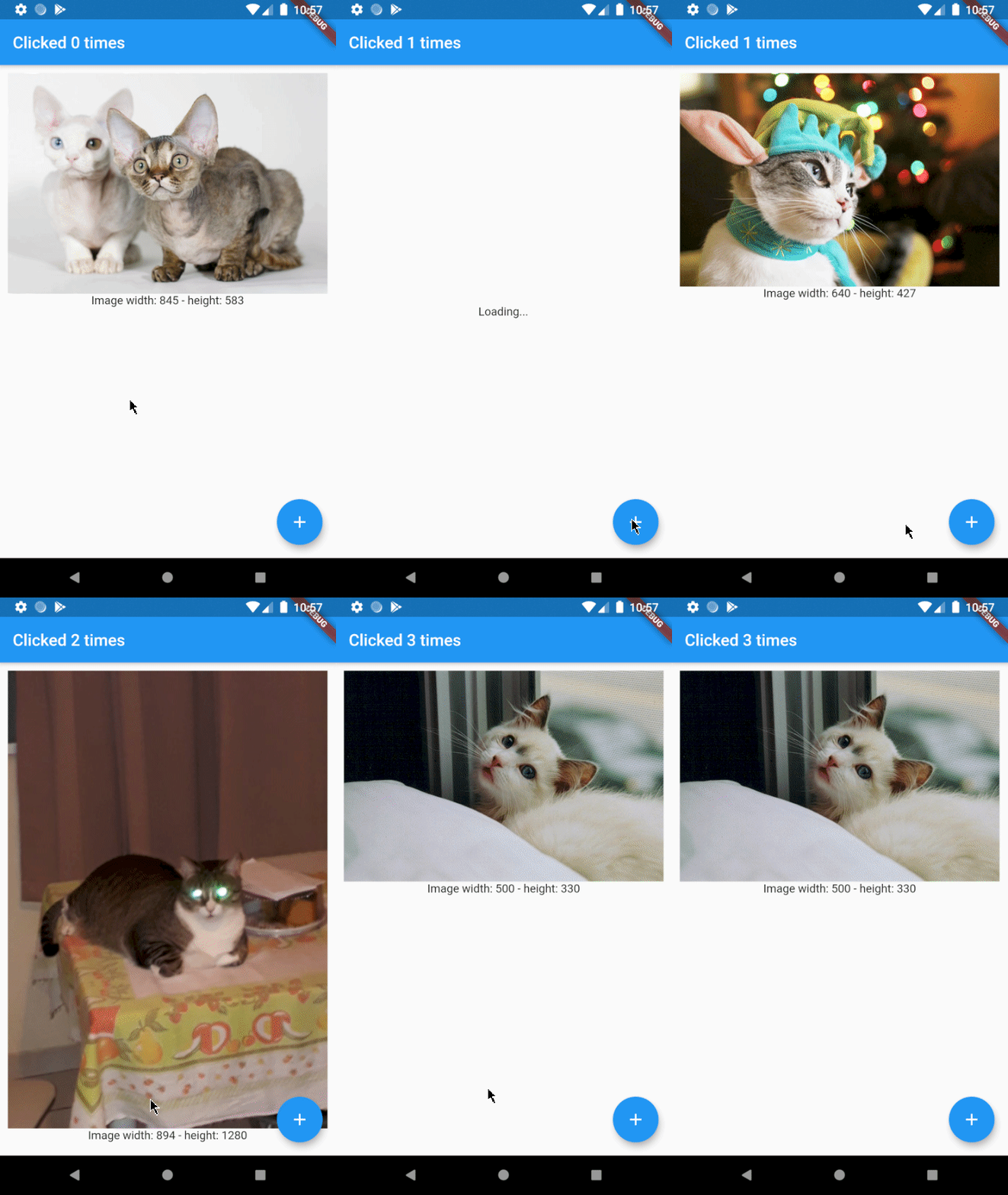
As you can see there's a problem. Whenever the button is clicked, a new cat is shown to the user. This is not what we want and can be solved by using EnhancedFutureBuilder.
Import the package and change the code to:
@override
Widget build(BuildContext context) {
  return Scaffold(
    appBar: AppBar(
      title: Text('Clicked $_counter times')
    ),
    body: EnhancedFutureBuilder(
      future: widget._api.getRandomCat(),
      // this is where the magic happens
      rememberFutureResult: true,
      whenDone: (dynamic cat) => _showCatWidget(cat),
      whenNotDone: Center(child: Text('Loading...')),
    ),
    floatingActionButton: FloatingActionButton(
      onPressed: _incrementCounter,
      tooltip: 'Increment',
      child: Icon(Icons.add),
    ),
  );
}
As you can see the code is a little easier to read now and the result will be just how we want it to be:
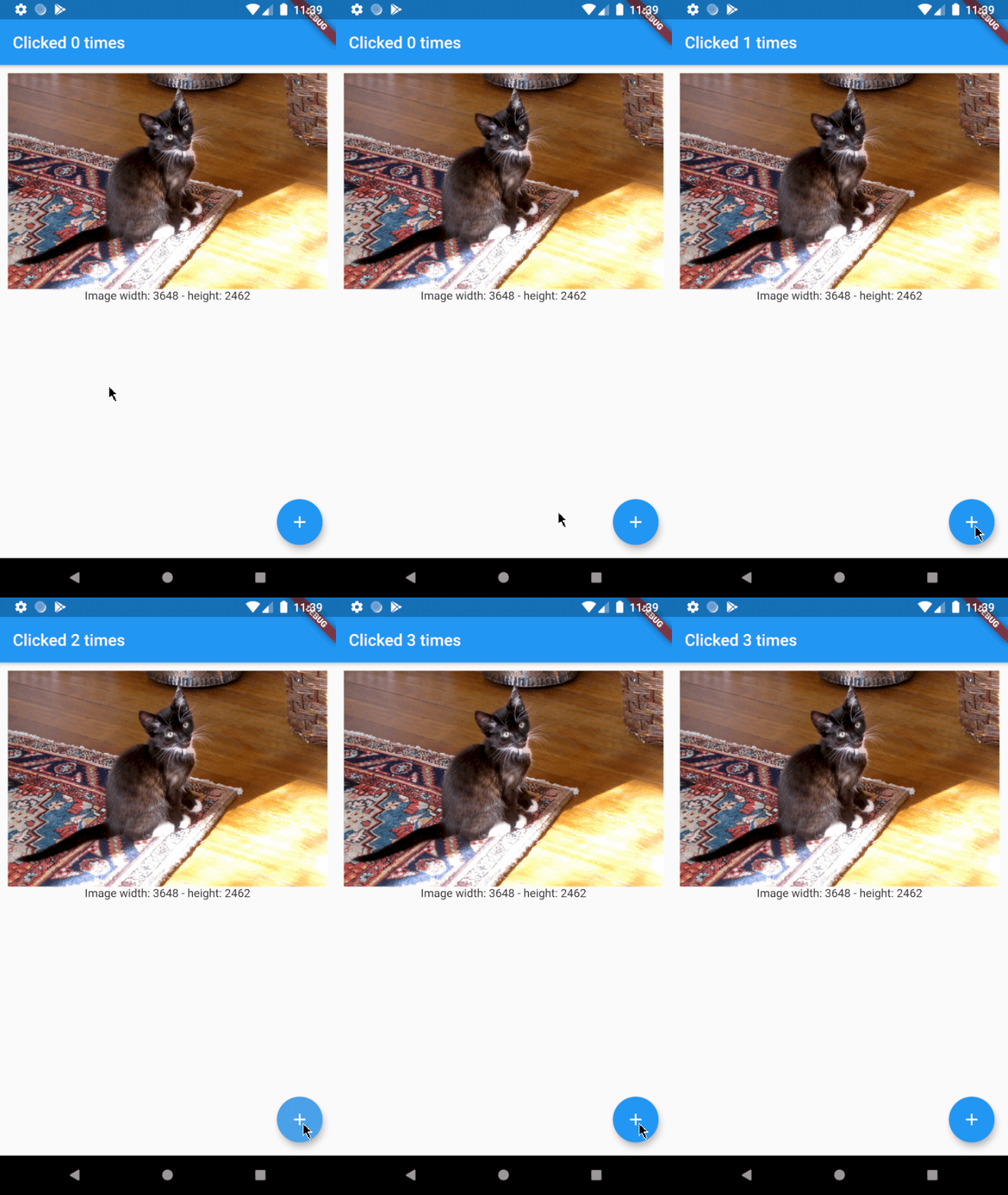
Ironically, EnhancedFutureBuilder doesn't require a builder anymore.
FutureBuilder:
FutureBuilder(
  future: _futureToResolve(),
  builder: (context, snapshot) {
    if (snapshot.connectionState == ConnectionState.done) {
      return MyWidget(snapshot.data);
    }else if (snapshot.connectionState == ConnectionState.waiting){
      return Center(child: Text('Waiting...'));
    }
    }else if (snapshot.connectionState == ConnectionState.active){
      return Center(child: Text('Active...'));
    }
    // ...
  }
}
EnhancedFutureBuilder:
EnhancedFutureBuilder(
  future: _futureToResolve(),
  rememberFutureResult: false,
  whenDone: (dynamic data) => MyWidget(data),
  whenWaiting: Center(child: Text('Waiting...')),
  whenActive: Center(child: Text('Active...')),
  // whenNone: ...
),
依赖清单 4 项
{"sdk":"flutter"}{"sdk":"flutter"}^1.7.0^1.6.0先按使用场景筛选,再比较项目活跃情况,最后到原始仓库核对使用要求。
“A repository is the most basic element of GitHub.”
GitHub Docs — About repositories ↗