
 v1.0.0
languagetool_textfield
LanguageTool TextField 包是一个专为 Flutter 应用设计的拼写检查器。这对于需要文本输入的应用程序(如消息、笔记和电子邮件)非常有用。
94喜欢 2470近 30 天下载160Pub 分数
iOSWeb
🌐 实现 LanguageTool 拼写检查的 Flutter 文本字段。

^2.11.0^1.17.1{"sdk":"flutter"}^1.0.0^1.11.0^0.10.1^2.0.1{"sdk":"flutter"}1.0.0以下为英文项目原文快照,最新内容请访问 GitHub。
Providing powerful spell-checking and grammar correction capabilities.
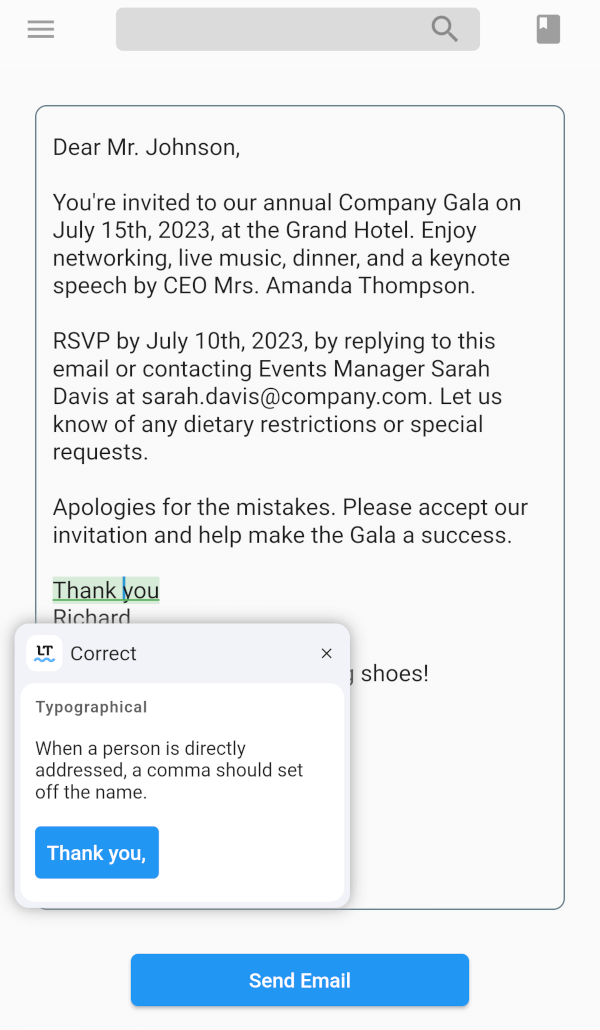
The LanguageTool TextField package is a spell-checker designed for Flutter apps. It integrates with the LanguageTool API to offer real-time spell-checking capabilities. This package will enhance text input accuracy by automatically detecting and highlighting spelling errors as users type.
It's particularly useful for apps that require precise text input, like chat or note-taking apps. By using the LanguageTool TextField package, developers can improve the user experience by providing an intuitive and reliable spell-checking feature.
flutter pub add languagetool_textfield
import 'package:languagetool_textfield/languagetool_textfield.dart';
To start using the plugin, copy this code or follow the example project in 'languagetool_textfield/example'
// Create a text controller for the Widget
final _controller = LanguageToolController();

// Use the text field widget in your layout
child: LanguageToolTextField(
  controller: _controller,

  // A language code like en-US, de-DE, fr, or auto to guess
  // the language automatically.
  // language = 'auto' by default.
  language: 'en-US',
);

// Don't forget to dispose the controller
_controller.dispose();
To incorporate the debounce or throttle functionality into the LanguageTool TextField, follow these:
Create a LanguageToolController and provide the desired debounce/throttle delay duration and delay type:
final _controller = LanguageToolController(
  // If the delay value is [Duration.zero], no delay is applied.
  delay: Duration(milliseconds: 500), // Set the debounce/throttle delay duration here
  delayType: DelayType.debouncing, // Choose either DelayType.debouncing or DelayType.throttling
);
DelayType.debouncing - Calls a function when a user hasn't carried out the event in a specific amount of time.
DelayType.throttling - Calls a function at intervals of a specified amount of time while the user is carrying out the event.
This is an unofficial plugin. We are not affiliated with LanguageTool. All logos are of their respected owners.
Current issues list is here.
Found a bug? Open the issue.