

 v0.0.1
animated_radial_menu
无需任何样板代码即可高度自定义的复杂径向动画。
34喜欢 81近 30 天下载130Pub 分数
AndroidiOSWebmacOSWindowsLinux
无需任何样板代码即可高度自定义的复杂径向动画。

以下为英文项目原文快照,最新内容请访问 GitHub。
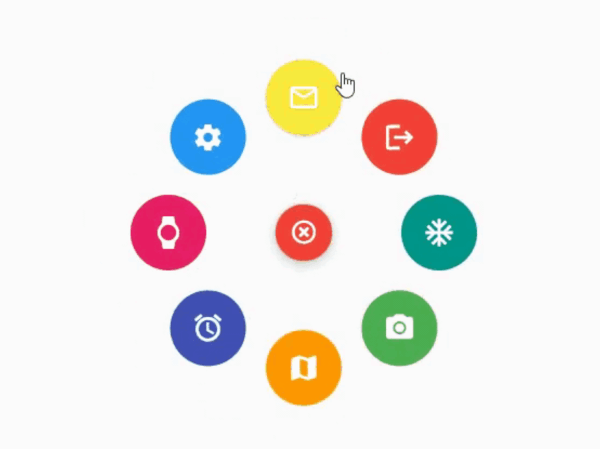
The package provides an easy way to work with radial menu along with animations.

You can check out the example here
To use this package : add the dependency to your pubspec.yaml file
   dependencies:
     flutter:
       sdk: flutter
     animated_radial_menu:
Import it to your project file
import 'package:animated_radial_menu/animated_radial_menu.dart';
Similar to column or row widget, simply pass in buttons as children and you are done
  RadialMenu(
     children: [
         RadialButton(
           icon: Icon(Icons.ac_unit),
           onPress: () => print("ac unit"),
         )
     ]
 ),
Eventhough you can use this widget anywhere, it's recommended to use RadialMenu with Stack Widget if your page contains tons of UI elements
     body: Stack(
          children: [
            RadialMenu(
              children: [
                RadialButton(
                  icon: Icon(Icons.ac_unit),
                  buttonColor: Colors.teal,
                  onPress: () => Get.to(TargetScreen())),
                RadialButton(
                    icon: Icon(Icons.camera_alt),
                    buttonColor: Colors.green,
                    onPress: () => Get.to(TargetScreen())),
                RadialButton(
                    icon: Icon(Icons.map),
                    buttonColor: Colors.orange,
                    onPress: () => Get.to(TargetScreen())),

                /* you can add any number of buttons, although it's
                  not recommended to insert beyond 8-9 buttons. */
              ],
            ),

            // rest of the widgets....

          ],
        ),
You can manually position the widget wherever you wish
   RadialMenu(
    centerButtonAlignment: Alignment(0.3,0.5) // by default alignment is set to Alignment.center
   )
You can also customize the main centered button(more customizations will be made available soon)
   RadialMenu(
        centerButtonSize: 0.5, // size ranging from 0.0 to 1.0
   )
依赖清单 4 项
{"sdk":"flutter"}^9.1.0^2.1.0{"sdk":"flutter"}先按使用场景筛选,再比较项目活跃情况,最后到原始仓库核对使用要求。
“A repository is the most basic element of GitHub.”
GitHub Docs — About repositories ↗