搜索插件、代码仓与 APP 分类

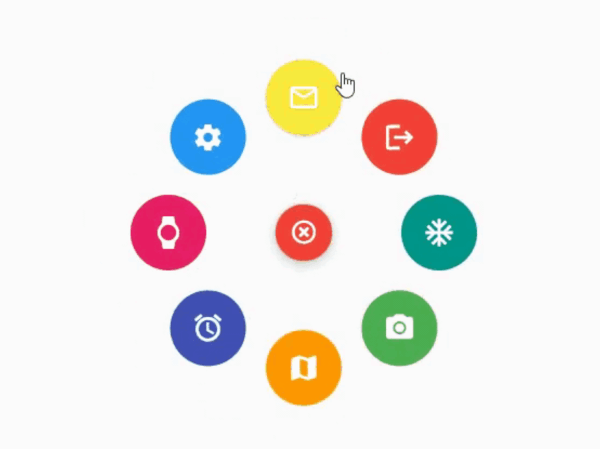
animated_radial_menu 封面
插件详情v0.0.1

animated_radial_menu

无需任何样板代码即可高度自定义的复杂径向动画。

AndroidiOSWebmacOSWindowsLinux
近 30 天下载
81
喜欢数
34
Pub 分数
130

安装插件

flutter pub add animated_radial_menu

插件介绍

基于插件公开信息、社区数据与项目使用情况整理的选型参考。

一个高度可定制的径向菜单包,适用于 Flutter,无需样板代码即可实现复杂的平滑动画。它使开发者能够跨多个平台创建具有优雅径向布局的交互式浮动操作菜单。该包通过最少的设置简化了动态、手势响应式菜单的实现,非常适合需要直观导航或增强用户交互的应用程序。该包注重性能和灵活性,支持广泛的自定义选项,包括动画速度、项目定位和视觉样式。

适合场景

  • 交互式应用导航
  • 基于手势的菜单触发
  • 浮动操作界面设计
  • 增强的用户参与度
  • 自定义 UI 组件
  • 移动和桌面应用程序界面

主要特点

  • 无需样板代码
  • 高度可定制
  • 平滑的径向动画
  • 跨平台支持
  • 手势响应式设计
  • 轻松集成

适合对象

  • 寻求简洁UI模式的开发者
  • 具有复杂导航需求的应用程序
  • 注重设计的 Flutter 项目
  • 跨平台应用程序
  • UI/UX优化工作

使用建议

  • 可能需要在低端设备上进行性能调优
  • 除了基本用法外,文档有限
  • 自定义可能会增加初学者的复杂性
  • 未针对非常大的菜单项进行优化
  • 依赖Flutter动画框架的稳定性

原始 README

以下为关联源码仓库的 README 原文快照,最新内容请访问源码仓库。

animated_radial_menu

The package provides an easy way to work with radial menu along with animations.

example

You can check out the example here

Installation

To use this package : add the dependency to your pubspec.yaml file

   dependencies:
     flutter:
       sdk: flutter
     animated_radial_menu:

Basic Usage

Import it to your project file

  import 'package:animated_radial_menu/animated_radial_menu.dart';

Similar to column or row widget, simply pass in buttons as children and you are done

  RadialMenu(
     children: [
         RadialButton(
           icon: Icon(Icons.ac_unit),
           onPress: () => print("ac unit"),
         )
     ]
 ),

Eventhough you can use this widget anywhere, it's recommended to use RadialMenu with Stack Widget if your page contains tons of UI elements

     body: Stack(
          children: [
            RadialMenu(
              children: [
                RadialButton(
                  icon: Icon(Icons.ac_unit),
                  buttonColor: Colors.teal,
                  onPress: () => Get.to(TargetScreen())),
                RadialButton(
                    icon: Icon(Icons.camera_alt),
                    buttonColor: Colors.green,
                    onPress: () => Get.to(TargetScreen())),
                RadialButton(
                    icon: Icon(Icons.map),
                    buttonColor: Colors.orange,
                    onPress: () => Get.to(TargetScreen())),
                                 
                /* you can add any number of buttons, although it's 
                  not recommended to insert beyond 8-9 buttons. */
              ],
            ),
            
            // rest of the widgets....

          ],
        ),

You can manually position the widget wherever you wish

   RadialMenu(
    centerButtonAlignment: Alignment(0.3,0.5) // by default alignment is set to Alignment.center
   )

You can also customize the main centered button(more customizations will be made available soon)

   RadialMenu(
        centerButtonSize: 0.5, // size ranging from 0.0 to 1.0
   )

所属分类

依赖

依赖清单 2 项

源码仓库

使用此插件的项目

暂无相关数据。