
 v0.2.0
easy_geofencing
这是一个 Dart 包,为 Android 和 iOS 提供最佳且经过优化的地理围栏后台服务功能。
61喜欢 44近 30 天下载125Pub 分数
AndroidiOSWebmacOS
这是一个 Dart 包,为 Android 和 iOS 提供最佳且经过优化的地理围栏后台服务功能。由 Uzair Leo 编写。

{"sdk":"flutter"}^9.0.2{"sdk":"flutter"}以下为英文项目原文快照,最新内容请访问 GitHub。
Easy Geofencing
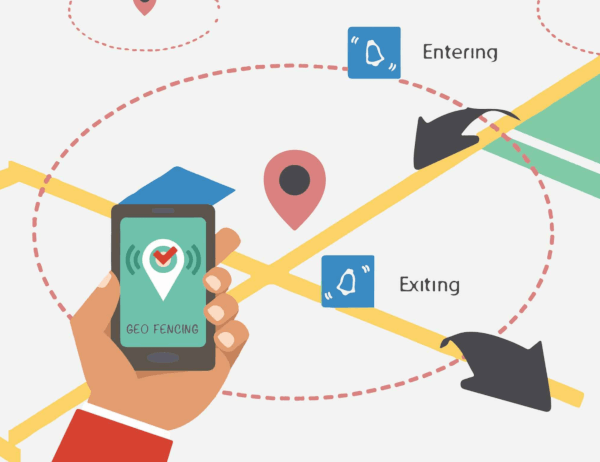
Easy Geofencing is a flutter geofencing package for flutter application (android & ios) which provides geofencing functionalities.It is completely written in pure dart language.
features
usage
To add the easy_geofencing to your flutter application read the install instructions. Below are some Android and iOS specifics that are required for the easy_geofencing to work correctly.
AndroidX
The easy_geofencing plugin requires the AndroidX version of the Android Support Libraries. This means you need to make sure your Android project supports AndroidX. Detailed instructions can be found here.
The TL;DR version is:
android.useAndroidX=true
android.enableJetifier=true
compileSdkVersion in your "android/app/build.gradle" file to 30:android {
compileSdkVersion 30
...
}
android. dependencies to their AndroidX counterparts (a full list can be found here: https://developer.android.com/jetpack/androidx/migrate).Permissions
On Android you'll need to add either the ACCESS_COARSE_LOCATION or the ACCESS_FINE_LOCATION permission to your Android Manifest. To do so open the AndroidManifest.xml file (located under android/app/src/main) and add one of the following two lines as direct children of the <manifest> tag (when you configure both permissions the ACCESS_FINE_LOCATION will be used):
<uses-permission android:name="android.permission.ACCESS_FINE_LOCATION" />
<uses-permission android:name="android.permission.ACCESS_COARSE_LOCATION" />
Starting from Android 10 you need to add the ACCESS_BACKGROUND_LOCATION permission (next to the ACCESS_COARSE_LOCATION or the ACCESS_FINE_LOCATION permission) if you want to continue receiving updates even when your App is running in the background (note that the easy_geofencing plugin doesn't support receiving an processing geofence status updates while running in the background):
<uses-permission android:name="android.permission.ACCESS_BACKGROUND_LOCATION" />
On iOS you'll need to add the following entries to your Info.plist file (located under ios/Runner) in order to access the device's location. Simply open your Info.plist file and add the following:
<key>NSLocationWhenInUseUsageDescription</key>
<string>This app needs access to location when open.</string>
<key>NSLocationAlwaysUsageDescription</key>
<string>This app needs access to location when in the background.</string>
If you would like to receive updates when your App is in the background, you'll also need to add the Background Modes capability to your XCode project (Project > Signing and Capabilities > "+ Capability" button) and select Location Updates. Be careful with this, you will need to explain in detail to Apple why your App needs this when submitting your App to the AppStore. If Apple isn't satisfied with the explanation your App will be rejected.
At first you need to start the geofence service and for that you need to pass the following arguments:
pointedLatitude: the latitude of the geofence area centerpointedLongitude: the longitude of the geofence area centerradiusInMeter: the radius of the geofence area in meterseventPeriodInSeconds: geofence status stream period in secondsimport 'package:easy_geofencing/easy_geofencing.dart';
EasyGeofencing.startGeofenceService(
pointedLatitude: "34.2165157",
pointedLongitude: "71.9437819",
radiusMeter: "250.0",
eventPeriodInSeconds: 5
);
To get the stream geofence Status updates on location changes, you need to subscribe getGeofenceStream to listen geofence status streams on current location updates.
import 'package:easy_geofencing/easy_geofencing.dart';

StreamSubscription<GeofenceStatus> geofenceStatusStream = EasyGeofencing.getGeofenceStream().listen(
  (GeofenceStatus status) {
    print(status.toString());
});
To stop geofence service you need to specify this:
import 'package:easy_geofencing/easy_geofencing.dart';

EasyGeofencing.stopGeofenceService();
Also, stop GeofenceStatus stream subscription listener which is geofenceStatusStream in our case
geofenceStatusStream.cancel();
Please file any issues, bugs or feature requests as an issue on our GitHub page.
This plugin is depended on geolocator plugin of baseflow.com
If you would like to contribute to the plugin (e.g. by improving the documentation, solving a bug or adding a cool new feature), feel free to send your pull request.
This easy_geofencing plugin for Flutter is developed by uzairleo.