

 v2.0.0
flutter_update_dialog
一个漂亮的 Flutter 应用版本更新对话框。您可以自定义自己的版本更新弹窗!
58喜欢 200近 30 天下载150Pub 分数
AndroidiOSWebmacOSWindowsLinux
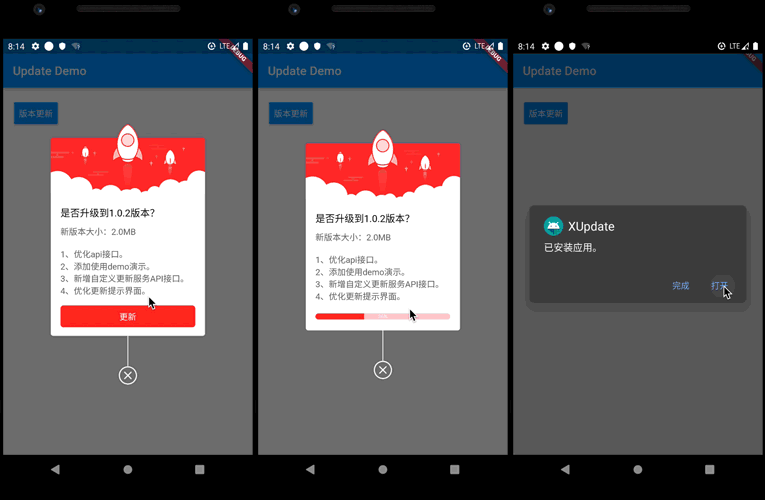
应用版本更新对话框。

以下为英文项目原文快照,最新内容请访问 GitHub。


Application version update dialog. With it, you can customize the logic of version update.
You can refer to the following project:
https://github.com/xuexiangjys/flutter_app_update_example
You should ensure that you add the flutter_update_dialog as a dependency in your flutter project.
// pub 集成
dependencies:
  flutter_update_dialog: ^2.0.0

//github  集成
dependencies:
  flutter_update_dialog:
    git:
      url: git://github.com/xuexiangjys/flutter_update_dialog.git
      ref: master
  void defaultStyle() {
    if (dialog != null && dialog.isShowing()) {
      return;
    }
    dialog = UpdateDialog.showUpdate(context,
        title: "是否升级到4.1.4版本?",
        updateContent: "新版本大小:2.0M\n1.xxxxxxx\n2.xxxxxxx\n3.xxxxxxx",
        onUpdate: onUpdate);
  }
  void customStyle() {
    if (dialog != null && dialog.isShowing()) {
      return;
    }
    dialog = UpdateDialog.showUpdate(context,
        width: 250,
        title: "是否升级到4.1.4版本?",
        updateContent: "新版本大小:2.0M\n1.xxxxxxx\n2.xxxxxxx\n3.xxxxxxx",
        titleTextSize: 14,
        contentTextSize: 12,
        buttonTextSize: 12,
        topImage: Image.asset('assets/bg_update_top.png'),
        extraHeight: 5,
        radius: 8,
        themeColor: Color(0xFFFFAC5D),
        progressBackgroundColor: Color(0x5AFFAC5D),
        isForce: true,
        updateButtonTxt: '升级',
        ignoreButtonTxt: '忽略此版本',
        enableIgnore: true, onIgnore: () {
          ToastUtils.waring("忽略");
          dialog.dismiss();
        },
        onUpdate: onUpdate);
  }
| Name | Type | Default | Description |
|---|---|---|---|
| width | double | 0.618 * screenWidth | dialog width |
| title | String | / | dialog title |
| updateContent | String | / | Update the modified content |
| onUpdate | VoidCallback | / | Click on the update button event |
| titleTextSize | double | 16.0 | The size of the title text |
| contentTextSize | double | 14.0 | The size of the update content text |
| buttonTextSize | double | 14.0 | The size of the button text |
| themeColor | Color | Colors.red | Theme color |
| progressBackgroundColor | Color | 0xFFFFCDD2 | The background color of the progress bar |
| topImage | Image | / | Picture at the top |
| extraHeight | double | 5.0 | Extra height from top image |
| radius | double | 4.0 | Angle of corner |
| enableIgnore | bool | false | Whether to enable the ignore version button |
| updateButtonText | String | '更新' | Update button text |
| ignoreButtonText | String | '忽略此版本' | Ignore button text |
| isForce | bool | false | Whether to force update |
| onIgnore | VoidCallback | / | Click on the ignore button event |
依赖清单 2 项
{"sdk":"flutter"}{"sdk":"flutter"}先按使用场景筛选,再比较项目活跃情况,最后到原始仓库核对使用要求。
“A repository is the most basic element of GitHub.”
GitHub Docs — About repositories ↗