flutter_chunked_upload
A Flutter package for handling chunked file uploads with resume capability, progress tracking, and queue management.
🚀 Demo
| Android Demo |
iOS Demo |
 |
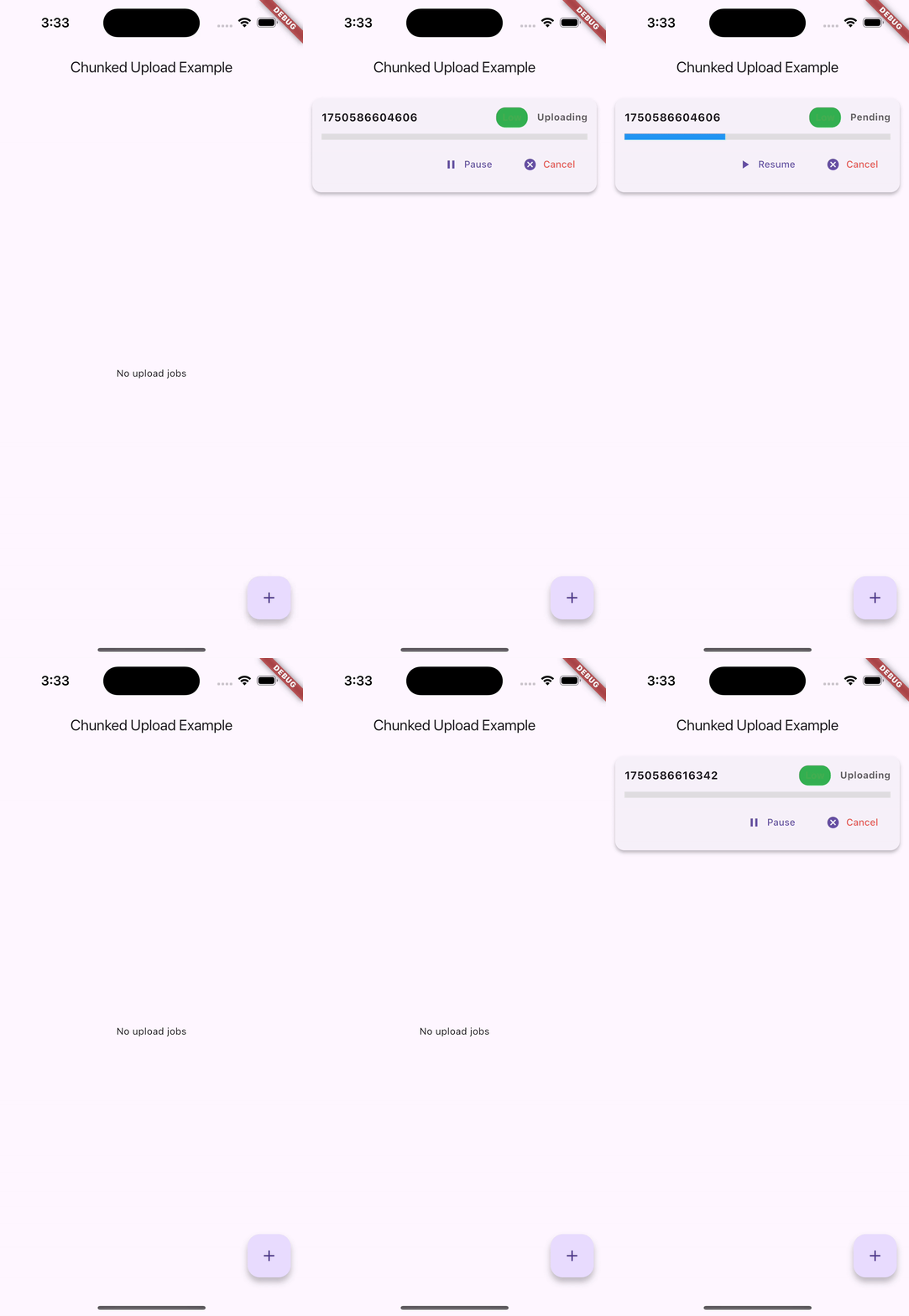 |
🌟 Features
- Chunked File Uploads: Split large files into manageable chunks for reliable uploads
- Resume Capability: Automatically resume uploads from where they left off
- Queue Management: Manage multiple uploads with priority support
- Progress Tracking: Real-time progress updates with callbacks
- Pause/Resume/Cancel: Full control over upload operations
- Automatic Connectivity Handling: Pause uploads when internet is lost, resume when restored
- Persistent Storage: Upload progress saved using Hive for app restarts
- Cross-Platform: Works on iOS, Android, Web, and Desktop
- Backend Agnostic: Works with any server that supports chunked uploads
- Notifications: Built-in success, retry, and failure notifications
- Error Handling: Comprehensive error handling with automatic retries
Getting started
Installation
Add this to your package's pubspec.yaml file:
dependencies:
  flutter_chunked_upload: ^1.0.0
Dependencies
This package requires the following dependencies:
dependencies:
  hive: ^2.2.3
  hive_flutter: ^1.1.0
  http: ^1.4.0
  path_provider: ^2.1.5
  flutter_local_notifications: ^19.2.1
  rxdart: ^0.28.0
  collection: ^1.19.0
Usage
Basic Setup
import 'package:flutter_chunked_upload/flutter_chunked_upload.dart';
final queueManager = UploadQueueManager();
await queueManager.initAsync();
Creating Upload Jobs
final job = UploadJob(
id: 'unique_job_id',
filePath: '/path/to/your/file.mp4',
url: 'https://api.example.com/upload',
chunkSize: 1024 * 1024,
priority: 5,
onProgress: (id, progress) {
print('Upload $id progress: ${(progress * 100).toStringAsFixed(1)}%');
},
onComplete: (id) {
print('Upload $id completed successfully!');
},
onFailed: (id, error) {
print('Upload $id failed: $error');
},
headerBuilder: (chunkIndex, totalChunks) {
return {
'Content-Type': 'application/octet-stream',
'X-Chunk-Index': chunkIndex.toString(),
'X-Total-Chunks': totalChunks.toString(),
};
},
);
await queueManager.addToQueue(job);
🔄 Automatic Connectivity Handling
The package automatically handles internet connectivity changes:
- Internet Lost: All active uploads are automatically paused
- Internet Restored: All paused uploads are automatically resumed
- No Manual Intervention: Works seamlessly in the background
- Progress Preserved: No data loss during connectivity changes
Managing Uploads
queueManager.pauseJob('job_id');
queueManager.resumeJob('job_id');
queueManager.cancelJob('job_id');
final pendingJobs = await queueManager.getPendingJobs();
final pausedJobs = await queueManager.getPausedJobs();
queueManager.clearAllJobs();
Using the Debug Panel
import 'package:flutter/material.dart';
import 'package:flutter_chunked_upload/flutter_chunked_upload.dart';
class MyApp extends StatelessWidget {
@override
Widget build(BuildContext context) {
return MaterialApp(
home: Scaffold(
appBar: AppBar(title: Text('Upload Manager')),
body: UploadJobsDebugPanel(),
),
);
}
}
Custom Storage Adapters
You can implement custom storage adapters for different persistence needs:
class CustomJobStorageAdapter implements UploadJobStorageAdapter {
@override
Future<void> saveJob(UploadJob job) async {
}
}
await queueManager.initAsync(
jobStorage: CustomJobStorageAdapter(),
chunkStorage: CustomChunkStorageAdapter(),
);
API Reference
UploadJob
The main class representing an upload job.
class UploadJob {
String id;
String filePath;
String url;
int chunkSize;
UploadJobStatus status;
int retryCount;
int maxRetries;
bool isPaused;
int priority;
double progress;
ProgressCallback? onProgress;
UploadCompleteCallback? onComplete;
UploadFailedCallback? onFailed;
HeaderBuilder? headerBuilder;
}
UploadJobStatus
enum UploadJobStatus {
pending,
uploading,
success,
failed,
}
UploadQueueManager
Singleton class for managing upload queue.
class UploadQueueManager {
Future<void> initAsync({...});
Future<void> addToQueue(UploadJob job);
void pauseJob(String jobId);
void resumeJob(String jobId);
void cancelJob(String jobId);
Future<List<UploadJob>> getPendingJobs();
Future<List<UploadJob>> getPausedJobs();
void clearAllJobs();
void dispose();
}
Configuration
Chunk Size
Choose appropriate chunk sizes based on your needs:
- Small files (< 10MB): 512KB chunks
- Medium files (10MB - 100MB): 1MB chunks
- Large files (> 100MB): 2-5MB chunks
Retry Configuration
final job = UploadJob(
maxRetries: 5,
retryCount: 0,
);
Priority Levels
- 0-2: Low priority
- 3-7: Medium priority
- 8-10: High priority
Error Handling
The package handles various error scenarios:
- File not found: Throws
FileSystemException
- Network errors: Automatic retry with exponential backoff
- Server errors: Retry based on HTTP status codes
- Storage errors: Graceful degradation
Platform Support
- ✅ Android
- ✅ iOS
- ✅ Web (with limitations)
- ❌ Desktop (not tested)
Contributing
- Fork the repository
- Create a feature branch
- Make your changes
- Add tests if applicable
- Submit a pull request
License
This project is licensed under the MIT License - see the LICENSE file for details.


 v1.0.2