

 v3.0.1
simple_url_preview
URL प्रीव्यू दिखाने के लिए Flutter पैकेज। ऊंचाई, बैकग्राउंड और टेक्स्ट स्टाइल, साथ ही लाइनों को कस्टमाइज़ किया जा सकता है।
77लाइक 10830-दिन डाउनलोड60Pub अंक
प्लेटफ़ॉर्म डेटा नहीं
फ्लटर के लिए सरल URL प्रीव्यू पैकेज

यह अंग्रेज़ी मूल स्नैपशॉट है। नवीनतम सामग्री GitHub पर देखें।
Flutter package to show url preview
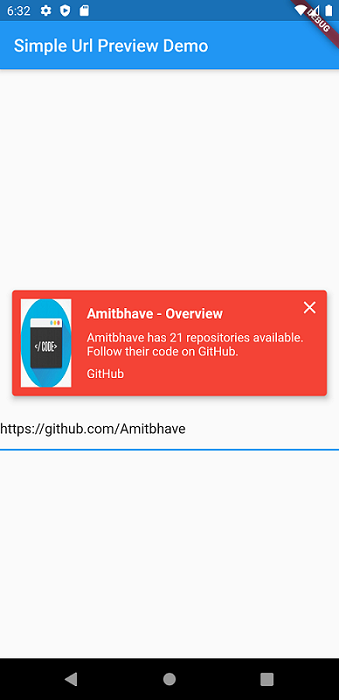
This shows url preview of a URL. (Now migrated to null-safety).
Currently only supports Open Graph Protocol
Please use latest version of the package.
Add simple_url_preview to pubspec.yaml, and hit command 'flutter pub get'
dependencies:
  ...
  simple_url_preview: ^3.0.1
SimpleUrlPreview(
  url: 'https://pub.dev/',
),
SimpleUrlPreview(
  url: 'https://pub.dev/',
  previewHeight: 200,
  previewContainerPadding: EdgeInsets.all(10),
),
Default bgColor = Theme.of(context).primaryColor
SimpleUrlPreview(
  url: 'https://pub.dev/',
  bgColor: Colors.red,
),
Default titleStyle = TextStyle( fontWeight: FontWeight.bold, fontSize: 16, color: Theme.of(context).accentColor )
Default descriptionStyle = TextStyle( fontSize: 14, color: Theme.of(context).accentColor )
Default siteNameStyle = TextStyle( fontSize: 14, color: Theme.of(context).accentColor )
SimpleUrlPreview(
  url: 'https://pub.dev/',
  titleStyle: TextStyle(
    fontSize: 16,
    fontWeight: FontWeight.bold,
    color: Colors.red,
  ),
  descriptionStyle: TextStyle(
    fontSize: 14,
    color: Theme.of(context).primaryColor,
  ),
  siteNameStyle: TextStyle(
    fontSize: 14,
    color: Theme.of(context).primaryColor,
  ),
),
SimpleUrlPreview(
  url: 'https://pub.dev/',
  isClosable: true,
),
Default and maximum title lines = 2 and description lines = 3.
SimpleUrlPreview(
  url: 'https://pub.dev/',
  titleLines: 1,
  descriptionLines: 2,
  imageLoaderColor: Colors.white,
),
By Default, will open URL in default browser.
SimpleUrlPreview(
  url: 'https://pub.dev/',
  onTap: () => print('Hello Flutter URL Preview'),
),
Would :heart: to see any contributions.
If you liked my work, show some :heart: by :star: repo.
Also you can appreciate by

|

|
निर्भरता सूची 8 आइटम
{"sdk":"flutter"}^0.13.3^0.15.0^6.0.6^0.3.0^3.0.0^1.15.0{"sdk":"flutter"}उपयोग के अनुसार छाँटें, गतिविधि की तुलना करें और अपनाने से पहले मूल प्रोजेक्ट की आवश्यकताएँ जाँचें।
“A repository is the most basic element of GitHub.”
GitHub Docs — About repositories ↗