
 v4.1.1
connection_notifier
एक फ्लटर पैकेज जो कि कोई इंटरनेट कनेक्शन नहीं होने पर सूचित करता है, साथ ही इंटरनेट कनेक्शन स्थिति के ट्रैकिंग में मदद करने वाले सरल उपकरण प्रदान करता है।
115लाइक 97730-दिन डाउनलोड150Pub अंक
AndroidiOSWebmacOSWindowsLinux
एक फ्लटर पैकेज जो जब कोई इंटरनेट कनेक्शन नहीं होता है, तब सूचित करता है।

निर्भरता सूची 5 आइटम
^0.28.0{"sdk":"flutter"}^2.9.1+2{"sdk":"flutter"}^2.0.2यह अंग्रेज़ी मूल स्नैपशॉट है। नवीनतम सामग्री GitHub पर देखें।
A simple way to notify your user about the connection status as well as providing simple tools that help tracking the internet connection status.
Version 4.0+: Now with injectable connectivity handlers, full Navigator 2.0 support, Web support, and seamless support for modern routing solutions.
Version 4.1+: Added async connectivity check via ConnectionNotifierTools.isConnectedAsync.
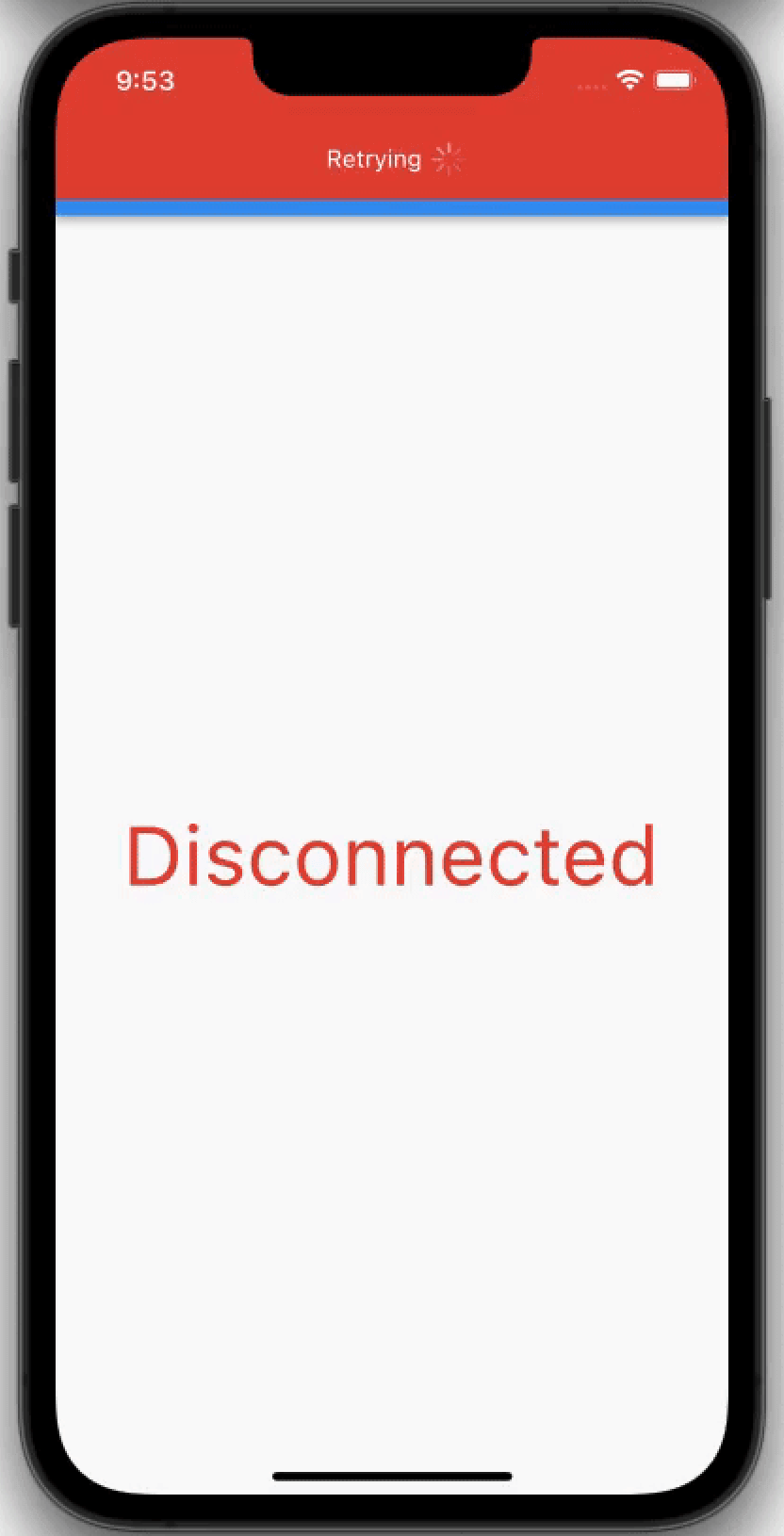
| https://user-images.githubusercontent.com/52869694/152056061-193a6a69-dbdd-48e0-bc10-892723b59478.gif | https://user-images.githubusercontent.com/52869694/152057700-71f9cccf-3fe0-435d-92c2-e20cddf6a7a3.gif |
| https://user-images.githubusercontent.com/52869694/204103379-2b83ab1b-d9e8-4e82-a98c-5afd60b6a084.gif |
If you don't need localization, simply wrap your MaterialApp:
import 'package:connection_notifier/connection_notifier.dart';
import 'package:flutter/material.dart';

void main() async {
  WidgetsFlutterBinding.ensureInitialized();
  await ConnectionNotifierTools.initialize();
  runApp(const MyApp());
}

class MyApp extends StatelessWidget {
  const MyApp({Key? key}) : super(key: key);

  @override
  Widget build(BuildContext context) {
    return GlobalConnectionNotifier(
      connectionNotificationOptions: ConnectionNotificationOptions(
        alignment: Alignment.topCenter,
      ),
      child: MaterialApp(
        title: 'My App',
        home: const MyHomePage(),
      ),
    );
  }
}
This is the recommended approach if you're using any localization package (EasyLocalization, flutter_localizations, intl, etc.):
Call ConnectionNotifierTools.initialize(...) once in main() before
runApp(...), same as the basic usage example.
import 'package:connection_notifier/connection_notifier.dart';
import 'package:easy_localization/easy_localization.dart'; // or your localization package
import 'package:flutter/material.dart';

class MyApp extends StatelessWidget {
  const MyApp({Key? key}) : super(key: key);

  @override
  Widget build(BuildContext context) {
    return MaterialApp(
      locale: context.locale,
      supportedLocales: context.supportedLocales,
      localizationsDelegates: context.localizationDelegates,
      builder: (context, child) => GlobalConnectionNotifier(
        connectionNotificationOptions: ConnectionNotificationOptions(
          alignment: Alignment.bottomCenter,
          // Now you can use localized strings with context!
          connectedText: 'connectionRestored'.tr(context: context),
          disconnectedText: 'connectionLost'.tr(context: context),
        ),
        child: child!,
      ),
      home: const MyHomePage(),
    );
  }
}
Why use the builder approach?
That's it! Connection notifications will work throughout your entire app with full localization support.
Works everywhere:
Works with ALL navigation types:
import 'package:go_router/go_router.dart';

class MyApp extends StatelessWidget {
  const MyApp({Key? key}) : super(key: key);

  final _router = GoRouter(
    routes: [
      GoRoute(path: '/', builder: (context, state) => const HomePage()),
      GoRoute(path: '/details', builder: (context, state) => const DetailsPage()),
    ],
  );

  @override
  Widget build(BuildContext context) {
    return GlobalConnectionNotifier(
      connectionNotificationOptions: ConnectionNotificationOptions(
        alignment: Alignment.topCenter,
      ),
      child: MaterialApp.router(
        title: 'My App',
        routerConfig: _router,
      ),
    );
  }
}
| Option | Description | Type | Default Value | Required |
|---|---|---|---|---|
| alignment | Alignment of the connection notification | AlignmentGeometry | AlignmentDirectional.topCenter | No |
| height | Height of the connection notification | double? | twice top padding | No |
| width | Width of the connection notification | double? | double.infinity | No |
| borderRadius | Border radius of the connection notification | BorderRadiusGeometry? | null | No |
| connectedBackgroundColor | Background color in connected state | Color? | Colors.green | No |
| disconnectedBackgroundColor | Background color in disconnected state | Color? | Colors.red | No |
| connectedDuration | Duration before auto-dismissing in connected state | Duration? | 2 seconds | No |
| disconnectedDuration | Duration before auto-dismissing in disconnected state | Duration? | infinity | No |
| overlayAnimationType | Animation type of the notification | OverlayAnimationType | OverlayAnimationType.fadeAndSlide | No |
| animationCurve | Animation curve | Curve? | Curves.fastOutSlowIn | No |
| animationDuration | Animation duration | Duration? | 300 milliseconds | No |
| connectedContent | Custom widget for connected state | Widget? | null | No |
| disconnectedContent | Custom widget for disconnected state | Widget? | null | No |
| shouldAlwaysPullContentDownOnTopAlignment | Pull content down on top alignment | bool | true | No |
| hasIndicationIcon | Show indication icon in default content | bool | true | No |
| textAndIconSeparationWidth | Distance between text and icon | double? | 10 | No |
| connectedText | Text for connected state | String? | 'Back Online' | No |
| disconnectedText | Text for disconnected state | String? | 'Retrying' | No |
| connectedTextStyle | Text style for connected state | TextStyle? | null | No |
| disconnectedTextStyle | Text style for disconnected state | TextStyle? | null | No |
| connectedIcon | Icon for connected state | Icon? | Icon(Icons.check) | No |
| disconnectedIcon | Icon for disconnected state | Icon? | CircularProgressIndicator | No |
| iconBoxSideLength | Size of the icon box | double? | 10 | No |
| connectedConnectionNotification | Custom notification widget for connected state | Widget? | null | No |
| disconnectedConnectionNotification | Custom notification widget for disconnected state | Widget? | null | No |
GlobalConnectionNotifier(
  connectionNotificationOptions: ConnectionNotificationOptions(
    alignment: Alignment.topCenter,
    connectedConnectionNotification: Container(
      padding: const EdgeInsets.all(16),
      decoration: BoxDecoration(
        color: Colors.green,
        borderRadius: BorderRadius.circular(8),
      ),
      child: Row(
        mainAxisSize: MainAxisSize.min,
        children: [
          const Icon(Icons.wifi, color: Colors.white),
          const SizedBox(width: 8),
          const Text('Connected', style: TextStyle(color: Colors.white)),
        ],
      ),
    ),
    disconnectedConnectionNotification: Container(
      padding: const EdgeInsets.all(16),
      decoration: BoxDecoration(
        color: Colors.red,
        borderRadius: BorderRadius.circular(8),
      ),
      child: Row(
        mainAxisSize: MainAxisSize.min,
        children: [
          const Icon(Icons.wifi_off, color: Colors.white),
          const SizedBox(width: 8),
          const Text('No Connection', style: TextStyle(color: Colors.white)),
        ],
      ),
    ),
  ),
  child: MaterialApp(home: MyHomePage()),
)
The easiest and most powerful way to handle localization is using the MaterialApp builder pattern. This gives you full access to the localization context:
import 'package:connection_notifier/connection_notifier.dart';
import 'package:easy_localization/easy_localization.dart'; // or any localization package
import 'package:flutter/material.dart';

class MyApp extends StatelessWidget {
  @override
  Widget build(BuildContext context) {
    return MaterialApp(
      locale: context.locale,
      supportedLocales: context.supportedLocales,
      localizationsDelegates: context.localizationDelegates,
      // Use the builder to access localization context
      builder: (context, child) => GlobalConnectionNotifier(
        connectionNotificationOptions: ConnectionNotificationOptions(
          alignment: Alignment.bottomCenter,
          // Access localized strings with full context support
          connectedText: 'connectionRestored'.tr(context: context),
          disconnectedText: 'connectionLost'.tr(context: context),
        ),
        child: child!,
      ),
      home: const MyHomePage(),
    );
  }
}
Benefits:
If you need more control over the UI, create custom widgets:
GlobalConnectionNotifier(
  connectionNotificationOptions: ConnectionNotificationOptions(
    connectedConnectionNotification: MyLocalizedConnectedWidget(),
    disconnectedConnectionNotification: MyLocalizedDisconnectedWidget(),
  ),
  child: MaterialApp(...),
)

class MyLocalizedConnectedWidget extends StatelessWidget {
  @override
  Widget build(BuildContext context) {
    final String message = 'connectionRestored'.tr(context: context);

    return Container(
      padding: EdgeInsets.all(16),
      decoration: BoxDecoration(
        color: Colors.green,
        borderRadius: BorderRadius.circular(8),
      ),
      child: Text(message, style: TextStyle(color: Colors.white)),
    );
  }
}
Toggle between widgets based on connection state:
ConnectionNotifierToggler(
  onConnectionStatusChanged: (connected) {
    if (connected == null) return; // Still initializing
    print(connected);
  },
  connected: Center(
    key: UniqueKey(),
    child: const Text(
      'Connected',
      style: TextStyle(color: Colors.green, fontSize: 48),
    ),
  ),
  disconnected: Center(
    key: UniqueKey(),
    child: const Text(
      'Disconnected',
      style: TextStyle(color: Colors.red, fontSize: 48),
    ),
  ),
);
Show connection notification for a specific screen only:
class MyScreen extends StatelessWidget {
  @override
  Widget build(BuildContext context) {
    return LocalConnectionNotifier(
      connectionNotificationOptions: const ConnectionNotificationOptions(
        alignment: Alignment.bottomCenter,
      ),
      child: Scaffold(
        appBar: AppBar(title: const Text('My Screen')),
        body: Center(child: Text('Content')),
      ),
    );
  }
}
Check connection status programmatically anywhere in your app:
First, initialize:
void main() async {
  WidgetsFlutterBinding.ensureInitialized();
  await ConnectionNotifierTools.initialize();
  runApp(const MyApp());
}
Then use:
// Check if connected (synchronous, last known status)
bool isConnected = ConnectionNotifierTools.isConnected;

// Async live check — use when you need a guaranteed up-to-date result,
// since isConnected may briefly hold stale data during a connection change.
bool isOnline = await ConnectionNotifierTools.isConnectedAsync;

// Listen to connection changes
ConnectionNotifierTools.onStatusChange.listen((isConnected) {
  print('Connection status: $isConnected');
});
The package is agnostic to how connectivity is detected. By default it uses
ConnectionNotifierHandlerImpl (internet_connection_checker_plus). If you have
your own source (socket, native SDK, etc.), implement ConnectionHandler and
pass it to ConnectionNotifierTools.initialize(...).
import 'package:connection_notifier/connection_notifier.dart';

class MySocketConnectionHandler implements ConnectionHandler {
  @override
  Stream<ConnectionNotifierInternetConnectionStatus> get onStatusChange =>
      mySocketStatusStream.map((isOnline) {
        return isOnline
            ? ConnectionNotifierInternetConnectionStatus.connected
            : ConnectionNotifierInternetConnectionStatus.disconnected;
      });

  @override
  Future<bool> get hasInternetAccess async => mySocketIsConnected;
}

void main() async {
  WidgetsFlutterBinding.ensureInitialized();
  await ConnectionNotifierTools.initialize(
    connectionHandler: MySocketConnectionHandler(),
  );
  runApp(const MyApp());
}
The package UI reacts to the handler stream. No manual notification API calls are required.
Version 4.0 introduces breaking changes. Please read below.
pauseConnectionListenerWhenAppInBackground — Background/foreground lifecycle is now managed internallyConnectionHandler support — Bring your own connectivity sourceStep 1: Remove pauseConnectionListenerWhenAppInBackground
If you were using this option, simply remove it:
// ❌ Before (v3.0):
GlobalConnectionNotifier(
  connectionNotificationOptions: ConnectionNotificationOptions(
    alignment: Alignment.topCenter,
    pauseConnectionListenerWhenAppInBackground: true, // ← REMOVE THIS
  ),
  child: MaterialApp(...),
)

// ✅ After (v4.0):
GlobalConnectionNotifier(
  connectionNotificationOptions: ConnectionNotificationOptions(
    alignment: Alignment.topCenter,
    // Background/foreground is handled automatically now
  ),
  child: MaterialApp(...),
)
Step 2: (Optional) Use custom connectivity source
New in v4.0: bring your own connectivity handler:
class MyCustomHandler implements ConnectionHandler {
  @override
  Stream<ConnectionNotifierInternetConnectionStatus> get onStatusChange {
    // Your custom connectivity source
    return myCustomConnectivityStream;
  }

  @override
  Future<bool> get hasInternetAccess async {
    // Your custom connectivity check
    return myCustomCheckInternet();
  }
}

void main() async {
  WidgetsFlutterBinding.ensureInitialized();
  await ConnectionNotifierTools.initialize(
    connectionHandler: MyCustomHandler(), // ← Inject your handler
  );
  runApp(const MyApp());
}
| Behavior | v3.0 | v4.0 |
|---|---|---|
| Background handling | Optional, manual via option | Always active, automatic |
| Resume delay | None | 3 seconds (for OS to settle) |
| Status deduplication | No | Yes (same status ignored) |
| Custom connectivity | No | Yes, via ConnectionHandler injection |
See CHANGELOG.md for detailed migration instructions.
Before (v2.x):
ConnectionNotifier(
  locale: const Locale('en', 'US'),
  supportedLocales: [Locale('en', 'US')],
  localizationsDelegates: [...],
  connectionNotificationOptions: ConnectionNotificationOptions(...),
  child: MaterialApp(
    home: MyHomePage(),
  ),
)
After (v3.0):
GlobalConnectionNotifier(
  connectionNotificationOptions: ConnectionNotificationOptions(...),
  child: MaterialApp(
    locale: const Locale('en', 'US'),
    supportedLocales: [Locale('en', 'US')],
    localizationsDelegates: [...],
    home: MyHomePage(),
  ),
)
Migration Steps:
ConnectionNotifier with GlobalConnectionNotifierMaterialApp: locale, supportedLocales, localizationsDelegates, etc.connectionNotificationOptions in GlobalConnectionNotifierimport 'package:connection_notifier/connection_notifier.dart';
import 'package:flutter/material.dart';
void main() async {
WidgetsFlutterBinding.ensureInitialized();
await ConnectionNotifierTools.initialize();
runApp(const MyApp());
}
class MyApp extends StatelessWidget {
const MyApp({Key? key}) : super(key: key);
@override
Widget build(BuildContext context) {
return GlobalConnectionNotifier(
connectionNotificationOptions: ConnectionNotificationOptions(
alignment: Alignment.topCenter,
height: 60,
connectedBackgroundColor: Colors.green,
disconnectedBackgroundColor: Colors.red,
connectedText: 'Back Online!',
disconnectedText: 'No Internet Connection',
connectedDuration: const Duration(seconds: 3),
),
child: MaterialApp(
title: 'Connection Notifier Demo',
theme: ThemeData(primarySwatch: Colors.blue),
home: const MyHomePage(),
),
);
}
}
class MyHomePage extends StatelessWidget {
const MyHomePage({Key? key}) : super(key: key);
@override
Widget build(BuildContext context) {
return Scaffold(
appBar: AppBar(title: const Text('Connection Notifier Demo')),
body: ConnectionNotifierToggler(
connected: Center(
child: const Text(
'Connected',
style: TextStyle(color: Colors.green, fontSize: 48),
),
),
disconnected: Center(
child: const Text(
'Disconnected',
style: TextStyle(color: Colors.red, fontSize: 48),
),
),
),
);
}
}
This package depends on the following (Big Thanks):
Check out my other open-source project:
MIT License