

 v1.1.0
sliding_switch
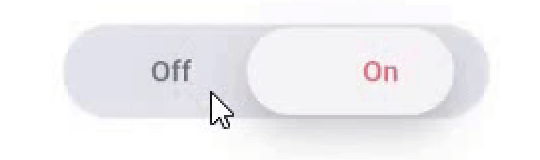
स्लाइडिंग स्विच - एक सरल स्विच विजेट। इसे आवश्यक चौड़ाई, रंग, पाठ आदि के साथ पूरी तरह से कस्टमाइज़ किया जा सकता है। इसमें चयन अवस्था भी बनी रहती है।
33लाइक 73130-दिन डाउनलोड130Pub अंक
AndroidiOSWebmacOSWindowsLinux
CodeAppRun/sliding_switch open-source repository details.

यह अंग्रेज़ी मूल स्नैपशॉट है। नवीनतम सामग्री GitHub पर देखें।
Sliding Switch - A simple switch widget. It can be fully customized with desired width, colors, text etc. It also maintains selection state.

In the pubspec.yaml of your flutter project, add the following dependency:
dependencies:
  ...
  sliding_switch: "latest"
Import it:
import 'package:sliding_switch/sliding_switch.dart';
SlidingSwitch(
 value: false,
 width: 250,
 onChanged: (bool value) {
   print(value);
 },
)

SlidingSwitch(
 value: false,
 width: 250,
 onChanged: (bool value) {
   print(value);
 },
 height : 55,
 animationDuration : const Duration(milliseconds: 400),
 onTap:(){},
 onDoubleTap:(){},
 onSwipe:(){},
 textOff : "Female",
 textOn : "Male",
 iconOff: Icons.human-female,
 iconOn: Icons.human-male,
 contentSize: 17,
 colorOn : const Color(0xffdc6c73),
 colorOff : const Color(0xff6682c0),
 background : const Color(0xffe4e5eb),
 buttonColor : const Color(0xfff7f5f7),
 inactiveColor : const Color(0xff636f7b),
),
If iconOn or iconOff are not null, they will be displayed in lieu of the respective textOn and textOff. The values for textOn and textOff are used as semantic labels for the icons for accessibility. The icons in the example are not in the default material icon set, but are from [Material Design Icons] (https://materialdesignicons.com/), available on pub.dev here.
contentSize drives the height of the text or icons.
Licensed Under the MIT License.
निर्भरता सूची 2 आइटम
{"sdk":"flutter"}{"sdk":"flutter"}उपयोग के अनुसार छाँटें, गतिविधि की तुलना करें और अपनाने से पहले मूल प्रोजेक्ट की आवश्यकताएँ जाँचें।
“A repository is the most basic element of GitHub.”
GitHub Docs — About repositories ↗