

 v0.0.5
cnic_scanner
एक पैकेज जो आपको अपने CNIC और ID कार्ड और अन्य सभी प्रकार के कार्ड को स्कैन करने की अनुमति देता है। यह Android और iOS दोनों के लिए समर्थित है और नल सुरक्षित है।
66लाइक 7630-दिन डाउनलोड140Pub अंक
AndroidiOS
Faiza-Farooqui/cnic_scanner open-source repository details.

यह अंग्रेज़ी मूल स्नैपशॉट है। नवीनतम सामग्री GitHub पर देखें।
A Flutter package that let's you to scan your CNIC and ID cards and all types of other cards.
Add following dependency in pubspec.yaml file. And add this import to your file.
cnic_scanner: latest version
image_picker: latest version

import 'package:cnic_scanner/cnic_scanner.dart';
// create a obj of CnicModel
CnicModel _cnicModel = CnicModel();
// then call this method fron package, our package needs you to pass ImageSource as an argument
scanImage(imageSource: imageSource) from CnicScanner class
await CnicScanner().scanImage(imageSource: imageSource);
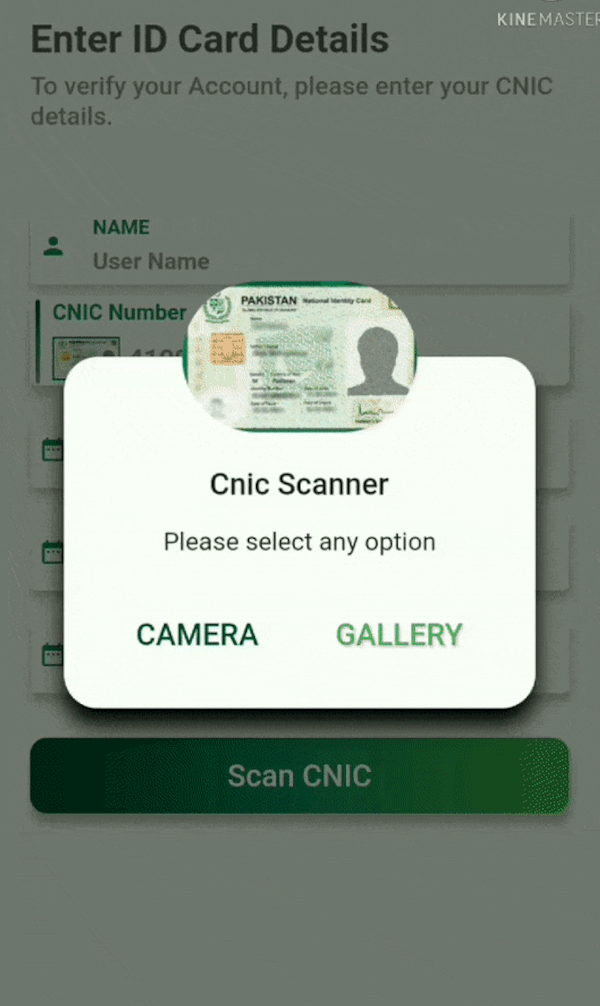
// I have created a custom dialog and passing ImageSource here in ths way. You can furture check it in example
CustomDialogBox(onCameraBTNPressed: () {
scanCnic(ImageSource.camera);
}, onGalleryBTNPressed: () {
scanCnic(ImageSource.gallery);
});
// this class will return these parameters.

class CardModel {
     String _cnicNumber = "";
     String _cnicIssueDate = "";
     String _cnicHolderName = "";
     String _cnicExpiryDate = "";
     String _cnicHolderDateOfBirth = "";
}
| Cnic Screen | Custom Dialog | Scanned Cnic Data |
|---|---|---|
 |
 |
 |
| Scanned from Gallery | Scanned from Camera |
|---|---|
 |
 |
Faiza Farooqui and Kamran Khan
निर्भरता सूची 7 आइटम
{"sdk":"flutter"}^0.13.0^0.8.3+2^8.1.4+2^0.17.0^8.2.1{"sdk":"flutter"}उपयोग के अनुसार छाँटें, गतिविधि की तुलना करें और अपनाने से पहले मूल प्रोजेक्ट की आवश्यकताएँ जाँचें।
“A repository is the most basic element of GitHub.”
GitHub Docs — About repositories ↗