
 v2.0.0
swipable_stack
एक कार्ड स्टैकिंग के लिए विजेट, जिसमें उपयोगकर्ता टिंडर की तरह क्षैतिज और लंबवत रूप से स्वाइप कर सकते हैं और शानदार एनीमेशन के साथ।
325लाइक 8.3 हज़ार30-दिन डाउनलोड150Pub अंक
AndroidiOSWebmacOSWindowsLinux
एक कार्ड स्टैकिंग के लिए विजेट, जिसमें उपयोगकर्ता को बहुत सुंदर एनीमेशन के साथ क्षैतिज और ऊर्ध्वाधर रूप से स्वाइप करने की अनुमति होती है, जैसे कि टिंडर UI।

{"sdk":"flutter"}^3.0.0{"sdk":"flutter"}—यह अंग्रेज़ी मूल स्नैपशॉट है। नवीनतम सामग्री GitHub पर देखें।
pub.dev github likes popularity pub points license
A widget for stacking cards, which users can swipe horizontally and vertically with beautiful animations like Tinder UI.
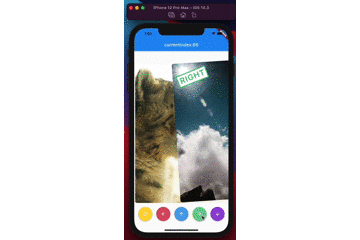
demo
(Sorry, the package name swipable_stack is typo of swipeable stack)
builderA SwipableStack uses a builder to display widgets.
SwipableStack(
  builder: (context, properties) {
    return Image.asset(imagePath);
  },
),
onSwipeCompletedYou can get completion event with onSwipeCompleted.
SwipableStack(
  onSwipeCompleted: (index, direction) {
    print('$index, $direction');
  },
)
overlayBuilderYou can show overlay on the front card with overlayBuilder.
SwipableStack(
  overlayBuilder: (context, properties) {
    final opacity = min(properties.swipeProgress, 1.0);
    final isRight = properties.direction == SwipeDirection.right;
    return Opacity(
      opacity: isRight ? opacity : 0,
      child: CardLabel.right(),
    );
  },
)
controllerSwipableStackController allows you to control swipe action & also rewind recent action.
final controller = SwipableStackController();

SwipableStack(
  controller:controller,
  builder: (context, properties) {
    return Image.asset(imagePath);
  },
);
controller.next(
  swipeDirection: SwipeDirection.right,
);
controller.rewind();
SwipableStackController provides to access currentIndex of SwipableStack.
final controller = SwipableStackController();
controller.addListener(() {
  print('${_controller.currentIndex}');
});
onWillMoveNextYou can also restrict user actions according to index or action with onWillMoveNext.
SwipableStack(
  onWillMoveNext: (index, direction) {
    final allowedActions = [
      SwipeDirection.right,
      SwipeDirection.left,
    ];
    return allowedActions.contains(direction);
  },
);
swipeAssistDurationYou can set the speed the user is able to swipe through Widgets with the swipeAssistDuration.
SwipableStack(
  swipeAssistDuration: Duration(milliseconds: 100),
)
The default is 650ms.
stackClipBehaviourYou can set the clipBehaviour of the stack with the stackClipBehaviour.
Change it to Clip.none to exceed the boundaries of parent widget size.
SwipableStack(
  stackClipBehaviour: Clip.none,
)
The default is Clip.hardEdge.
allowVerticalSwipeDisable vertical swipe with allowVerticalSwipe.
Changing to false disable vertical swipe capabilities
SwipableStack(
  allowVerticalSwipe: false,
)
The default is true.
swipeTopAnchorSet the swipe anchor with swipeAnchor with the following enum
SwipeAnchor.top : card rotation on bottom and anchored on top
SwipeAnchor.bottom : card rotation on top and anchored on bottom
SwipableStack(
  swipeAnchor: SwipeAnchor.top,
)
The default is SwipeAnchor.top.