

v2.0.1
flutter_icp_auth
एक फ्लटर-आईसीपी पैकेज जो इंटरनेट पहचान प्रमाणीकरण को स्वचालित करता है।
22लाइक 3930-दिन डाउनलोड130Pub अंक
AndroidiOS
एक फ्लटर-आईसीपी पैकेज जो इंटरनेट पहचान प्रमाणीकरण को स्वचालित करता है

यह अंग्रेज़ी मूल स्नैपशॉट है। नवीनतम सामग्री GitHub पर देखें।
This Flutter package simplifies integrating ICP internet identity authentication flow within your Flutter application.
isLocal is used to denote whether you are running your application using mainnet links or locally.isLocal is true then replace the values of backendCanisterId and middlePageCanisterId with the locally deployed canister ids.isLocal is false then replace the values of backendCanisterId and middlePageCanisterId with the main-net deployed canister ids.backendCanisterId make sure you have the following function in your backend:Rust:
use ic_cdk::api::caller;
#[ic_cdk::query]
fn whoami() -> String {
    let principal_id = caller().to_string();
    format!("principal id - : {:?}", principal_id)
}
Motoko:
import Principal "mo:base/Principal";
actor {
    public shared (msg) func whoami() : async Text {
        Principal.toText(msg.caller);
    };
};
For main-net you can use our canisterId as well: cni7b-uaaaa-aaaag-qc6ra-cai
middlePageCanisterId make sure you have the following:Local:
Clone the repo from here and deploy locally: https://github.com/ICP-hub/flutter_icp_auth_middleware
Main-net:
a. You can deploy the cloned middlePage to main net and use the main net canister id.
OR
b. You can use our main-net id as well: nplfj-4yaaa-aaaag-qjucq-cai
You can use candid_dart to generate the did files and the IDL services and then use them in the app as demonstrated in the example app.
OR
You can add/write the file or code manually and then use them accordingly.
Add these packages in pubspec.yaml:
dependencies:
  flutter_icp_auth: ^1.0.0
  agent_dart: ^1.0.0-dev.22
Import the packages in you main.dart:
import 'package:agent_dart/agent_dart.dart';
import 'package:flutter_icp_auth/flutter_icp_auth.dart';
Configure Deep Linking in AndroidManifest.XML:
Open android → app → src → main → AndroidManifest.XML, , add the following snippet, and replace android:scheme and android:host with your app's values:
<meta-data android:name="flutter_deeplinking_enabled" android:value="true" />
            <intent-filter android:autoVerify="true">
                <action android:name="android.intent.action.VIEW"/>
                <category android:name="android.intent.category.DEFAULT"/>
                <category android:name="android.intent.category.BROWSABLE" />
                <data android:scheme="your_app_scheme" android:host="your_app_callback" />
                <data android:scheme="https" />
            </intent-filter>
Declare your variables:
bool isLocal =
    false; // To confirm if you running your project locally or using main-net. Change it to true if running locally
Service idlService =
    FieldsMethod.idl; // Idl service (Location: lib/integration.dart)
String backendCanisterId =
    'cni7b-uaaaa-aaaag-qc6ra-cai'; // Replace it with your backend canisterId
String middlePageCanisterId =
    'nplfj-4yaaa-aaaag-qjucq-cai'; // Replace it with your middlePage canisterId
Define the initState and dispose methods:
@override
void initState() {
  super.initState();
  AuthLogIn.checkLoginStatus(isLocal, backendCanisterId).then((loggedIn) {
    setState(() {
      isLoggedIn = loggedIn;
      if (loggedIn) {
        _principalId = AuthLogIn.getPrincipal;
      }
    });
    if (!loggedIn) {
      UrlListener.handleInitialUri(_fetchAgent, () {});
      UrlListener.initListener(_fetchAgent);
    }
  });
}

@override
void dispose() {
  UrlListener.cancelListener();
  super.dispose();
}
Manual login:
isLoggedIn and _principalId are used to change the state of the log in/log out button and principal text. You can modify them according to your applications need.
Future<void> _manualLogin(Uri uri) async {
  List<dynamic> result = await AuthLogIn.fetchAgent(
      uri.queryParameters, isLocal, backendCanisterId, idlService);
  if (result.isNotEmpty) {
    setState(() {
      isLoggedIn = uri.queryParameters['status'] == "true" ? true : false;
      _principalId = result[0];
    });
  } else {
    setState(() {
      isLoggedIn = false;
      _principalId = "Log in to see your principal";
    });
  }
}
When passing argument in the IIDLogin button, remember to pass your app:host and app:callback:
Replace the argument host and scheme with your app's host and scheme
AuthLogIn.authenticate(isLocal, middlePageCanisterId, "exampleCallback", "example");
List<Object> logoutValidation = await AuthLogout.logout(isLocal, backendCanisterId);
ZipFileEncoder.close and SingingBlockZipFileEncoder.close error: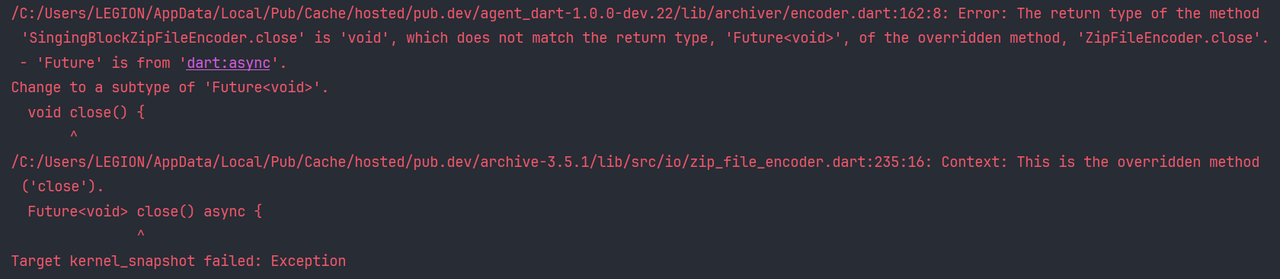
Go the agent_dart package location: agent_dart-1.0.0-dev.22/lib/archiver/encoder.dart:162:8
Replace:
void close() {
  _encoder.writeBlock(_output);
  _encoder.endEncode();
  _output.close();
}
with:
Future<void> close() async{
_encoder.writeBlock(_output);
_encoder.endEncode();
await _output.close();
}
Go the code location: example\android\app\build.gradle
Change the minSdkVersion to 23
defaultConfig {
    minSdkVersion 23
    targetSdkVersion flutter.targetSdkVersion
    versionCode flutterVersionCode.toInteger()
    versionName flutterVersionName
}
example/lib/main.dartनिर्भरता सूची 8 आइटम
{"sdk":"flutter"}^1.0.0-dev.22^2.0.0+1^9.2.1^2.2.3^0.5.1{"sdk":"flutter"}^4.0.0उपयोग के अनुसार छाँटें, गतिविधि की तुलना करें और अपनाने से पहले मूल प्रोजेक्ट की आवश्यकताएँ जाँचें।
“A repository is the most basic element of GitHub.”
GitHub Docs — About repositories ↗