

v1.0.0
sliver_fab
एक वраФ퍰र विजेट जो एक विजेट को FlexibleSpacebar के किनारे पर रखने की अनुमति देता है
76लाइक 1.2 हज़ार30-दिन डाउनलोड40Pub अंक
प्लेटफ़ॉर्म डेटा नहीं
एक फ्लटर प्लगइन जो एक लचीले स्पेसबार के साथ फ्लोटिंग एक्शन बटन के लिए है

यह अंग्रेज़ी मूल स्नैपशॉट है। नवीनतम सामग्री GitHub पर देखें।
A wrapper widget allowing to place a widget on the edge of FlexibleSpacebar.
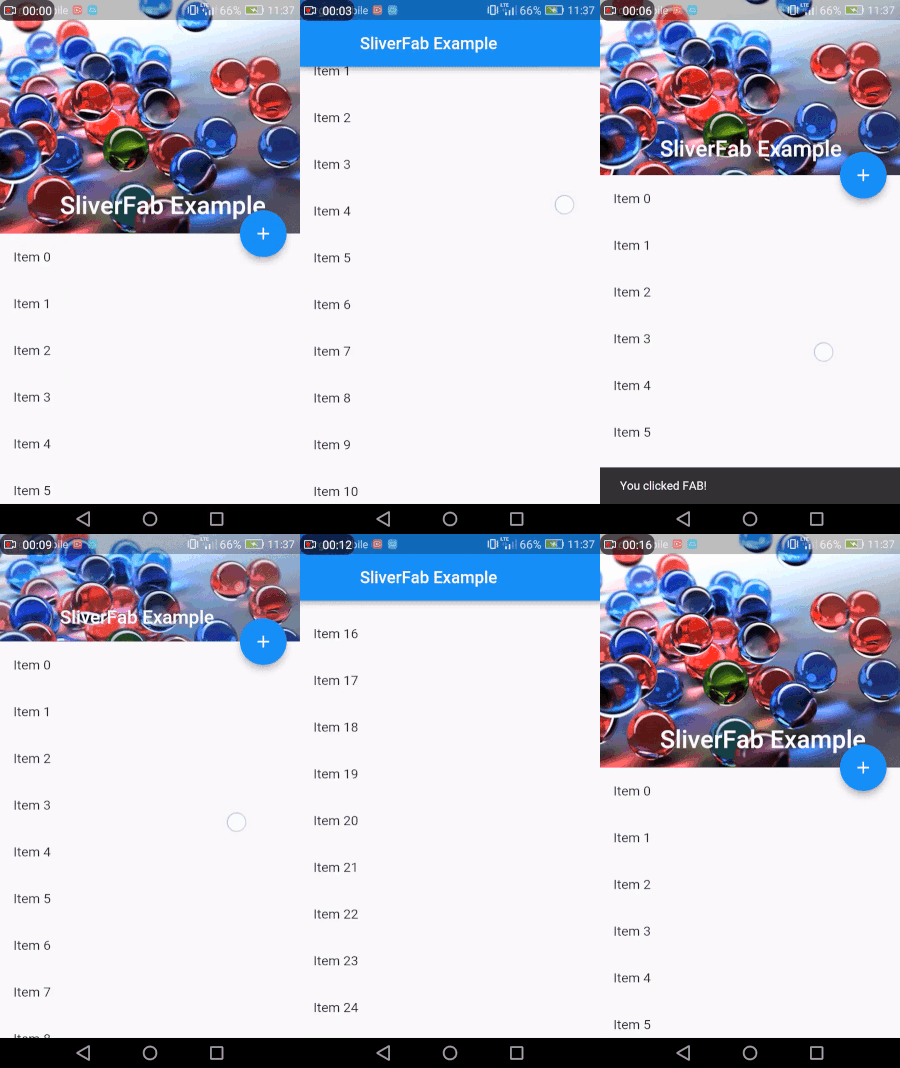

class MyHomePage extends StatelessWidget {
  @override
  Widget build(BuildContext context) {
    return new Scaffold(
      body: new Builder(
        builder: (context) =>
        new SliverFab(
          floatingWidget: FloatingActionButton(
            onPressed: () =>
                Scaffold.of(context).showSnackBar(
                    SnackBar(content: Text("You clicked FAB!"))),
            child: Icon(Icons.add),
          ),
          floatingPosition: FloatingPosition(right: 16),
          expandedHeight: 256.0,
          slivers: <Widget>[
            new SliverAppBar(
              expandedHeight: 256.0,
              pinned: true,
              flexibleSpace: new FlexibleSpaceBar(
                title: new Text("SliverFab Example"),
                background: new Image.asset(
                  "img.jpg",
                  fit: BoxFit.cover,
                ),
              ),
            ),
            new SliverList(
              delegate: new SliverChildListDelegate(
                new List.generate(
                  30,
                      (int index) =>
                  new ListTile(title: new Text("Item $index")),
                ),
              ),
            ),
          ],
        ),
      ),
    );
  }
}
Add this to your package's pubspec.yaml file:
dependencies:
  sliver_fab: "^1.0.0"
You can install packages from the command line:
with Flutter:
$ flutter packages get
Alternatively, your editor might support packages get. Check the docs for your editor to learn more.
Now in your Dart code, you can use:
import 'package:sliver_fab/sliver_fab.dart';
This package was made mostly for use case I needed. If you fill it is missing any features or you have found a bug, pull requests are very welcome!
निर्भरता सूची 1 आइटम
{"sdk":"flutter"}उपयोग के अनुसार छाँटें, गतिविधि की तुलना करें और अपनाने से पहले मूल प्रोजेक्ट की आवश्यकताएँ जाँचें।
“A repository is the most basic element of GitHub.”
GitHub Docs — About repositories ↗