

v0.1.3
flutter_dialogflow
Dialogflow को आसानी से एकीकृत करने और Dialogflow v2 का समर्थन करने वाला Flutter पैकेज
50लाइक 15430-दिन डाउनलोड40Pub अंक
प्लेटफ़ॉर्म डेटा नहीं
Dialogflow को आसानी से एकीकृत करने और Dialogflow v2 का समर्थन करने वाला Flutter पैकेज

यह अंग्रेज़ी मूल स्नैपशॉट है। नवीनतम सामग्री GitHub पर देखें।

A new Flutter package.
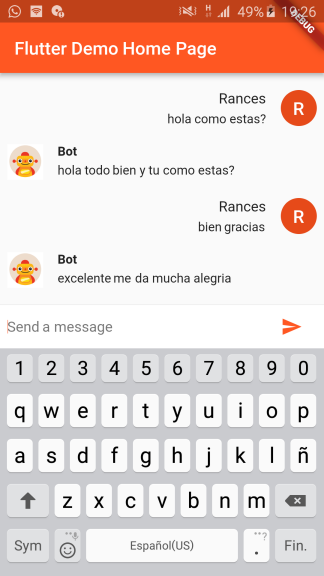
Thanks for the tutorials!
dependencies:
  flutter_dialogflow: ^0.1.0
$ flutter packages get
import 'package:flutter_dialogflow/flutter_dialogflow.dart';
import 'package:flutter_dialogflow/dialogflow_v2.dart';
  Dialogflow dialogflow = Dialogflow(token: "Your Token");
  AIResponse response = await dialogflow.sendQuery("Your Query");
  void Response(query) async {
    Dialogflow dialogflow = Dialogflow(token: "10178f9cb6cf12321asdf4aae75c87cd");
    AIResponse response = await dialogflow.sendQuery(query);
    print(response.getMessageResponse());
  }
flutter:
  uses-material-design: true
  assets:
    - assets/your_file_downloaded_google_cloud.json
import 'package:flutter_dialogflow/dialogflow_v2.dart';
  AuthGoogle authGoogle = await AuthGoogle(fileJson: "Asset Your File Json").build();
  // Select Language.ENGLISH or Language.SPANISH or others...
  Dialogflow dialogflow =Dialogflow(authGoogle: authGoogle,language: Language.ENGLISH);
  AIResponse response = await dialogflow.detectIntent("Your Query");
  AuthGoogle authGoogle = await AuthGoogle(fileJson: "assets/your_file_downloaded_google_cloud.json").build();
  Dialogflow dialogflow = Dialogflow(authGoogle: authGoogle,language: Language.ENGLISH);
  AIResponse response = await dialogflow.detectIntent("Hi!!!");
  print(response.getMessage())
Call function response.getListMessage()
response List<dynamic>
example
new CardDialogflow(response.getListMessage()[0]).title
Convert first item in CardDialogflow for worked easy
CardDialogflow have
- title
- subtitle
- imageUri
- List buttonss
    - each button have text and postback
Get a session id from your backend server after authentication.(Eg: OAuth Token)
Pass the session id a named parameter 'sessionId' to AuthGoogle function.
On the dialogflow fulfillment, access it inside `agent.session` (WebhookClient.session)
and apply your session logic

Example:
  AuthGoogle authGoogle = await AuthGoogle(fileJson: "assets/your_file_downloaded_google_cloud.json", sessionId: "YOUR_CUSTOM_SESSION_ID").build();
  Dialogflow dialogflow = Dialogflow(authGoogle: authGoogle,language: Language.ENGLISH);
  AIResponse response = await dialogflow.detectIntent("Hi!!!");
  print(response.getMessage())

Visit the repository: Flutter Dialogflow Web 🚀
निर्भरता सूची 5 आइटम
{"sdk":"flutter"}^0.12.0+2^0.2.6—{"sdk":"flutter"}उपयोग के अनुसार छाँटें, गतिविधि की तुलना करें और अपनाने से पहले मूल प्रोजेक्ट की आवश्यकताएँ जाँचें।
“A repository is the most basic element of GitHub.”
GitHub Docs — About repositories ↗