पैकेज, रिपॉज़िटरी और ऐप श्रेणियाँ खोजें

GitHub रिपॉज़िटरीadityadees/flutter_profile_picture

flutter_profile_picture

यादृच्छिक नाम और पृष्ठभूमि रंग के साथ प्रोफ़ाइल छवि स्वतः उत्पन्न करें। यदि आपके पास छवियाँ हैं, तो आप उन्हें भी प्रदान कर सकते हैं। डिफ़ॉल्ट रंग नाम के पहले अक्षर के आधार पर है: :fire: :fire: :fire: https://adityadees.github.io/flutter_profile_picture/

flutter_profile_picture प्रोजेक्ट कवर
स्टार
13
फ़ोर्क
12
अंतिम पुश (UTC)
17 फ़र॰ 2023
प्रोजेक्ट स्थिति
सक्रिय

मूल README

यह अंग्रेज़ी मूल स्नैपशॉट है। नवीनतम सामग्री GitHub पर देखें।

FLUTTER PROFILE PICTURE

Automatically generate profile picture with random first name and background color. But you can still provide pictures if you have them. As the default color, based on the name of the first letter.

Flutter Test Build GitHub Pages License: MIT pub package GitHub popularity version

bandicam 2021-09-22 20-35-48-079 (online-video-cutter com)

Style

Default Style

image

ProfilePicture(
    name: 'Dees',
    radius: 31,
    fontsize: 21,
);

ProfilePicture(
    name: 'Aditya Dharmawan Saputra',
    radius: 31,
    fontsize: 21,
);
Random Color

image

ProfilePicture(
    name: 'Aditya Dharmawan Saputra',
    radius: 31,
    fontsize: 21,
    random: true,
);
Max letter

image


ProfilePicture(
    name: 'Aditya Dharmawan Saputra',
    radius: 31,
    fontsize: 21,
    count: 3,
);
Empty Name / Blank

image

ProfilePicture(
    name: '',
    radius: 31,
    fontsize: 21,
);
With Images

image

ProfilePicture(
    name: 'Aditya Dharmawan Saputra',
    radius: 31,
    fontsize: 21,
    img: 'https://avatars.githubusercontent.com/u/37553901?v=4',
);
Tooltips without role

image

ProfilePicture(
    name: 'Aditya Dharmawan Saputra',
    role: '',
    radius: 31,
    fontsize: 21,
    tooltip: true,
);
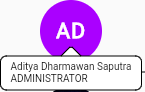
Tooltips with role

image

ProfilePicture(
    name: 'Aditya Dharmawan Saputra',
    role: 'ADMINISTRATOR',
    radius: 31,
    fontsize: 21,
    tooltip: true,
);
Tooltips with role and images

image

ProfilePicture(
    name: 'Aditya Dharmawan Saputra',
    role: 'ADMINISTRATOR',
    radius: 31,
    fontsize: 21,
    tooltip: true,
    img: 'https://avatars.githubusercontent.com/u/37553901?v=4',
);
Aditya Dharmawan Saputra GitHub avatar
GitHub लेखक

Aditya Dharmawan Saputra ↗

Someone who adheres to idealism. It can be anything as long as you put in the hard work | Sarcasm | Web and Mobile Developer | Information System Unsri '13

indonesia
भाषाएँDartHTMLSwiftKotlinObjective-C

श्रेणियाँ

इस रिपॉज़िटरी के पैकेज

उपयोग की गई निर्भरताएँ

निर्भरता सूची 2 आइटम

  • flutter{"sdk":"flutter"}
  • flutter_testडेवलपमेंट{"sdk":"flutter"}

अपने प्रोजेक्ट के लिए रिपॉज़िटरी कैसे चुनें?

उपयोग के अनुसार छाँटें, गतिविधि की तुलना करें और अपनाने से पहले मूल प्रोजेक्ट की आवश्यकताएँ जाँचें।

  1. नाम, लेखक या विवरण से खोजें और तकनीकी विषय से परिणाम सीमित करें।
  2. स्टार, फ़ोर्क और हाल के पुश की तुलना करें। स्टार रुचि दर्शाते हैं, गुणवत्ता की गारंटी नहीं।
  3. उपयोग से पहले GitHub पर README, लाइसेंस और Issues जाँचें।

स्रोत और रखरखाव

“A repository is the most basic element of GitHub.”

GitHub Docs — About repositories ↗