
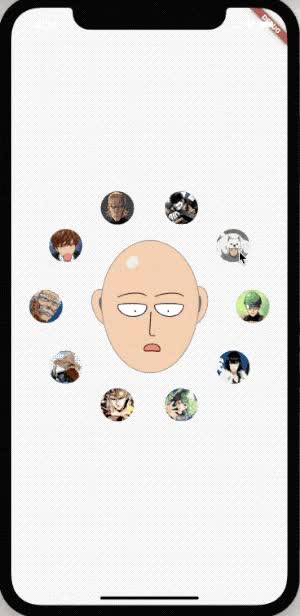
 v1.0.5
circle_list
यह एक पूरी तरह से डार्ट का उपयोग करके लिखा गया फ्लटर सर्कल सूची प्लगइन है, आप इसका उपयोग ios, android या वेब में कर सकते हैं!
92लाइक 29730-दिन डाउनलोड140Pub अंक
AndroidiOSWebmacOSWindowsLinux
एक नया फ्लटर पैकेज सर्कल सूची के लिए।

{"sdk":"flutter"}{"sdk":"flutter"}यह अंग्रेज़ी मूल स्नैपशॉट है। नवीनतम सामग्री GitHub पर देखें।
A new Flutter package for Circle List.
dependencies:
  circle_list: ^1.0.2
import 'package:flutter/material.dart';
import 'package:circle_list/circle_list.dart';

class ShowDemoPage extends StatelessWidget {

  @override
  Widget build(BuildContext context) {
    return Scaffold(
      appBar: AppBar(backgroundColor: Colors.white,),
      body: Center(
        child: CircleList(
          origin: Offset(0, 0),
          children: List.generate(10, (index) {
            return Icon(
              Icons.details,
              color: index % 2 == 0 ? Colors.blue : Colors.orange,
            );
          }),
        ),
      ),
    );
  }
}
image
CircleList(
          gradient: LinearGradient(
            colors: [Colors.redAccent, Colors.blueAccent],
          ),
          origin: Offset(0, 0),
          children: List.generate(10, (index) {
            return Icon(
              Icons.details,
              color: index % 2 == 0 ? Colors.blue : Colors.orange,
            );
          }),
        ),
image
CircleList(
          innerCircleColor: Colors.redAccent,
          outerCircleColor: Colors.greenAccent,
          origin: Offset(0, 0),
          children: List.generate(10, (index) {
            return Icon(
              Icons.details,
              color: index % 2 == 0 ? Colors.blue : Colors.orange,
            );
          }),
        )
image
CircleList(
          origin: Offset(0, 0),
          children: List.generate(10, (index) {
            return Icon(
              Icons.details,
              color: index % 2 == 0 ? Colors.blue : Colors.orange,
            );
          }),
          centerWidget: ClipRRect(
              borderRadius: BorderRadius.all(Radius.circular(100)),
              child: Image.asset("images/avator.jpg")),
        ),
image
image
  double innerRadius;
  double outerRadius;
  double childrenPadding;
  double initialAngle;
  Color outerCircleColor;
  Color innerCircleColor;
  Gradient gradient;
  Offset origin;
  List<Widget> children;
  bool isChildrenVertical;
  RotateMode rotateMode;
  bool innerCircleRotateWithChildren;
  bool showInitialAnimation;
  Widget centerWidget;
  RadialDragStart onDragStart;
  RadialDragUpdate onDragUpdate;
  RadialDragEnd onDragEnd;
  AnimationSetting animationSetting;