
 v1.0.3+4
flutter_instagram_stories
WhatsApp और Instagram की तरह कहानियाँ (वीडियो और छवियाँ) प्रदर्शित करें।
176लाइक 12730-दिन डाउनलोड80Pub अंक
प्लेटफ़ॉर्म डेटा नहीं
इंस्टाग्राम में जैसे कहानियाँ, प्रत्येक कहानी में एक से अधिक छवियाँ और वीडियो शामिल हो सकते हैं। पैकेज वीडियो, शीर्षक और पूर्व अस्थायी कैशिंग का समर्थन करता है।


{"sdk":"flutter"}^0.28.0^2.8.3^3.3.1^3.3.0^3.10.0^5.6.1anyanyanyanyanyanyयह अंग्रेज़ी मूल स्नैपशॉट है। नवीनतम सामग्री GitHub पर देखें।
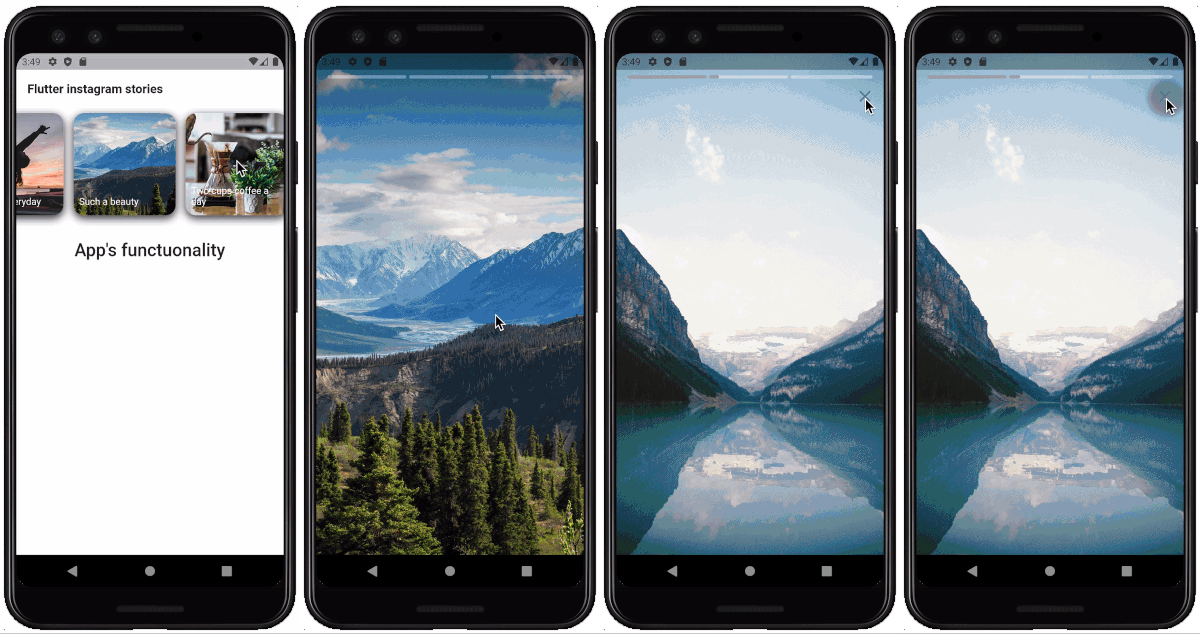
A Flutter package for displaying stories just like Whatsapp & Instagram. Built-in groups (multiple stories with one icon), cache, video, gifs.
The package can be used in any app for displaying news, educational content and etc. Look the sample app here.
Note: This package is under active development, and there are some known bugs and a lot of features to implement. Please, add issues or feature requests here: issue
The project was initially copied from https://github.com/blackmann/story_view - great thanks for this excellent package. In case, you need more flexible functionality, you can check the original repository.
Showcase|100x100, 10%
Important notes:
Look how to install here https://pub.dev/packages/flutter_instagram_stories#-installing-tab-
Now in your Dart code, you can use:
import 'package:flutter_instagram_stories/flutter_instagram_stories.dart';
For playing video, the package uses official video_player https://pub.dev/packages/video_player
From documentation:
Warning: The video_player plugin doesn’t work on iOS simulators. You must test videos on real iOS devices.
For iOS, add the following to the Info.plist file found at /ios/Runner/Info.plist.
<key>NSAppTransportSecurity</key>
  <dict>
    <key>NSAllowsArbitraryLoads</key>
    <true/>
  </dict>
You can find a complete working example here https://github.com/awaik/flutter_instagram_stories/tree/master/example
Dart code
Connect to the collection where you keep stories
    static String collectionDbName = 'instagram_stories_db';
    CollectionReference dbInstance =
      Firestore.instance.collection(collectionDbName);
And add stories full functionality to your app.
    FlutterInstagramStories(
        collectionDbName: collectionDbName,
        showTitleOnIcon: true,
        backFromStories: () {
          _backFromStoriesAlert();
        },
        iconTextStyle: TextStyle(
          fontSize: 14.0,
          color: Colors.white,
        ),
        iconImageBorderRadius: BorderRadius.circular(15.0),
        iconBoxDecoration: BoxDecoration(
          borderRadius: BorderRadius.all(Radius.circular(15.0)),
          color: Color(0xFFffffff),
          boxShadow: [
            BoxShadow(
              color: Color(0xff333333),
              blurRadius: 10.0,
              offset: Offset(
                0.0,
                4.0,
              ),
            ),
          ],
        ),
        iconWidth: 150.0,
        iconHeight: 150.0,
        textInIconPadding:
            EdgeInsets.only(left: 8.0, right: 8.0, bottom: 12.0),
        //how long story lasts in seconds
        imageStoryDuration: 7,
        progressPosition: ProgressPosition.top,
        repeat: true,
        inline: false,
        languageCode: 'en',
        backgroundColorBetweenStories: Colors.black,
        closeButtonIcon: Icon(
          Icons.close,
          color: Colors.white,
          size: 28.0,
        ),
        closeButtonBackgroundColor: Color(0x11000000),
        sortingOrderDesc: true,
        lastIconHighlight: true,
        lastIconHighlightColor: Colors.deepOrange,
        lastIconHighlightRadius: const Radius.circular(15.0),
        captionTextStyle: TextStyle(
          fontSize: 22,
          color: Colors.white,
        ),
        captionMargin: EdgeInsets.only(
          bottom: 50,
        ),
        captionPadding: EdgeInsets.symmetric(
          horizontal: 24,
          vertical: 8,
        ),
      ),
Firestore database
The package works with Firestore database and package https://pub.dev/packages/cloud_firestore already included into the package.
You can use example with the sample database in the example folder, or, create your own database.
Steps to create:
Showcase|100x100, 10%
Important! Pay attention to array, map types. Otherwise you will have a null error https://github.com/awaik/flutter_instagram_stories/issues/20
Data structure
That's it! Now your app has instagram stories with caching and other powerful features.
App for Android and iOS - https://lifext.app/
Lifext app