
पॉपकॉर्न
🍿 अपनी अगली पसंदीदा फिल्म की खोज करें। क्लीन आर्किटेक्चर, ब्लॉक और TMDB API इंटीग्रेशन को दिखाने वाला एक फ्लटर ऐप।

- स्टार
- 105
- फ़ोर्क
- 1
- अंतिम पुश (UTC)
- 27 अप्रैल 2026
- प्रोजेक्ट स्थिति
- सक्रिय
मूल README
यह अंग्रेज़ी मूल स्नैपशॉट है। नवीनतम सामग्री GitHub पर देखें।
🍿 Popcorn


A modern Flutter movie discovery app. Browse trending films, explore genres, search, build a personal watchlist, and dive into rich movie details all powered by TMDB.
📝 New here? Start with the API key. Popcorn needs a free TMDB v4 read-access token. I wrote a step-by-step guide that walks you through the whole thing, even if you haven't created the project yet: How to get a TMDB API key (even if your project doesn't exist yet) — Medium
Status: ✅ Feature-complete across the five core flows — splash, onboarding, home discovery, movie detail, search, and watchlist. Focus now is polish + tests.
📱 App Icon

Custom iOS launch icons, generated from a single source. I wrote a short reminder on how I set this up end-to-end:
How to change Flutter app icons (iOS & Android) — a quick reminder — Medium
✨ Screenshots
Splash + Onboarding
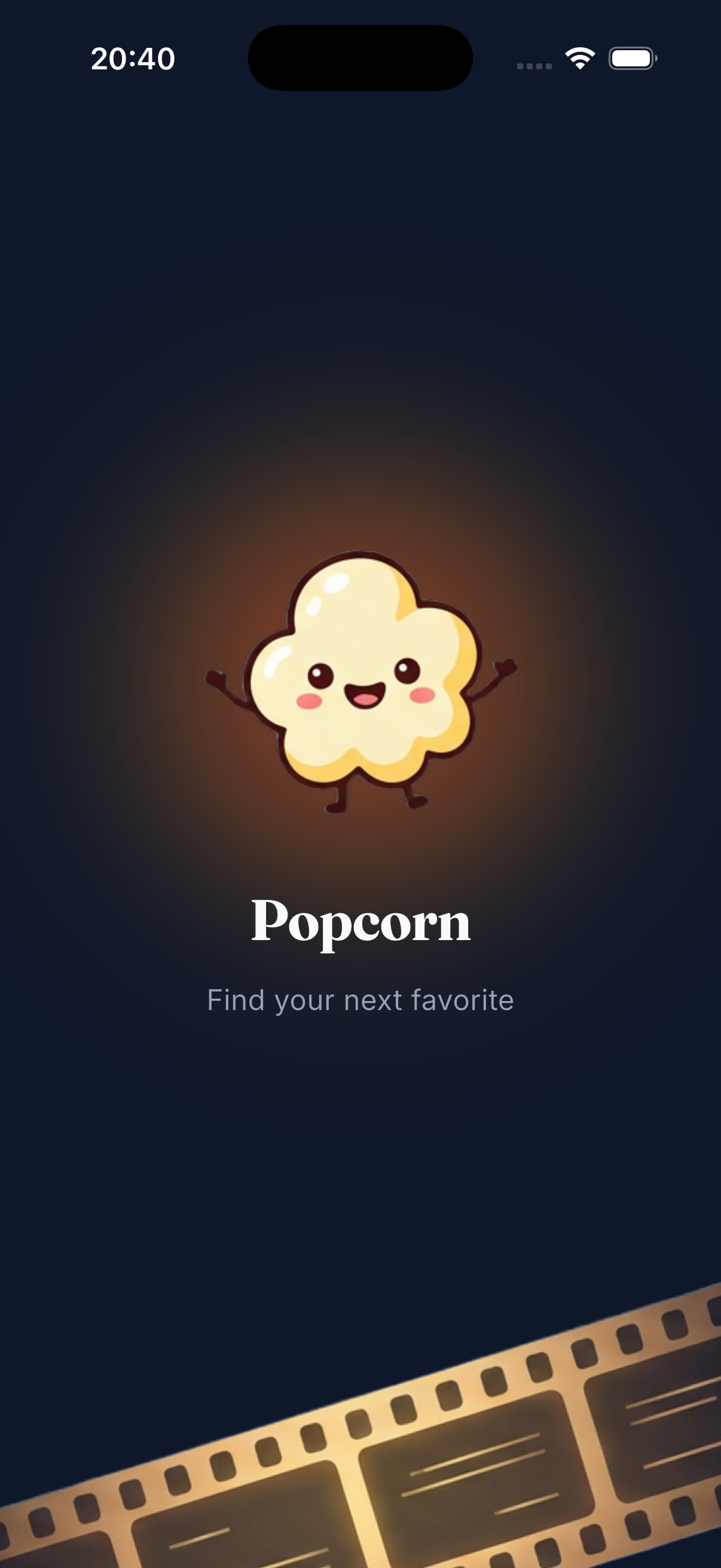
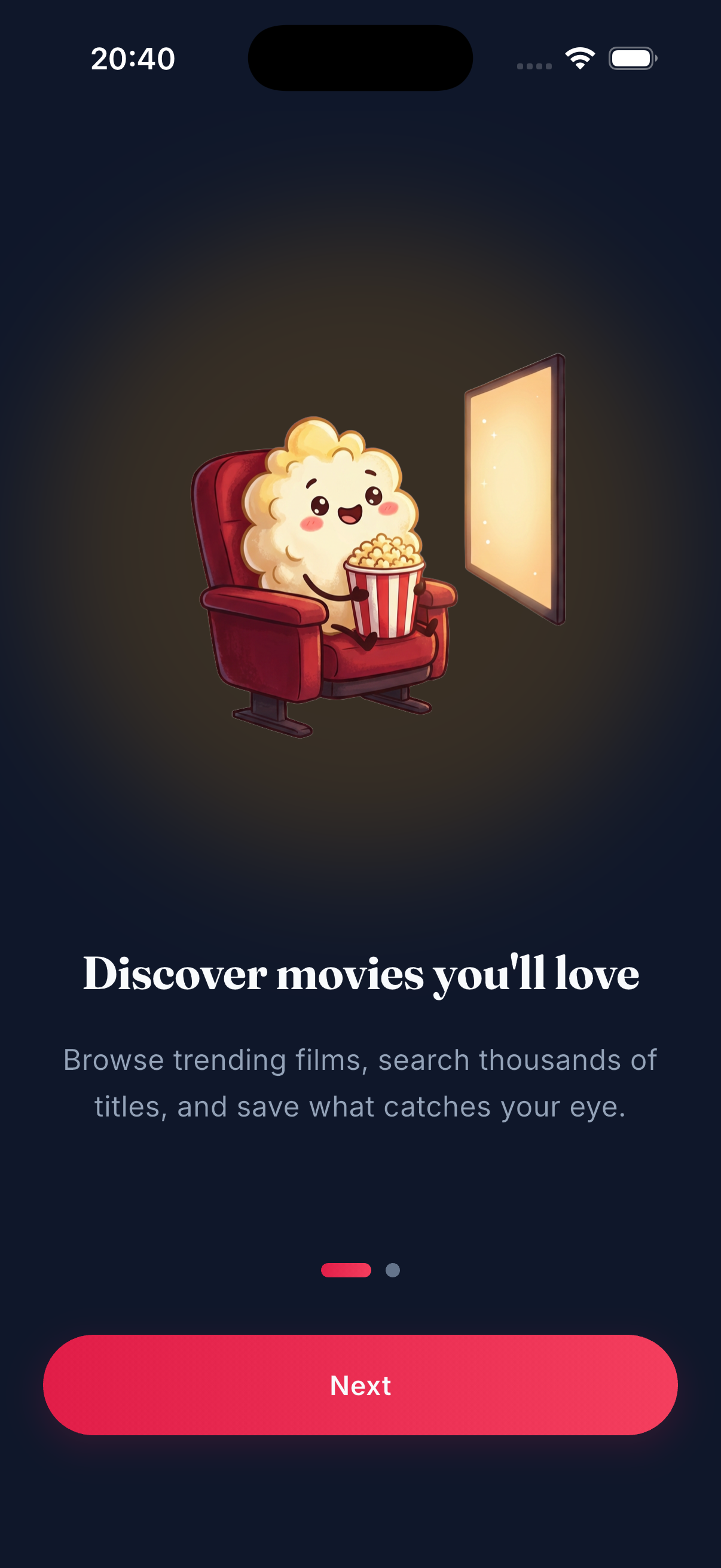
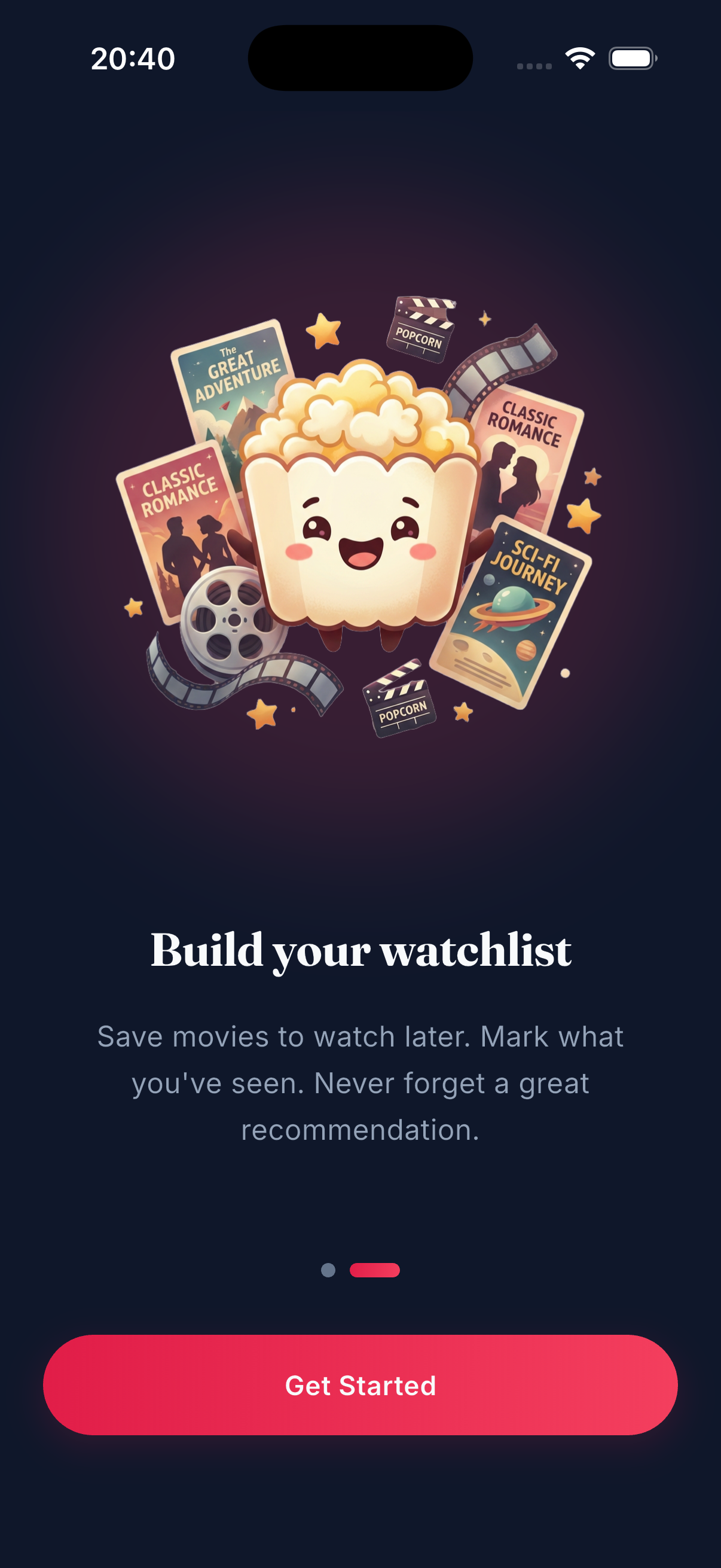
Animated splash reads the onboarding flag from Hive and routes accordingly. Returning users skip straight to Home.
Home
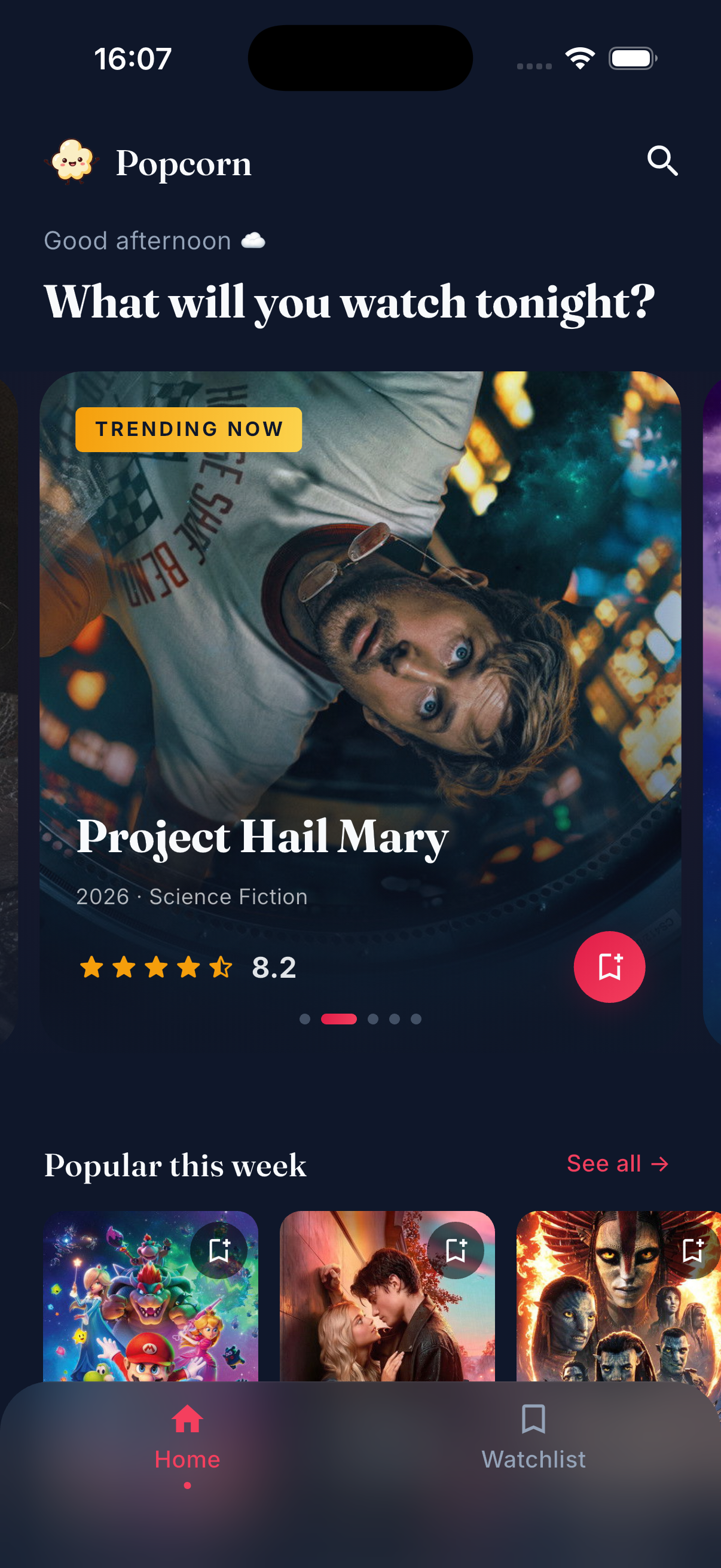
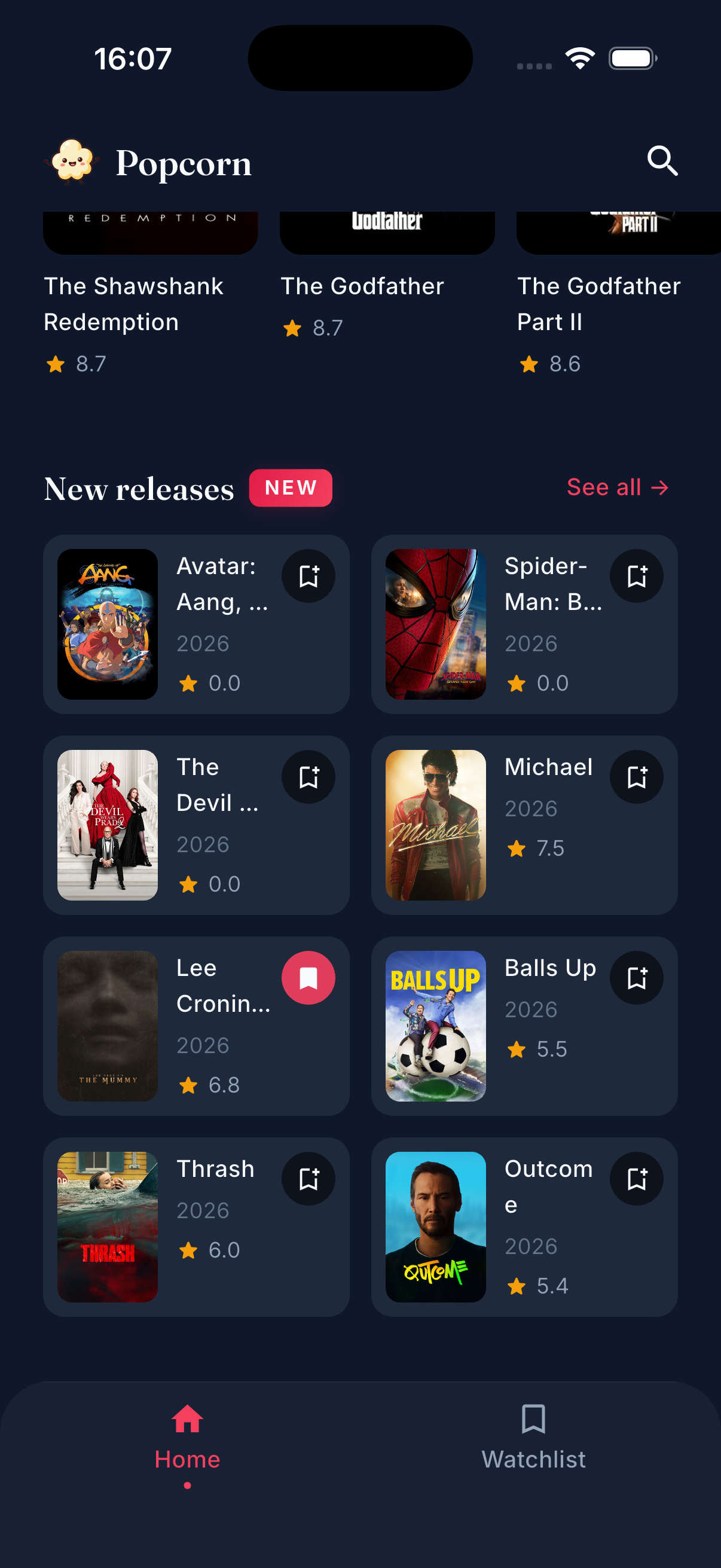
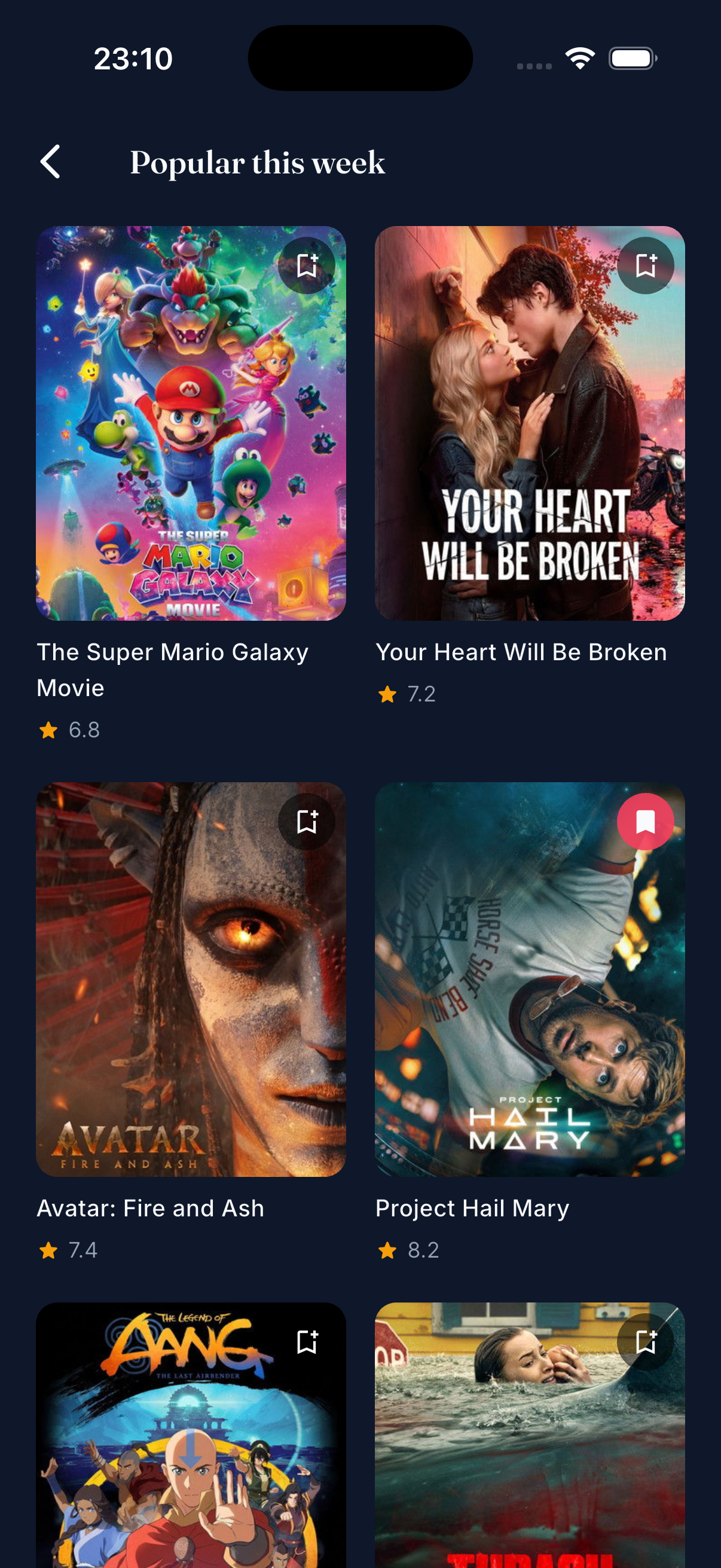
Auto-advancing hero carousel (6s cadence, peek of next card, pauses on user touch) with a subtle radial rose glow behind. Three horizontal sections (Popular, Top rated) and a 2-column New releases grid with its own NEW pill + matching shimmer silhouette. Pull-to-refresh re-hits all endpoints. See all → pushes a dedicated Movies List screen with proper loading/error/empty branching.
Detail
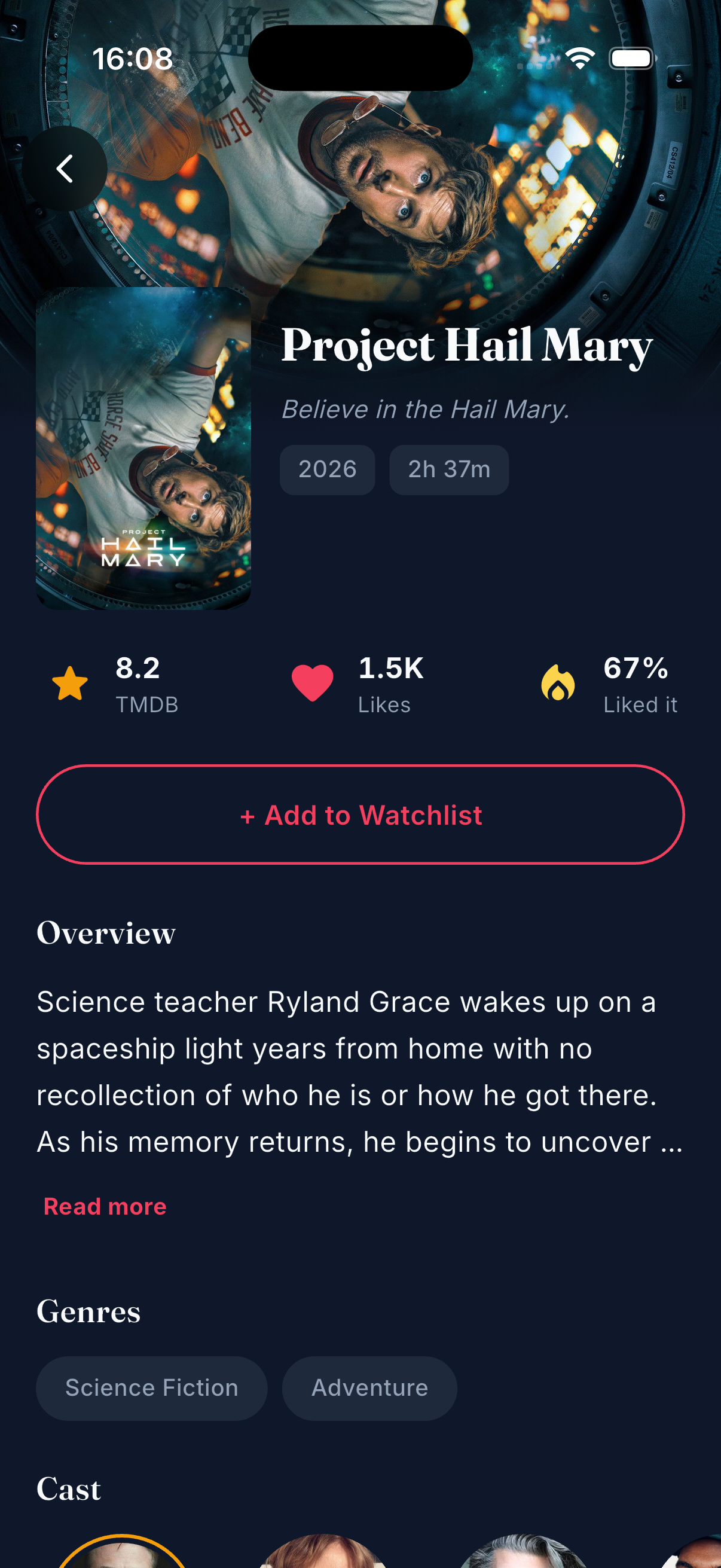
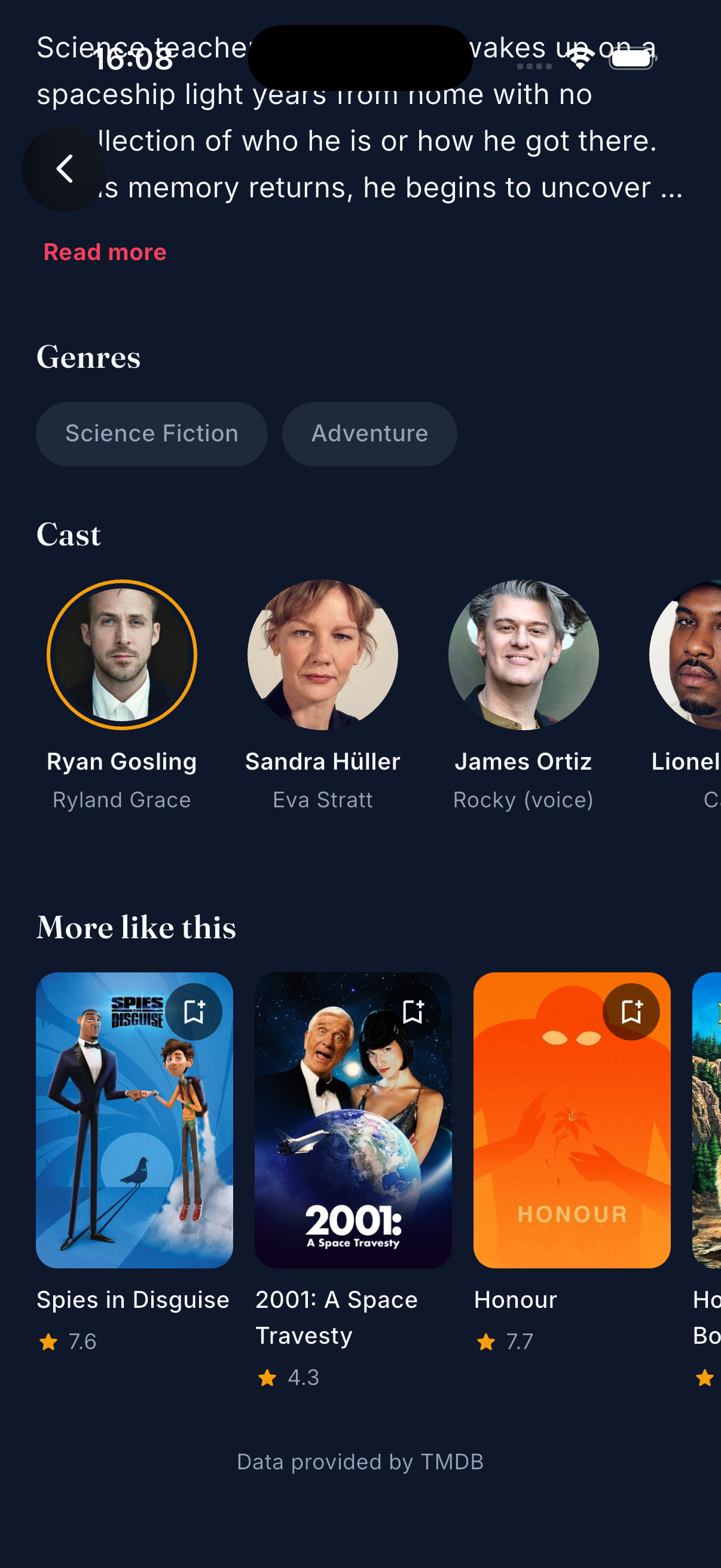
Tap any poster → Hero-animated transition into a cinematic detail screen. Backdrop header + overlapping poster, stats row (TMDB rating / likes / % liked it), expandable overview, genre pills, horizontal cast avatars (gold ring on lead, initial-letter fallback for missing photos), and a "More like this" row that reuses the Home MovieCard. "Add to Watchlist" is outlined when unsaved, filled gradient when saved. Three parallel TMDB calls (/movie/:id, /credits, /similar) load each section independently.
Search
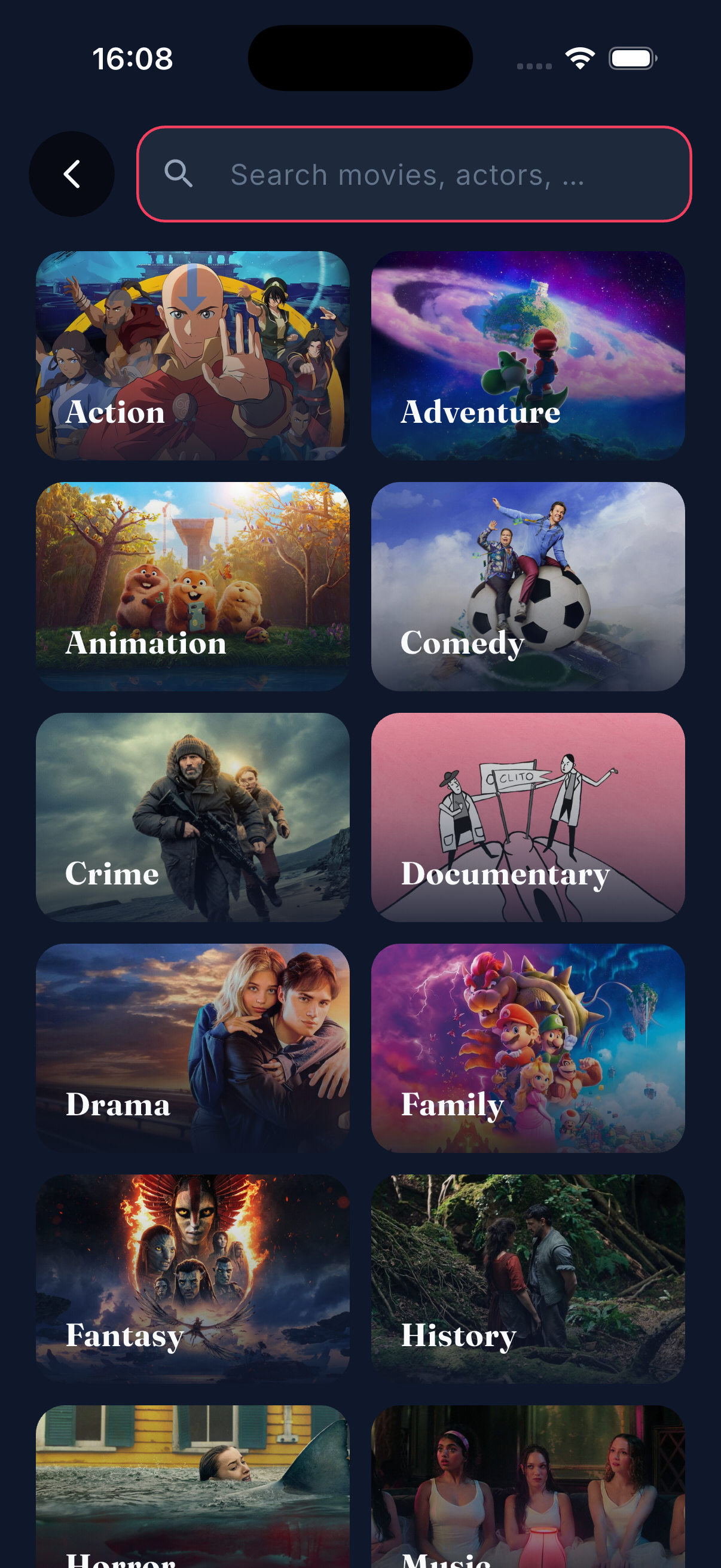
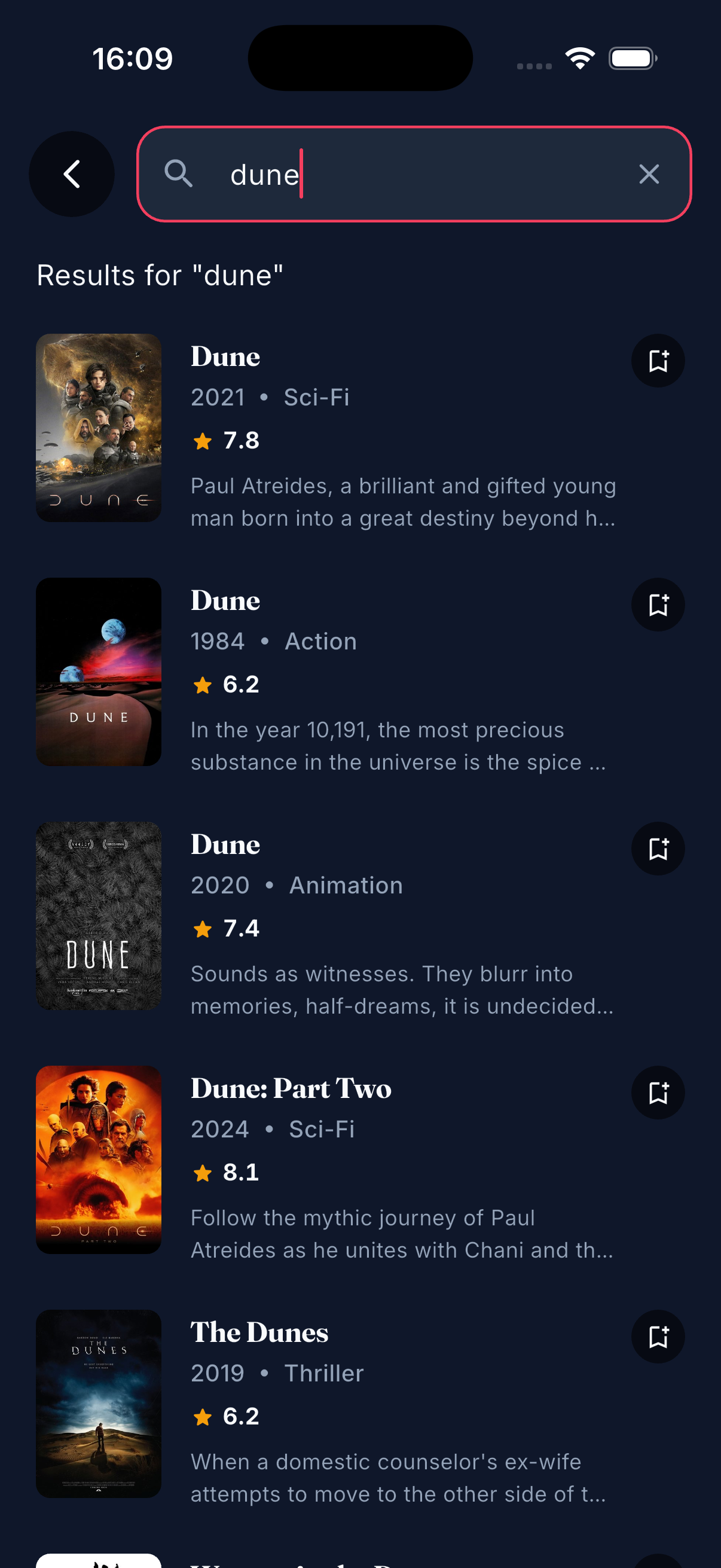
Three distinct modes driven by a single SearchBloc:
- Idle — an 18-genre grid where each tile uses a real movie backdrop fetched from
/discover/movie?with_genres=…. A sequential + deduplicated fetch makes sure each genre shows a unique blockbuster, cached forever in Hive so subsequent opens are instant. - Typing — 400ms debounced search via
stream_transform(debounce.switchMap) so stale requests can't overwrite fresh results. Each row is a denseSearchResultItem(poster, title, year · genre, rating, 2-line overview, inline watchlist toggle). - Genre-filtered — tap any tile → shows that genre's popular movies with an
ActiveFilterChipto clear back to idle.
Empty state uses problem_popcorn.png; network failure renders an inline retry with connection_popcorn.png.
Watchlist
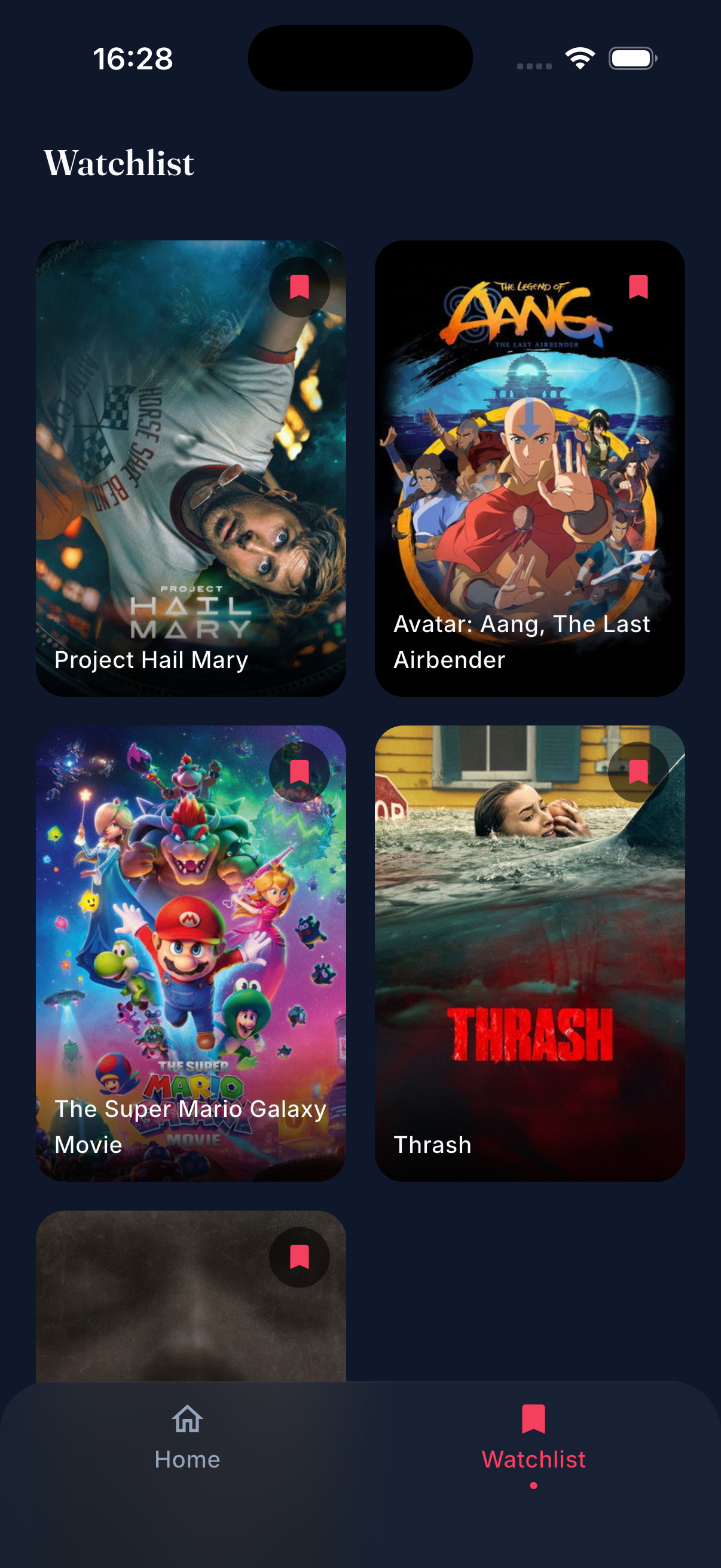
2-column poster grid with staggered fade+scale entry animation. Each poster carries the same Hero tag (movie_poster_${id}) as Home's MovieCard, so navigating Watchlist → Detail gets a shared-element transition too. Tap the bookmark chip to remove, with haptic feedback. Persisted via Hive across app restarts.
Features
- 🎬 Discover — Trending, Popular, Top Rated sections + a 2-col New Releases grid, all from live TMDB
- 🎠 Auto-advancing hero — Swipeable top-5 with peek of neighbors, pauses 4s after user interaction
- 🔎 Search — Backdrop-driven genre grid + 400ms debounced text search + genre filter pill
- 🎞️ Detail — Backdrop parallax, hero-animated poster, stats, expandable overview, cast row, similar movies, inline watchlist CTA
- 🔖 Watchlist — Add/remove from anywhere (Home card, hero, search results, detail), saved locally in Hive, persists across restarts, shared hero transition into detail
- ✨ Splash + Onboarding — Animated intro for first-time users; flag stored in Hive so returning users go straight home
- 🎨 Premium dark UI — Fraunces + Inter typography, cinema-inspired palette (rose + gold), frosted-glass bottom nav, radial ambient glow on the hero
- 📱 Responsive layouts — Horizontal sections, vertical poster grids, intrinsic-height rows, matching shimmer silhouettes to avoid layout shift
- 🔄 Pull-to-refresh on Home
- 🧠 Smart caching — App-wide Bloc singletons for Home/Watchlist keep state across navigation; Hive-cached genre backdrops never re-fetch; factory-scoped blocs for Detail/Search so each entry starts fresh
Tech Stack
Runtime
| Package | Purpose |
|---|---|
flutter_bloc / bloc |
State management (sealed events + single state per slice) |
go_router |
Declarative routing, ShellRoute for bottom nav, deep-linking |
get_it |
Service locator / dependency injection |
dio |
HTTP with interceptors (bearer token, logging, error mapping) |
hive + hive_flutter |
Local NoSQL persistence (onboarding flag, watchlist, genre backdrops cache) |
flutter_dotenv |
Environment variable loader |
cached_network_image |
Network image caching + shimmer placeholders |
shimmer |
Loading state placeholders |
flutter_staggered_animations |
Grid/list entry animations (genre grid, watchlist, search results) |
stream_transform |
Debounced + switch-mapped search input |
equatable |
Value equality for events/states/entities |
Dev
build_runner, hive_generator, bloc_test, mocktail
Not used (intentionally)
- ❌
injectable— manualgetIt.registerLazySingleton/registerFactoryis readable and sufficient - ❌
fpdart— we ship our own tiny sealedEither<L, R>inlib/core/types/ - ❌
google_fonts— Fraunces + Inter bundled as local.ttfassets for smaller dependency surface - ❌
share_plus— share button explicitly out of scope for MVP
Typography
Both bundled locally under assets/fonts/.
Architecture
Popcorn follows Clean Architecture pragmatically — full data / domain / presentation slices for feature-heavy modules with real business logic, lightweight storage classes for simple UI/app state.
Decision rule
Does this feature have real domain concepts and rules?
- Yes (Home, Detail, Search, Watchlist) → full slice
- No (onboarding flag, future settings flags) → single class under
lib/core/storage/
Layer breakdown (Detail as example)
Domain (pure Dart)
 ├── entities/{movie_detail,cast_member}.dart     Equatable
 ├── repositories/detail_repository.dart          abstract contract
 └── usecases/{get_movie_detail,get_movie_credits,get_similar_movies}.dart

Data (infrastructure)
 ├── models/{movie_detail_model,cast_member_model}.dart   fromJson
 ├── datasources/detail_remote_datasource.dart            Dio calls
 └── repositories/detail_repository_impl.dart             wraps calls with shared guard<T>()

Presentation (Flutter)
 ├── bloc/detail_{event,state,bloc}.dart   per-section MovieStatus, parallel dispatch
 ├── screens/detail_screen.dart            SingleChildScrollView + Stack for the overlap
 └── widgets/
      ├── detail_backdrop_header.dart
      ├── detail_poster_title.dart
      ├── detail_stats_row.dart
      ├── detail_actions.dart
      ├── detail_overview.dart
      ├── detail_genres.dart
      ├── detail_cast_section.dart / cast_avatar.dart
      └── detail_similar_section.dart
State management
- Sealed events + single state per feature. Each feature has one
Stateclass with per-slicestatusfields (MovieStatus.initial/loading/success/failure) — avoids state explosion. - App-wide lazy singleton Blocs for Home + Watchlist. State persists across navigation — returning to Home sees cached data, no re-fetch. Registered in
get_it, injected viaMultiBlocProviderinmain.dart, mounted withBlocProvider.valueso the singleton isn't closed on widget dispose. - Screen-scoped factory Blocs for Detail + Search. Each
/movie/:idpush creates a freshDetailBloc; each/searchopen creates a freshSearchBloc. Transient state, no leak risk. - Event transformers for debounce.
SearchBlocusesstream_transform'sdebounce(400ms).switchMapso a burst of keystrokes collapses to one request, and in-flight stale requests get cancelled.
Error handling
Typed Failure (for Either) and matching Exception hierarchies live in lib/core/error/failures.dart — server / network / not-found / unauthenticated / cache. DioClient's interceptor maps DioException → these exceptions, and every repository funnels calls through guard<T>() in lib/core/error/guard.dart so exceptions become Left(Failure) at the domain boundary. UI code never sees a throw.
Routing
go_router with a ShellRoute wrapping / and /watchlist in a shared glass nav shell. Other routes are top-level and render full-screen.
initialLocation: '/splash',
ShellRoute → GlassNavShell
 ├── / → HomeScreen
 └── /watchlist → WatchlistScreen
(top-level)
 ├── /splash → SplashScreen
 ├── /onboarding → OnboardingScreen
 ├── /search → SearchScreen
 ├── /movie/:id → DetailScreen
 └── /movies/:type → MoviesListScreen   // "See all" destination
Folder Structure
lib/
├── core/
│   ├── constants/              # Top-level const strings (URLs, image sizes, Hive keys)
│   ├── di/injection.dart       # get_it wiring (singletons + factories)
│   ├── error/
│   │   ├── failures.dart       # Failure + Exception hierarchies
│   │   └── guard.dart          # guard<T>(fetch) — shared data→domain boundary
│   ├── network/                # DioClient, ApiEndpoints
│   ├── router/                 # GoRouter, GlassNavShell
│   ├── storage/                # Simple Hive wrappers (onboarding flag)
│   ├── theme/                  # Colors, text styles, M3 theme
│   ├── types/either.dart       # Sealed Either<L, R> + Left/Right
│   └── usecase/usecase.dart    # UseCase<Success, Params> + NoParams
│
├── features/
│   ├── splash/                 # Animated logo, routes via onboarding flag
│   ├── onboarding/             # PageView + Get Started
│   │
│   ├── home/
│   │   ├── data / domain /
│   │   └── presentation/
│   │       ├── bloc/           # home_{event,state,bloc}.dart — parallel dispatch
│   │       ├── screens/        # home_screen, movies_list_screen
│   │       └── widgets/        # home_hero_section, movie_card, movie_section,
│   │                           # movie_list_item, new_releases_grid (+ NewReleasesShimmer)
│   │
│   ├── detail/
│   │   ├── data / domain /
│   │   └── presentation/
│   │       ├── bloc/           # detail_{event,state,bloc}.dart
│   │       ├── screens/        # detail_screen
│   │       └── widgets/        # backdrop_header, poster_title, stats_row, actions,
│   │                           # overview, genres, cast_section, cast_avatar,
│   │                           # similar_section
│   │
│   ├── search/
│   │   ├── data / domain /
│   │   └── presentation/
│   │       ├── bloc/           # search_{event,state,bloc}.dart — debounce + switchMap
│   │       ├── screens/        # search_screen — AnimatedSwitcher across 3 modes
│   │       └── widgets/        # search_app_bar, active_filter_chip,
│   │                           # genre_grid, genre_card,
│   │                           # search_results_list, search_result_item,
│   │                           # search_empty_state, search_error_state
│   │
│   └── watchlist/
│       ├── data/watchlist_storage.dart       # Hive wrapper
│       └── presentation/
│           ├── bloc/           # watchlist_{event,state,bloc}.dart
│           ├── screens/        # watchlist_screen — staggered grid
│           └── widgets/        # watchlist_poster_card (Hero-tagged),
│                               # watchlist_empty, watchlist_toggle_button
│
├── shared/
│   └── widgets/                # Cross-feature widgets
│       ├── popcorn_button.dart         # Gradient / outlined pill CTA
│       ├── popcorn_shimmer.dart        # Shimmer wrapper w/ default surface fill
│       ├── poster_fallback.dart        # Missing-poster placeholder (icon + bg)
│       ├── glass_back_button.dart      # Blurred 48dp round back button
│       ├── pressable_scale.dart        # Tap-to-shrink + haptic wrapper
│       ├── movie_rating.dart           # Star + voteAverage row
│       ├── app_empty_state.dart        # Image + title + subtitle (full screen)
│       └── app_error_state.dart        # Icon/image + title + retry (PopcornButton)
│
└── main.dart                                  # Bootstrap: dotenv → Hive → DI → runApp
Getting Started
Prerequisites
- Flutter 3.10+ (Dart 3.x)
- A free TMDB v4 read-access token — grab one here or follow the walkthrough on Medium if it's your first time
Setup
git clone https://github.com/<you>/popcorn.git
cd popcorn

# 1. Create your env file
cp .env.example .env

# 2. Paste your TMDB token into .env
#    TMDB_ACCESS_TOKEN=eyJhbGciOi...

# 3. Install dependencies
flutter pub get

# 4. Run
flutter run
Font assets
The project uses Fraunces and Inter, bundled locally. They live at:
assets/fonts/fraunces/Fraunces-{Regular,SemiBold,Bold}.ttf
assets/fonts/inter/Inter-{Regular,Medium,SemiBold,Bold}.ttf
Files are already in the repo; no download needed.
Environment
.env is gitignored — never commit your token. .env.example is the template others clone and fill in.
Project Conventions
Conventions are defaults, not dogma — but they hold across the codebase and make new slices easy to predict.
Naming + structure
- Screens, not Pages. Mobile idiom:
home_screen.dart→class HomeScreen, lives inscreens/folder. feature/data/+feature/domain/+feature/presentation/slices for anything with real rules. Splash, Onboarding, and core/storage are simpler — single classes.
Dart 3 features we lean on
- Sealed classes for events.
sealed class HomeEvent,SearchEvent,DetailEvent,WatchlistEvent— subclasses arefinal class, compiler enforces exhaustive handling in the bloc. final classfor states. Single state per feature,Equatable, immutable viacopyWith. Not sealed — we use status enum fields instead of state-per-status classes (see below).- Sealed
Either<L, R>inlib/core/types/either.dartwithLeft/Rightsubclasses and afold<T>()method. Nofpdart. - Switch expressions for status-driven UI:
switch (state.status) { MovieStatus.loading => … }— no nestedif/elseladders. - Wildcard
_parameters for unused callback args (e.g.placeholder: (_, _) => …).
Top-level first, abstract final class only when namespacing earns its keep
Dart's guidance is "avoid classes with only static members" — prefer top-level declarations. We follow that by default:
- Top-level
constfor plain strings that read fine unprefixed:tmdbBaseUrl,posterMedium,backdropLarge,watchlistBox,settingsBox,genreBackdropsBox, … — all inlib/core/constants/app_constants.dart, zero classes. abstract final classonly where the group is the semantic unit and the prefix improves readability:AppColors.primaryRose,AppTextStyles.headlineMedium,AppTheme.darkTheme,ApiEndpoints.movieDetail(id),MovieGenres.all. A bareprimaryRoseortrendingat top level would be noise; the class name is the namespace.
Rule of thumb: if you catch yourself importing three related constants together, consider an abstract final class; if each stands on its own, keep it top-level.
State modeling
- One
Stateclass per feature, with status enums per section.HomeStatehastrendingStatus,popularStatus,topRatedStatus,genresStatus— each section loads independently, failures don't cascade. Same pattern inDetailState(movieStatus / castStatus / similarStatus) andSearchState(resultsStatus / backdropsStatus). MovieStatusenum is shared, defined once inhome_state.dartand re-exported (export 'home_state.dart' show MovieStatus;) from every other state file. One enum, three names would be worse.copyWithis the only mutation path. Events → bloc handler →emit(state.copyWith(...)). Never mutate collections in place.
Data layer
Either<Failure, T>at the repository boundary. Data sources throw; repositories funnel calls through the sharedguard<T>()inlib/core/error/guard.dartthat catches each*Exceptionand maps to the matching*Failure. Presentation never sees exceptions.- Datasources return models; repositories return entities.
MovieModel extends Movie+fromJson; UI code touchesMovieonly.
Styling
- No hardcoded colors in widgets. Everything goes through
AppColors.*. Genre tiles used to ship their own gradient stops inMovieGenres; we removed them once backdrops replaced the flat design. - Fraunces for display, Inter for body. Never both in one heading.
Touch targets
- 44×44 minimum tap targets on anything the user has to hit — back buttons, read-more links, remove chips, genre cards. Visual size can be smaller; hit target is not.
Roadmap
- [x] Architectural scaffolding (DI, router, theme, error types, typography)
- [x] Splash + onboarding flow with Hive-backed first-run flag
- [x] Home discovery (hero carousel + sections + new releases grid + auto-advance + radial glow)
- [x] "See all" → Movies List screen with loading/error/empty branching
- [x] Watchlist with local persistence, shared-element Hero into detail, staggered entry
- [x] Detail screen — backdrop, overlapping hero poster, stats, overview, genres, cast, similar
- [x] Search — 3-mode flow (idle/typing/genre-filtered), backdrop-powered genre grid with Hive-cached deduped fetch, 400ms debounced text search
- [ ] Pagination for Movies List (infinite scroll beyond page 1)
- [ ] Tests — Bloc unit tests with
bloc_test+mocktail - [ ] CI — GitHub Actions (
flutter analyze+ tests on PR)
Credits
- Movie data & images courtesy of The Movie Database (TMDB). This product uses the TMDB API but is not endorsed or certified by TMDB.
- Fonts: Fraunces and Inter, SIL Open Font License.
- Popcorn character illustrations — custom assets.

Ayda Nil Ozyurek ↗
श्रेणियाँ
उपयोग की गई निर्भरताएँ
निर्भरता सूची 21 आइटम
- flutter
{"sdk":"flutter"} - cupertino_icons
^1.0.8 - flutter_bloc
^8.1.6 - bloc
^8.1.4 - equatable
^2.0.7 - dio
^5.7.0 - get_it
^7.7.0 - hive
^2.2.3 - hive_flutter
^1.1.0 - flutter_dotenv
^5.2.1 - go_router
^14.6.2 - cached_network_image
^3.4.1 - shimmer
^3.0.0 - flutter_staggered_animations
^1.1.1 - stream_transform
^2.1.0 - flutter_testडेवलपमेंट
{"sdk":"flutter"} - flutter_lintsडेवलपमेंट
^6.0.0 - build_runnerडेवलपमेंट
^2.4.13 - hive_generatorडेवलपमेंट
^2.0.1 - bloc_testडेवलपमेंट
^9.1.7 - mocktailडेवलपमेंट
^1.0.4
रैंकिंग
अपने प्रोजेक्ट के लिए रिपॉज़िटरी कैसे चुनें?
उपयोग के अनुसार छाँटें, गतिविधि की तुलना करें और अपनाने से पहले मूल प्रोजेक्ट की आवश्यकताएँ जाँचें।
- नाम, लेखक या विवरण से खोजें और तकनीकी विषय से परिणाम सीमित करें।
- स्टार, फ़ोर्क और हाल के पुश की तुलना करें। स्टार रुचि दर्शाते हैं, गुणवत्ता की गारंटी नहीं।
- उपयोग से पहले GitHub पर README, लाइसेंस और Issues जाँचें।
स्रोत और रखरखाव
“A repository is the most basic element of GitHub.”
GitHub Docs — About repositories ↗
- aydozy/popcorn · GitHub ↗
- GitHub Docs — Saving repositories with stars ↗
- डायरेक्टरी का रखरखाव Ducafecat ↗