

 v0.0.3
skeletons
एक फ्लटर पैकेज जो लोडिंग के दौरान पेज के लेआउट की नकल करने के लिए कस्टम स्केलेटन विजेट बनाने के लिए है।
343लाइक 1.3 हज़ार30-दिन डाउनलोड60Pub अंक
प्लेटफ़ॉर्म डेटा नहीं
एक फ्लटर पैकेज जो लोडिंग के दौरान पेज के लेआउट की नकल करने के लिए कस्टम स्केलेटन विजेट बनाने के लिए है।

यह अंग्रेज़ी मूल स्नैपशॉट है। नवीनतम सामग्री GitHub पर देखें।
A Flutter package for building custom skeleton widgets to mimic the page's layout while loading.
| Items | ListView (Default) | |
|---|---|---|
 |
 |
 |
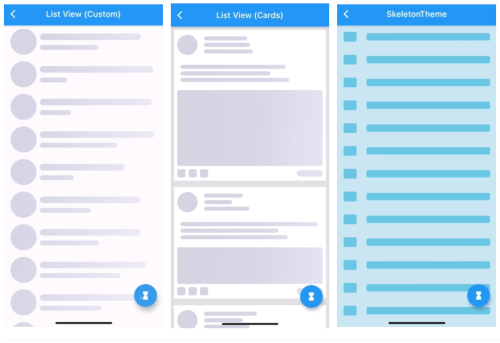
| ListView (Custom) | ListView (Complex Cards) | SkeletonTheme |
|---|---|---|
 |
 |
 |
| Light/Dark modes | Right-To-Left | Custom Shimmer |
|---|---|---|
 |
 |
 |
All examples can be found here examples.
Can be used by encapsulating the child widget in a Skeleton widget:
import 'package:skeletons/skeletons.dart';

Skeleton(
        isLoading: _isLoading,
        skeleton: SkeletonListView(),
        child: Container(child: Center(child: Text("Content"))),
      )
or directly:
Container(
    child: _isLoading
    ? SkeletonListView()
    : Container(child: Center(
                       child: Text("Content"))),
)
a SkeletonTheme can be used to set the default configs for all skeleton descendants in the tree.
SkeletonTheme(
    // themeMode: ThemeMode.light,
    shimmerGradient: LinearGradient(
        colors: [
          Color(0xFFD8E3E7),
          Color(0xFFC8D5DA),
          Color(0xFFD8E3E7),
        ],
        stops: [
          0.1,
          0.5,
          0.9,
        ],
      ),
      darkShimmerGradient: LinearGradient(
        colors: [
          Color(0xFF222222),
          Color(0xFF242424),
          Color(0xFF2B2B2B),
          Color(0xFF242424),
          Color(0xFF222222),
        ],
        stops: [
          0.0,
          0.2,
          0.5,
          0.8,
          1,
        ],
        begin: Alignment(-2.4, -0.2),
        end: Alignment(2.4, 0.2),
        tileMode: TileMode.clamp,
      ),
        child: MateriaApp(
            ...
        ),
      ),
| ListView (Complex Cards) |
|---|
|
for more complex shapes you can build your skeleton inside a SkeletonItem widget:
ListView.builder(
  physics: NeverScrollableScrollPhysics(),
  itemCount: 5,
  itemBuilder: (context, index) => Padding(
    padding: const EdgeInsets.all(8.0),
    child: Container(
      padding: const EdgeInsets.all(8.0),
      decoration: BoxDecoration(color: Colors.white),
      child: SkeletonItem(
          child: Column(
        children: [
          Row(
            children: [
              SkeletonAvatar(
                style: SkeletonAvatarStyle(
                    shape: BoxShape.circle, width: 50, height: 50),
              ),
              SizedBox(width: 8),
              Expanded(
                child: SkeletonParagraph(
                  style: SkeletonParagraphStyle(
                      lines: 3,
                      spacing: 6,
                      lineStyle: SkeletonLineStyle(
                        randomLength: true,
                        height: 10,
                        borderRadius: BorderRadius.circular(8),
                        minLength: MediaQuery.of(context).size.width / 6,
                        maxLength: MediaQuery.of(context).size.width / 3,
                      )),
                ),
              )
            ],
          ),
          SizedBox(height: 12),
          SkeletonParagraph(
            style: SkeletonParagraphStyle(
                lines: 3,
                spacing: 6,
                lineStyle: SkeletonLineStyle(
                  randomLength: true,
                  height: 10,
                  borderRadius: BorderRadius.circular(8),
                  minLength: MediaQuery.of(context).size.width / 2,
                )),
          ),
          SizedBox(height: 12),
          SkeletonAvatar(
            style: SkeletonAvatarStyle(
              width: double.infinity,
              minHeight: MediaQuery.of(context).size.height / 8,
              maxHeight: MediaQuery.of(context).size.height / 3,
            ),
          ),
          SizedBox(height: 8),
          Row(
            mainAxisAlignment: MainAxisAlignment.spaceBetween,
            children: [
              Row(
                children: [
                  SkeletonAvatar(
                      style: SkeletonAvatarStyle(width: 20, height: 20)),
                  SizedBox(width: 8),
                  SkeletonAvatar(
                      style: SkeletonAvatarStyle(width: 20, height: 20)),
                  SizedBox(width: 8),
                  SkeletonAvatar(
                      style: SkeletonAvatarStyle(width: 20, height: 20)),
                ],
              ),
              SkeletonLine(
                style: SkeletonLineStyle(
                    height: 16,
                    width: 64,
                    borderRadius: BorderRadius.circular(8)),
              )
            ],
          )
        ],
      )),
    ),
  ),
);
For issues, please report here. Contributions are welcome.
निर्भरता सूची 2 आइटम
{"sdk":"flutter"}{"sdk":"flutter"}उपयोग के अनुसार छाँटें, गतिविधि की तुलना करें और अपनाने से पहले मूल प्रोजेक्ट की आवश्यकताएँ जाँचें।
“A repository is the most basic element of GitHub.”
GitHub Docs — About repositories ↗