पैकेज, रिपॉज़िटरी और ऐप श्रेणियाँ खोजें

skeletons कवर
पैकेज विवरणv0.0.3

skeletons

एक फ्लटर पैकेज जो लोडिंग के दौरान पेज के लेआउट की नकल करने के लिए कस्टम स्केलेटन विजेट बनाने के लिए है।

30-दिन डाउनलोड
1.3 हज़ार
लाइक
343
Pub अंक
60

पैकेज इंस्टॉल करें

flutter pub add skeletons

पैकेज अवलोकन

सार्वजनिक जानकारी से बना चयन मार्गदर्शन। केवल संदर्भ हेतु।

स्केलेटन पैकेज फ्लटर में कस्टम स्केलेटन लोडिंग विजेट बनाने का एक सरल तरीका प्रदान करता है, जिससे डेवलपर्स कंटेंट लोड होने के दौरान पेज के लेआउट की नकल कर सकते हैं। यह उपयोगकर्ता अनुभव को बेहतर बनाने में मदद करता है, जब अंतिम UI को दर्शाने वाली एक स्थानापन्न संरचना दिखाई जाती है, जिससे लोड समय का अनुभव कम होता है। पैकेज हल्का और लचीला है, जो स्थानापन्न के लिए विभिन्न आकार और एनीमेशन का समर्थन करता है। जटिल लेआउट वाले स्क्रीन्स के लिए आदर्श है, जो लोडिंग से कंटेंट डिस्प्ले तक के चलने को सुगम बनाता है।

उपयोग

  • लोडिंग स्क्रीन स्थान भरे
  • डेटा फ़ैच के दौरान सामग्री प्रीव्यू
  • सीमित प्रदर्शन में सुधार
  • जटिल यूआई लेआउट सिमुलेशन
  • ऑनबोर्डिंग स्क्रीन्स
  • डायनामिक सूची स्थान लेने वाले

मुख्य विशेषताएँ

  • कस्टमाइज़ करने योग्य स्केलेटन आकृतियाँ
  • एम्बेडेड एनिमेशन सपोर्ट
  • मौजूदा विजेट्स के साथ आसान एकीकरण
  • लचीला लेआउट मैचिंग
  • हल्का और कार्यक्षम
  • नेस्टेड स्केलेटन का समर्थन करता है

इनके लिए उपयुक्त

  • UI/UX डिजाइनर
  • फ्रंटएंड डेवलपर्स
  • भारी डेटा लोडिंग वाले ऐप्स
  • इंटरैक्टिव स्क्रीन के प्रोटोटाइप बनाना
  • चिकनी लोडिंग स्टेट्स की आवश्यकता वाले मोबाइल ऐप्स

विचार योग्य बातें

  • केवल दृश्य स्थान भरने वाले केवल
  • कोई बिल्ट-इन डेटा फ़ेचिंग नहीं
  • हाथ से लेआउट संरेखण की आवश्यकता है
  • अनुपयुक्त गैर-दृश्य लोडिंग संकेतक के लिए
  • सटीक लेआउट पूर्वानुमान पर निर्भर करता है

मूल README

संबंधित सोर्स रिपॉज़िटरी के मूल README का स्नैपशॉट। नवीनतम सामग्री के लिए रिपॉज़िटरी देखें।

Skeletons

A Flutter package for building custom skeleton widgets to mimic the page's layout while loading.

Examples

Items ListView (Default)
items paragraphs listview_default
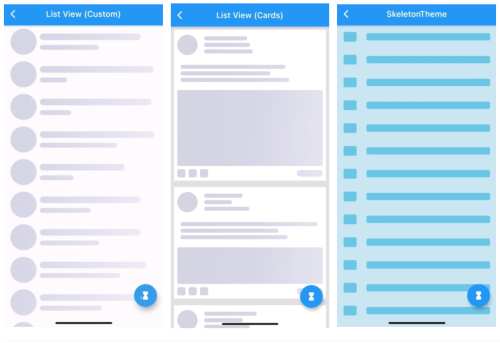
ListView (Custom) ListView (Complex Cards) SkeletonTheme
listview_custom listview_cards skeleton_theme
Light/Dark modes Right-To-Left Custom Shimmer
light_dark_modes rtl custom_shimmer

All examples can be found here examples.

How To Use

Can be used by encapsulating the child widget in a Skeleton widget:

import 'package:skeletons/skeletons.dart';

Skeleton(
        isLoading: _isLoading,
        skeleton: SkeletonListView(),
        child: Container(child: Center(child: Text("Content"))),
      )

or directly:

Container(
    child: _isLoading 
    ? SkeletonListView() 
    : Container(child: Center(
                       child: Text("Content"))),
)

a SkeletonTheme can be used to set the default configs for all skeleton descendants in the tree.

SkeletonTheme(
    // themeMode: ThemeMode.light,
    shimmerGradient: LinearGradient(
        colors: [
          Color(0xFFD8E3E7),
          Color(0xFFC8D5DA),
          Color(0xFFD8E3E7),
        ],
        stops: [
          0.1,
          0.5,
          0.9,
        ],
      ),
      darkShimmerGradient: LinearGradient(
        colors: [
          Color(0xFF222222),
          Color(0xFF242424),
          Color(0xFF2B2B2B),
          Color(0xFF242424),
          Color(0xFF222222),
        ],
        stops: [
          0.0,
          0.2,
          0.5,
          0.8,
          1,
        ],
        begin: Alignment(-2.4, -0.2),
        end: Alignment(2.4, 0.2),
        tileMode: TileMode.clamp,
      ),
        child: MateriaApp(
            ...
        ),
      ),

More Customization:

ListView (Complex Cards)
listview_cards

for more complex shapes you can build your skeleton inside a SkeletonItem widget:

ListView.builder(
  physics: NeverScrollableScrollPhysics(),
  itemCount: 5,
  itemBuilder: (context, index) => Padding(
    padding: const EdgeInsets.all(8.0),
    child: Container(
      padding: const EdgeInsets.all(8.0),
      decoration: BoxDecoration(color: Colors.white),
      child: SkeletonItem(
          child: Column(
        children: [
          Row(
            children: [
              SkeletonAvatar(
                style: SkeletonAvatarStyle(
                    shape: BoxShape.circle, width: 50, height: 50),
              ),
              SizedBox(width: 8),
              Expanded(
                child: SkeletonParagraph(
                  style: SkeletonParagraphStyle(
                      lines: 3,
                      spacing: 6,
                      lineStyle: SkeletonLineStyle(
                        randomLength: true,
                        height: 10,
                        borderRadius: BorderRadius.circular(8),
                        minLength: MediaQuery.of(context).size.width / 6,
                        maxLength: MediaQuery.of(context).size.width / 3,
                      )),
                ),
              )
            ],
          ),
          SizedBox(height: 12),
          SkeletonParagraph(
            style: SkeletonParagraphStyle(
                lines: 3,
                spacing: 6,
                lineStyle: SkeletonLineStyle(
                  randomLength: true,
                  height: 10,
                  borderRadius: BorderRadius.circular(8),
                  minLength: MediaQuery.of(context).size.width / 2,
                )),
          ),
          SizedBox(height: 12),
          SkeletonAvatar(
            style: SkeletonAvatarStyle(
              width: double.infinity,
              minHeight: MediaQuery.of(context).size.height / 8,
              maxHeight: MediaQuery.of(context).size.height / 3,
            ),
          ),
          SizedBox(height: 8),
          Row(
            mainAxisAlignment: MainAxisAlignment.spaceBetween,
            children: [
              Row(
                children: [
                  SkeletonAvatar(
                      style: SkeletonAvatarStyle(width: 20, height: 20)),
                  SizedBox(width: 8),
                  SkeletonAvatar(
                      style: SkeletonAvatarStyle(width: 20, height: 20)),
                  SizedBox(width: 8),
                  SkeletonAvatar(
                      style: SkeletonAvatarStyle(width: 20, height: 20)),
                ],
              ),
              SkeletonLine(
                style: SkeletonLineStyle(
                    height: 16,
                    width: 64,
                    borderRadius: BorderRadius.circular(8)),
              )
            ],
          )
        ],
      )),
    ),
  ),
);

Issues and feedback

For issues, please report here. Contributions are welcome.

श्रेणियाँ

सोर्स रिपॉज़िटरी

इस पैकेज का उपयोग करने वाले प्रोजेक्ट