

 v5.0.1
material_segmented_control
एक सेगमेंटेड कंट्रोल विजेट जैसे कि iOS के लिए, लेकिन मैटीरियल डिज़ाइन में।
103लाइक 11.2 हज़ार30-दिन डाउनलोड150Pub अंक
AndroidiOSWebmacOSWindowsLinux
पूर्ण नियंत्रण के साथ एक मैटीरियल शैली का सेगमेंटेड नियंत्रण।

यह अंग्रेज़ी मूल स्नैपशॉट है। नवीनतम सामग्री GitHub पर देखें।
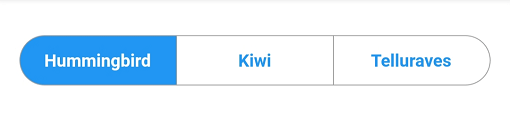
A material segmented control like the one for iOS, in Material style.

We all know well the Cupertino segmented widget in Flutter. But there is no similar in Material, so I thought, why not to create one.
You can check it out on pub.dev: (see package on pub.dev)
In your pubspec.yaml, add
dependencies:
    material_segmented_control: ^5.0.1
Wherever you want to use this widget, import
import 'package:material_segmented_control/material_segmented_control.dart';
int _currentSelection = 0;

MaterialSegmentedControl(
    children: _children,
    selectionIndex: _currentSelection,
    borderColor: Colors.grey,
    selectedColor: Colors.redAccent,
    unselectedColor: Colors.white,
    selectedTextStyle: TextStyle(color: Colors.white),
    unselectedTextStyle: TextStyle(color: Colors.redAccent),
    borderWidth: 0.7,
    borderRadius: 32.0,
    disabledChildren: [3],
    onSegmentTapped: (index) {
      setState(() {
        _currentSelection = index;
      });
    },
);

Map<int, Widget> _children = {
  0: Text('Hummingbird'),
  1: Text('Kiwi'),
  2: Text('Rio'),
  3: Text('Telluraves')
};
selectionIndex to null. It un-selects all options.onPressed to null on a button) by setting disabledChildren. Give it a list with all indices that should be disabled. Give it either null or an empty list to not use the disabled feature.You might want to check out the example project.
निर्भरता सूची 3 आइटम
{"sdk":"flutter"}{"sdk":"flutter"}^2.0.1उपयोग के अनुसार छाँटें, गतिविधि की तुलना करें और अपनाने से पहले मूल प्रोजेक्ट की आवश्यकताएँ जाँचें।
“A repository is the most basic element of GitHub.”
GitHub Docs — About repositories ↗