

 v2.1.0
popup_menu
एक Flutter पॉपअप मेनू। शुद्ध डार्ट के साथ लिखा गया, iOS और Android दोनों के लिए समर्थित।
157लाइक 2.4 हज़ार30-दिन डाउनलोड135Pub अंक
AndroidiOSWebmacOSWindowsLinux
🔥एक Flutter पॉपअप मेनू। Pub समर्थित।

यह अंग्रेज़ी मूल स्नैपशॉट है। नवीनतम सामग्री GitHub पर देखें।


This project was written completely in dart, and it supports both iOS and Android.


You can find the demo at the 'example' folder.
First, you should set the context at somewhere in you code. Like below:
PopupMenu.context = context;
PopupMenu menu = PopupMenu(
      items: [
        MenuItem(title: 'Copy', image: Image.asset('assets/copy.png')),
        MenuItem(title: 'Home', image: Icon(Icons.home, color: Colors.white,)),
        MenuItem(title: 'Mail', image: Icon(Icons.mail, color: Colors.white,)),
        MenuItem(title: 'Power', image: Icon(Icons.power, color: Colors.white,)),
        MenuItem(title: 'Setting', image: Icon(Icons.settings, color: Colors.white,)),
        MenuItem(title: 'Traffic', image: Icon(Icons.traffic, color: Colors.white,))],
      onClickMenu: onClickMenu,
      onShow: onShow,
      onDismiss: onDismiss);

menu.show(rect: rect);
or
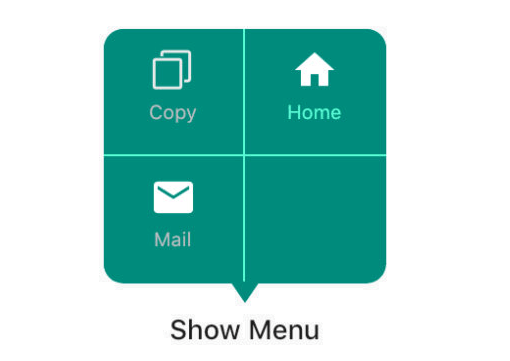
PopupMenu menu = PopupMenu(
        backgroundColor: Colors.teal,
        lineColor: Colors.tealAccent,
        maxColumn: 3,
        items: [
          MenuItem(title: 'Copy', image: Image.asset('assets/copy.png')),
          MenuItem(
              title: 'Home',
              textStyle: TextStyle(fontSize: 10.0, color: Colors.tealAccent),
              image: Icon(
                Icons.home,
                color: Colors.white,
              )),
          MenuItem(
              title: 'Mail',
              image: Icon(
                Icons.mail,
                color: Colors.white,
              )),
          MenuItem(
              title: 'Power',
              image: Icon(
                Icons.power,
                color: Colors.white,
              )),
          MenuItem(
              title: 'Setting',
              image: Icon(
                Icons.settings,
                color: Colors.white,
              )),
          MenuItem(
              title: 'PopupMenu',
              image: Icon(
                Icons.menu,
                color: Colors.white,
              ))
        ],
        onClickMenu: onClickMenu,
        onDismiss: onDismiss);
    menu.show(widgetKey: btnKey2);
निर्भरता सूची 2 आइटम
{"sdk":"flutter"}{"sdk":"flutter"}उपयोग के अनुसार छाँटें, गतिविधि की तुलना करें और अपनाने से पहले मूल प्रोजेक्ट की आवश्यकताएँ जाँचें।
“A repository is the most basic element of GitHub.”
GitHub Docs — About repositories ↗