
 v2.0.0
stretchy_header
इस पैकेज का उपयोग हम एलास्टिक हेडर बनाने के लिए कर सकते हैं, ताकि विजेट को स्क्रॉल करते समय अच्छा प्रभाव मिले।
98लाइक 23630-दिन डाउनलोड140Pub अंक
AndroidiOSWebmacOSWindowsLinux
diegoveloper/flutter_stretchy_header open-source repository details.

निर्भरता सूची 2 आइटम
{"sdk":"flutter"}{"sdk":"flutter"}यह अंग्रेज़ी मूल स्नैपशॉट है। नवीनतम सामग्री GitHub पर देखें।
This package allows us to create an elastic header, to give a good effect when you scroll down the widget.
Sample 1
https://media.giphy.com/media/1hBwHq01CeFJOgJg8p/giphy.gif
Sample 2
https://media.giphy.com/media/f9SzoZKqo1vfdlCaT5/giphy.gif
You should ensure that you add the router as a dependency in your flutter project.
dependencies:
  stretchy_header: "^1.0.8"
You should then run flutter packages upgrade or update your packages in IntelliJ.
There is an example project in the example folder. Check it out. Otherwise, keep reading to get up and running.
import 'package:flutter/material.dart';
import 'package:stretchy_header/stretchy_header.dart';

class SampleListView extends StatelessWidget {
  @override
  Widget build(BuildContext context) {
    return Scaffold(
      body: StretchyHeader.listViewBuilder(
        headerData: HeaderData(
          headerHeight: 250,
          header: Image.asset(
            "images/chichen.jpg",
            fit: BoxFit.cover,
          ),
        ),
        itemCount: 15,
        itemBuilder: (context, index) {
          return ListTile(
            title: Text("item $index"),
            onTap: () {
              final snackBar = SnackBar(
                content: Text('item $index tapped'),
              );
              ScaffoldMessenger.of(context).showSnackBar(snackBar);
            },
          );
        },
      ),
    );
  }
}
import 'package:flutter/material.dart';
import 'package:stretchy_header/stretchy_header.dart';

class SampleCustomHeader extends StatelessWidget {
  @override
  Widget build(BuildContext context) {
    return Scaffold(
      body: StretchyHeader.singleChild(
        headerData: HeaderData(
          headerHeight: 200,
          backgroundColor: Colors.black54,
          blurColor: Colors.yellow,
          header: UserAccountsDrawerHeader(
            accountName: Text("Diego"),
            accountEmail: Text("twitter @diegoveloper"),
            currentAccountPicture: CircleAvatar(
              backgroundColor: Colors.red,
              child: Text("DV"),
            ),
            margin: EdgeInsets.zero,
          ),
          overlay: Align(
            alignment: Alignment.bottomRight,
            child: Material(
              color: Colors.transparent,
              child: InkResponse(
                onTap: () {
                  ScaffoldMessenger.of(context).showSnackBar(
                    SnackBar(
                      content: Text('onTap'),
                    ),
                  );
                },
                child: Padding(
                  padding: EdgeInsets.all(12),
                  child: Icon(
                    Icons.fullscreen,
                    color: Colors.white,
                  ),
                ),
              ),
            ),
          ),
        ),
        child: Padding(
          padding: const EdgeInsets.all(15),
          child: Text(
            "Hello World!",
            style: TextStyle(fontSize: 45, color: Colors.white),
          ),
        ),
      ),
    );
  }
}
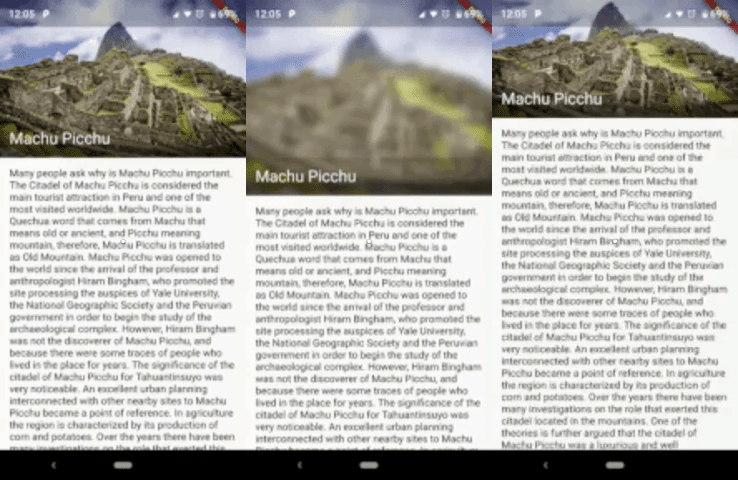
class SampleBottomLabel extends StatelessWidget {
  @override
  Widget build(BuildContext context) {
    return Scaffold(
      body: StretchyHeader.singleChild(
        headerData: HeaderData(
          headerHeight: 250,
          header: Image.asset(
            "images/machu.jpg",
            fit: BoxFit.cover,
          ),
          highlightHeaderAlignment: HighlightHeaderAlignment.bottom,
          highlightHeader: Container(
            width: MediaQuery.of(context).size.width,
            decoration: BoxDecoration(
                gradient: LinearGradient(
                  colors: [
                    Colors.black54,
                    Colors.black54,
                    Colors.black26,
                    Colors.black12,
                    Colors.black12,
                  ],
                  begin: Alignment.bottomCenter,
                  end: Alignment.topCenter,
                )),
            child: Padding(
              padding: const EdgeInsets.all(15),
              child: Text(
                "Machu Picchu",
                style: TextStyle(color: Colors.white, fontSize: 22),
              ),
            ),
          ),
        ),
        child: Padding(
          padding: const EdgeInsets.all(15),
          child: Text(LONG_DESCRIPTION),
        ),
      ),
    );
  }
}
class SampleCenterWidget extends StatelessWidget {
  @override
  Widget build(BuildContext context) {
    return Scaffold(
      body: StretchyHeader.singleChild(
        headerData: HeaderData(
          headerHeight: 250,
          header: Image.asset(
            "images/machu.jpg",
            fit: BoxFit.cover,
          ),
          highlightHeaderAlignment: HighlightHeaderAlignment.center,
          highlightHeader: SizedBox(
            width: MediaQuery.of(context).size.width,
            child: GestureDetector(
              onTap: () {
                print("tap highlightHeader");
              },
              child: CircleAvatar(
                backgroundColor: Colors.red,
                child: Text("M"),
              ),
            ),
          ),
        ),
        child: Padding(
          padding: const EdgeInsets.all(15),
          child: Text(LONG_DESCRIPTION),
        ),
      ),
    );
  }
}
You can follow me on twitter @diegoveloper