

 v3.0.0
multiple_search_selection
एक अत्यधिक कस्टमाइज़ेबल बहु-चयन विजेट जिसमें फज़ी सर्च कार्यक्षमता है।
73लाइक 1.4 हज़ार30-दिन डाउनलोड150Pub अंक
AndroidiOSWebmacOSWindowsLinux
एक अत्यधिक कस्टमाइज़ेबल बहु-चयन विजेट जिसमें फज़ी सर्च कार्यक्षमता है।

यह अंग्रेज़ी मूल स्नैपशॉट है। नवीनतम सामग्री GitHub पर देखें।


Show some love by dropping a ⭐ at GitHub

// Use this controller to adjust the behaviour of the widget
// 1. getAllItems
// 2. getPickedItems
// 3. searchItems
// 4. clearSearchField
// 5. clearAllPickedItems
// 6. selectAllItems
// 7. minCharsToShowItems
// 8. allowDuplicateSelection
// 9. isSelectable
MultipleSearchController controller = MultipleSearchController();
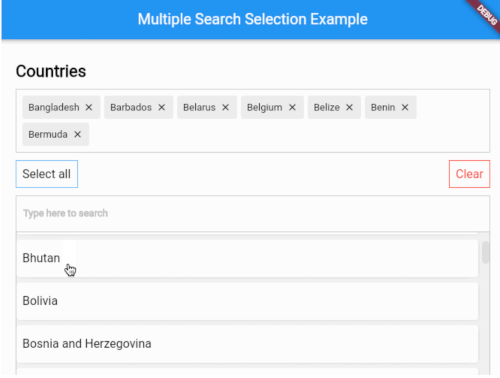
MultipleSearchSelection<Country>(
  // The TextField that is used to search items.
  //
  // You can use this to customize the search field.
  // The `onChanged` of the `searchField` is used internally to search items,
  // so you can use the `onSearchChanged` callback to get the search query.
  searchField: TextField(
    decoration: InputDecoration(
      hintText: 'Search countries',
      border: OutlineInputBorder(
        borderRadius: BorderRadius.circular(6),
        ),
      ),
    ),
  onSearchChanged: (text) {
    print('Text is $text');
  },
  items: countries, // List<Country>
  fieldToCheck: (c) {
    return c.name; // String
  },
  itemBuilder: (country,index,isPicked) {
    return Padding(
      padding: const EdgeInsets.all(6.0),
      child: Container(
        decoration: BoxDecoration(
          borderRadius: BorderRadius.circular(6),
          color: Colors.white,
        ),
        child: Padding(
          padding: const EdgeInsets.symmetric(
            vertical: 20.0,
            horizontal: 12,
          ),
          child: Text(country.name),
        ),
      ),
    );
  },
  pickedItemBuilder: (country) {
    return Container(
      decoration: BoxDecoration(
        color: Colors.white,
        border: Border.all(color: Colors.grey[400]!),
      ),
      child: Padding(
        padding: const EdgeInsets.all(8),
        child: Text(country.name),
      ),
    );
  },
  onTapShowedItem: () {},
  onPickedChange: (items) {},
  onItemAdded: (item) {},
  onItemRemoved: (item) {},
  sortShowedItems: true,
  sortPickedItems: true,
  fuzzySearch: FuzzySearch.jaro,
  itemsVisibility: ShowedItemsVisibility.alwaysOn,
  title: Text(
    'Countries',
    style: kStyleDefault.copyWith(
      fontSize: 22,
      fontWeight: FontWeight.bold,
    ),
  ),
  showSelectAllButton: true,
  maximumShowItemsHeight: 200,
)
MultipleSearchSelection<T>.creatable constructor can now create new item when search result does not return any results. It takes a new required parameter, createOptions e.g :
// [T] here is [Country]
createOptions: CreateOptions<Country>(
    // You need to create and return the item you want to add since [T] is not always [String].
    create: (text) {
        return Country(name: text, iso: text);
    },
    // A callback when the item is succesfully created.
    onCreated: (c) => print('Country ${c.name} created'),
    // Create item Widget that appears instead of no results.
    createBuilder: (text) => Align(
        alignment: Alignment.centerLeft,
            child: Padding(
                padding: const EdgeInsets.all(8.0),
                child: Text('Create "$text"'),
            ),
        ),
    // Whether you want to pick the newly created item or just add it to your list. Defaults to false.
    pickCreated: true,
),

itemsVisibility behaviour for the default & creatable constructors
| ShowedItemsVisibility.alwaysOn | ShowedItemsVisibility.onType | ShowedItemsVisibility.toggle |
|---|---|---|
 |
 |
 |
Found a bug or want a new feature? Open an issue in the Github repository of the project.
निर्भरता सूची 4 आइटम
{"sdk":"flutter"}^5.0.0{"sdk":"flutter"}^2.0.1उपयोग के अनुसार छाँटें, गतिविधि की तुलना करें और अपनाने से पहले मूल प्रोजेक्ट की आवश्यकताएँ जाँचें।
“A repository is the most basic element of GitHub.”
GitHub Docs — About repositories ↗